
1. Introduction
This instruction manual provides comprehensive guidance for the safe and proper assembly, installation, and use of the PureMounts PM-TVS-02 Universal Tabletop TV Stand. Please read this manual thoroughly before beginning installation to ensure correct setup and to prevent damage to the product or injury.
The PureMounts PM-TVS-02 is designed to securely hold televisions with screen diagonals from 81 cm (32 inches) to 165 cm (65 inches) and a maximum weight of 35 kg. It supports various VESA mounting patterns, offering a stable and adjustable solution for your television.
2. Safety Information
- Weight Capacity: Do not exceed the maximum load capacity of 35 kg (77 lbs). Exceeding this limit can result in serious injury or property damage.
- Screen Size: This stand is suitable for TVs between 32 and 65 inches. Ensure your TV's VESA pattern and weight are within the specified limits.
- VESA Compatibility: Verify your TV's VESA mounting pattern (distance between mounting holes on the back of the TV) matches the supported patterns: 200x200, 300x300, 400x200, 400x400, 600x400 mm.
- Assembly: Assemble the stand exactly as described in this manual. Incorrect assembly can lead to instability and potential hazards.
- Tools: Use appropriate tools for assembly. Ensure all screws are tightened securely, but do not overtighten.
- Placement: Place the assembled stand on a stable, level, and sturdy surface that can support the combined weight of the stand and the television.
- Children: Keep children away from the assembly area. Small parts can be a choking hazard.
- Disposal: Dispose of packaging materials responsibly.
3. Package Contents
Before beginning assembly, please verify that all components listed below are present and undamaged. If any parts are missing or damaged, do not proceed with assembly and contact customer support.

Figure 3.1: Overview of all included components, including the stand parts, various screws, washers, and the installation manual.
- 1x PM-TVS-02 Stand Base (two-piece design)
- 1x Screw Set (various screws, washers, and spacers for TV mounting)
- 1x Installation Instructions Manual
- Mounting arms and vertical brackets
The screw set includes different lengths and sizes of screws to accommodate various TV models. Please refer to the detailed diagrams in the included printed manual for specific screw identification.
4. Setup and Installation
Follow these steps carefully to assemble and install your PureMounts PM-TVS-02 TV stand.
4.1. Assemble the Stand Bases
Begin by assembling the two main stand base components. Ensure they are securely fastened according to the diagrams in the printed manual. The design is compact and two-piece for stability.

Figure 4.1: The two main components of the PureMounts PM-TVS-02 tabletop TV stand, ready for assembly.
4.2. Attach Mounting Brackets to TV
Identify the correct screws and spacers from the screw set that fit your television's VESA mounting holes. Attach the vertical mounting brackets to the back of your TV. Ensure the brackets are oriented correctly and securely fastened.

Figure 4.2: Side view illustrating the VESA mounting points and overall structure of the stand. Supported VESA patterns are 200x200, 300x300, 400x200, 400x400, and 600x400 mm.
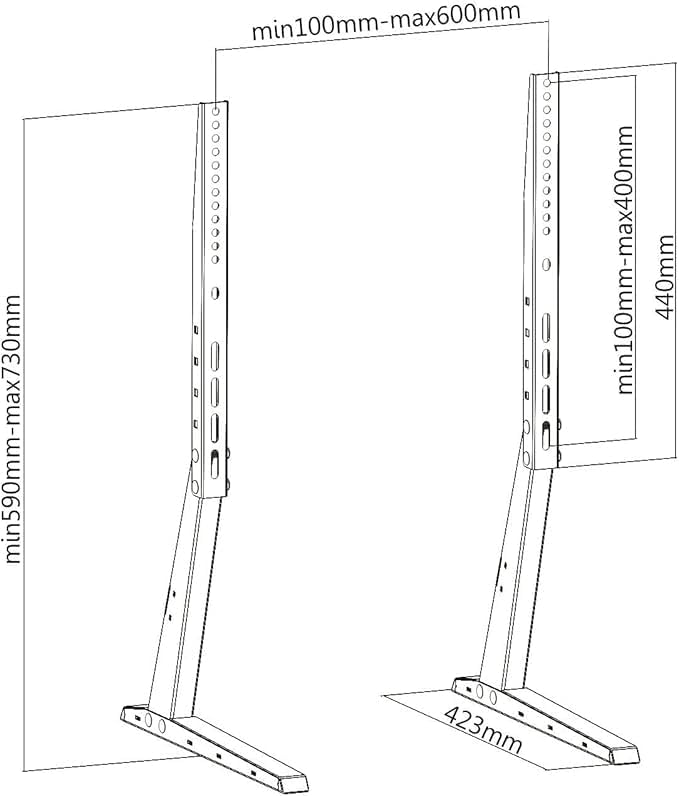
Figure 4.3: Technical drawing showing minimum and maximum dimensions for VESA mounting (min 100mm - max 600mm width, min 100mm - max 400mm height) and overall stand height (min 590mm - max 730mm).
4.3. Mount TV to Stand
Carefully lift the television with the attached brackets and align them with the vertical posts of the assembled stand. Hook the brackets onto the posts. Secure the TV to the stand using the provided locking mechanisms or screws, ensuring it is stable and cannot accidentally dislodge.

Figure 4.4: The PureMounts PM-TVS-02 stand supporting a television on a tabletop, demonstrating its compact and stable design.
4.4. Height Adjustment
The stand offers 5-level height adjustment. To adjust the height, carefully lift the TV slightly, reposition the mounting brackets to the desired height holes on the vertical posts, and re-secure. Always ensure the TV is level and stable after adjustment.
5. Operating Instructions
Once installed, the PureMounts PM-TVS-02 stand provides a stable base for your television. The stand allows for a slight tilt of up to 5 degrees. To adjust the tilt, loosen the appropriate fasteners, adjust the TV to the desired angle, and re-tighten the fasteners securely.
Cable Management: The stand features integrated cable management options. Route your TV's power and signal cables neatly along the stand's structure to maintain a tidy appearance and prevent accidental disconnections or damage.
6. Maintenance
- Cleaning: Clean the stand with a soft, dry cloth. Do not use abrasive cleaners or solvents, as these may damage the finish.
- Periodic Checks: Periodically check all screws and fasteners to ensure they remain tight. Over time, vibrations or movement can cause fasteners to loosen.
- Stability: Ensure the stand remains on a stable and level surface. Any signs of instability should be addressed immediately.
7. Troubleshooting
- Stand is Unstable:
- Ensure all assembly screws are securely tightened.
- Verify the stand is placed on a flat, level, and sturdy surface.
- Confirm the TV's weight does not exceed the 35 kg capacity.
- TV Does Not Fit Brackets:
- Check your TV's VESA mounting pattern against the supported patterns (200x200, 300x300, 400x200, 400x400, 600x400 mm).
- Ensure you are using the correct screws and spacers from the provided screw set for your specific TV model.
- Difficulty Adjusting Height:
- Ensure the TV is slightly lifted to relieve pressure on the adjustment holes before attempting to reposition.
- Verify that no cables are obstructing the movement of the brackets.
8. Specifications
| Model Number | PM-TVS-02 |
| Brand | PureMounts |
| Mounting Type | Tabletop Mount |
| Material | Alloy Steel |
| Compatible TV Sizes | 32 - 65 inches (81 - 165 cm) |
| Maximum Load Capacity | 35 kg (77 lbs) |
| Supported VESA Patterns | 200x200, 300x300, 400x200, 400x400, 600x400 mm |
| Height Adjustment | 5-level adjustable (min 590mm - max 730mm) |
| Tilt Angle | Up to 5 degrees |
| Product Dimensions (L x W x H) | 17.44 x 28.66 x 16.65 inches (approximate, assembled) |
| Item Weight | 5.32 pounds (2.41 kg) |
| Color | Black |
9. Warranty and Support
PureMounts products are manufactured with quality and durability in mind. While specific warranty details are not provided in this document, please retain your proof of purchase. For any questions, missing parts, or technical assistance, please contact PureMounts customer support through their official website or the retailer where the product was purchased.
Please refer to the contact information provided with your purchase or on the PureMounts official website for the most up-to-date support options.
