Important Safety Information
Please read all instructions carefully before assembly and use. Keep this manual for future reference.
- Do not exceed the maximum weight capacity of 17.6 lbs (8 kg) per arm.
- Ensure your desk surface is stable and can support the combined weight of the stand and monitors.
- Always use two people when lifting and positioning heavy monitors.
- Tighten all screws firmly, but do not overtighten.
- Keep small parts away from children.
Package Contents
Verify that all components are present before beginning assembly. If any parts are missing or damaged, please contact customer support.
- Base Plate
- Center Pole
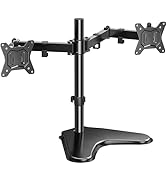
- Dual Monitor Arm Assembly
- VESA Plates (2x)
- Cable Management Clips
- Hardware Kit (various screws, washers, Allen wrenches)
Compatibility Requirements
Before installation, confirm your monitors meet the following criteria:
- Monitor Size: 13 to 32 inches
- Monitor Weight: Up to 17.6 lbs (8 kg) per arm
- VESA Compatibility: 75x75mm or 100x100mm mounting holes on the back of the monitor.

If your monitor lacks VESA mounting holes, a VESA adapter kit may be required. Please search for 'HUANUO HNMUA4 VESA Mount Adapter' if needed.
Setup and Installation
Follow these steps to assemble and install your dual monitor stand:
- Assemble the Base: Attach the center pole to the base plate using the provided screws. Ensure it is securely fastened.
- Attach Monitor Arms: Slide the dual monitor arm assembly onto the center pole. Adjust the height to your preference and secure it with the locking mechanism.
- Install VESA Plates: Attach the VESA plates to the back of your monitors using the appropriate screws from the hardware kit. Ensure the screws are tightened securely.
- Mount Monitors: Carefully lift each monitor and slide the VESA plate onto the monitor arm's mounting head. Secure the monitor to the arm using the provided thumb screws or locking mechanism. It is recommended to have assistance for this step.
- Position the Stand: Place the assembled stand with monitors on a stable, flat desk surface. The base dimensions are approximately 15.4 inches by 11 inches.


Operating Instructions (Adjustments)
The HUANUO Dual Monitor Stand offers extensive adjustability for optimal viewing comfort:
- Height Adjustment: Loosen the clamp on the center pole to slide the arm assembly up or down. Retighten the clamp firmly at the desired height. The maximum height is 16.4 inches.
- Tilt Adjustment: Each monitor can be tilted -90° to +90° (forward/backward). Use the adjustment knob or screw on the VESA plate to set the tilt angle.
- Swivel Adjustment: Each monitor can swivel -90° to +90° (left/right).
- Rotation Adjustment: Each monitor can rotate 360° for landscape or portrait orientation.

Stability Considerations
To maintain optimal stability, especially with heavier monitors:
- Balance the Arms: Ensure the monitor arms are positioned symmetrically and bent with similar angles to distribute weight evenly.
- Avoid Over-Extension: Do not extend monitors too far forward or backward beyond the stand's center of gravity. This can compromise stability.
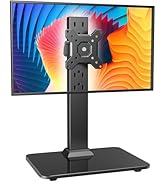

Cable Management
Utilize the integrated cable management clips to keep your workspace tidy:
- Route monitor cables (power, video) along the underside of the monitor arms.
- Secure cables using the provided clips on the arms.
- Guide the cables down the center pole and secure them with the pole clips.

Maintenance
Regular maintenance ensures the longevity and proper function of your monitor stand:
- Cleaning: Wipe the stand with a soft, damp cloth. Avoid abrasive cleaners or solvents.
- Periodic Checks: Periodically check all screws and connections to ensure they remain tight. Retighten if necessary.
- Lubrication: No lubrication is typically required for the moving parts.
Troubleshooting
If you encounter issues with your monitor stand, refer to the following common problems and solutions:
- Stand is Unstable/Tilting:
- Ensure monitors do not exceed the 17.6 lbs per arm weight limit.
- Verify that the monitor arms are balanced and not extended too far forward or backward. Refer to the 'Stability Considerations' section.
- Confirm all screws, especially those connecting the pole to the base and the arms to the pole, are securely tightened.
- Difficulty Adjusting Monitor Position:
- For height adjustment, ensure the clamp on the center pole is sufficiently loosened before attempting to move the arms.
- For tilt, swivel, or rotation, check if any adjustment knobs or screws are overtightened. Loosen slightly to allow movement, then retighten to secure.
- Monitors Not Level:
- Ensure both monitors are of similar size and weight for optimal alignment.
- Adjust the VESA plate tilt and rotation for each monitor individually to achieve a level display.
Specifications
| Feature | Specification |
|---|---|
| Model Number | HNCM1 |
| Monitor Size Compatibility | 13 - 32 inches |
| Weight Capacity per Arm | 17.6 lbs (8 kg) |
| VESA Compatibility | 75x75mm, 100x100mm |
| Tilt Angle | -90° to +90° |
| Swivel Angle | -90° to +90° |
| Rotation | 360° |
| Maximum Height Adjustment | 16.4 inches |
| Base Dimensions | 15.4 x 11 inches |
| Material | Alloy Steel |
| Product Weight | 7.72 pounds |
Warranty and Support
HUANUO products are designed for durability and performance. This product comes with a standard manufacturer's warranty against defects in materials and workmanship.
For warranty claims, technical assistance, or any questions regarding your HUANUO Dual Monitor Stand, please contact HUANUO customer support through the retailer's platform or the official HUANUO website. Please have your model number (HNCM1) and purchase information ready when contacting support.


