1. Product Overview
The LG LT1000P refrigerator water filter is designed to provide high-quality drinking water and ice by effectively reducing various contaminants. This genuine LG filter is certified by NSF International to meet industry-leading filtration standards: NSF42, NSF53, and NSF401.
It is engineered to remove 99.99% of cysts, 99% of asbestos, and significantly reduce mercury, lead, benzene, herbicides, pesticides, pharmaceuticals, and insect repellent found in water. Each filter provides up to 200 gallons of filtered water and should be replaced approximately every 6 months for optimal performance.

Image: LG LT1000P Water Filter in its retail packaging.
2. Installation Instructions
Follow these steps to replace your LG LT1000P water filter. It is recommended to have a towel ready to catch any drips.
- Locate the Filter Compartment: The water filter compartment is typically located in the upper left corner inside the fresh food section of your LG refrigerator.
- Open the Filter Cover: Gently push the tab on the filter cover to release and open it.
- Remove the Old Filter: Twist the old filter counter-clockwise until it releases from the housing. Pull it straight down and out. Some water may drip out; this is normal.
- Prepare the New Filter: Remove the protective cap from the new LG LT1000P water filter. Ensure the O-rings are properly seated.
- Insert the New Filter: Push the new filter into the housing and twist it clockwise until it locks securely into place. You should feel it click.
- Close the Filter Cover: Close the filter compartment cover until it snaps shut.

Image: New LG LT1000P water filter with its protective cap removed, ready for installation.
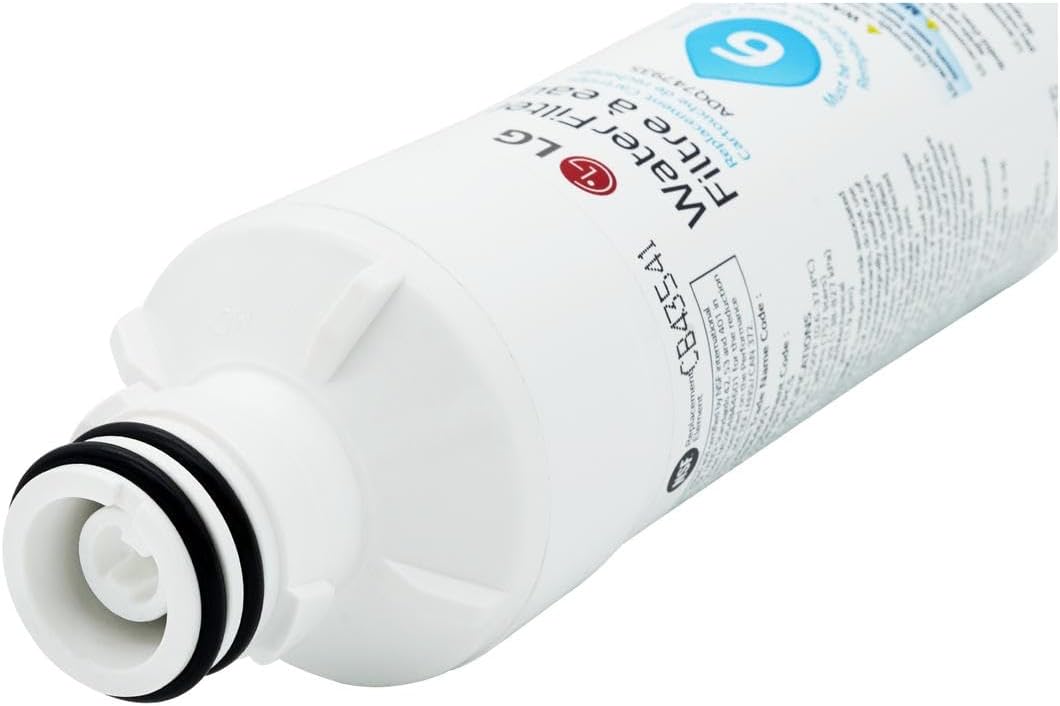
Image: Close-up view of the filter's top, showing the O-rings for a secure seal.
Installation Video Guides:
Video: Detailed guide on how to install the LG LT1000P Refrigerator Water Filter.
Video: Overview and installation steps for the LG water filter.
Video: Instructions on how to install the LG water filter.
3. Operating Instructions
After installing a new water filter, it is crucial to flush the system to remove any trapped air and loose carbon particles. This ensures optimal water quality and flow.
- Flush the System: Dispense approximately 2.5 gallons of water through the refrigerator's dispenser. It is recommended to do this in cycles of 30 seconds ON and 60 seconds OFF, rather than dispensing continuously. This helps to effectively remove trapped air and contaminants.
- Check for Leaks: After flushing, inspect the filter area for any signs of leaks.
4. Maintenance
Regular maintenance of your water filter is essential for consistent water quality and to prevent potential issues.
- Replacement Schedule: Replace the LG LT1000P water filter approximately every 6 months, or after dispensing 200 gallons of water, whichever comes first. Your refrigerator's display will typically indicate when a replacement is due.
- Reset Filter Indicator: After replacing the water filter, press and hold the 'Water Filter' or 'Ice Plus Water Filter' button on your refrigerator's control panel for three seconds to turn the icon light off. This resets the filter monitoring system.
- Packaging Note: LG is in the process of updating its packaging. You may receive either the classic black design or the updated white version. Both contain the same genuine OEM LG refrigerator water filter replacement.

Image: Information about the LG ThinQ App, which can help monitor appliance status. Download on the App Store

Image: Information on setting up smart reorders for LG ThinQ appliances.
5. Troubleshooting
- Slow Water Flow: If you notice a decrease in water flow from the dispenser, it is likely an indication that the filter is clogged and needs to be replaced.
- Unpleasant Taste or Odor: A change in the taste or odor of your water or ice suggests that the filter's effectiveness has diminished, and it should be replaced.
- "Replace Filter" Light Flashing: This indicator on your refrigerator's display signals that it is time to change the water filter. Follow the replacement and reset instructions.
- Water Leaks After Installation: Ensure the filter is correctly seated and twisted clockwise until it is fully locked. Check the O-rings for any damage or misalignment.
- Air in Water Line After Installation: Dispense 2.5 gallons of water as described in the Operating Instructions to purge air from the system.
6. Specifications
| Feature | Detail |
|---|---|
| Brand | LG |
| Model Number | LT1000P (Compatible with ADQ74793501, ADQ75795105, AGF80300704, AGF80300705) |
| Material | Plastic |
| Product Dimensions | 2.1"D x 2.1"W x 7.1"H |
| Item Weight | 0.39 Pounds (approx. 6.2 ounces) |
| Capacity | 200 Gallons |
| Filter Life | 6 Months |
| External Testing Certification | NSF 42, NSF 53, NSF 401 |
| Product Benefits | Provides cleaner, fresher, and better tasting water and ice; reduces contaminants including pesticides, herbicides, pharmaceuticals, and insect repellent. |
| Included Components | 1 Water Filter |
7. Warranty and Support
LG strongly recommends the use of genuine LG-authorized water filters. Third-party filters may cause damage, are not covered under the LG warranty, and can lead to unnecessary repairs or water quality issues.
For further assistance, please contact the LG Electronics Customer Information Center or visit the official LG website.
- Official Website: www.lg.com
- LG Store: Visit the LG Store on Amazon