
1. Introduction
The BenQ MH760 is designed for reliable performance in meeting rooms, offering high picture quality and convenient digital connectivity. This manual provides essential information for setting up, operating, and maintaining your projector.

Figure 1: BenQ MH760 1080P Business Projector, front-angled view.
2. Key Features
- High Brightness: 5000 ANSI Lumens for clear projections in various lighting conditions.
- High Image Quality: Full HD (1920 x 1080) resolution with a high native contrast ratio for sharp and visible images.
- Network Control: Supports Crestron, AMX, and PJ-Link for control via LAN, and RS-232 for installations up to 49 feet.
- Flexible Setup: Keystone correction for versatile projection from various angles.
- Digital Connectivity: Equipped with 2x HDMI ports and other universal ports.
3. What's in the Box
Verify that all items are present in the packaging:
- Remote Control
- Power Cord
- User Manual (this document)
- Warranty Card
- VGA Cable
- Projector Lens Cover
4. Setup
4.1. Placement and Mounting
The BenQ MH760 projector offers flexible placement options, including front table, rear table, front ceiling, and rear ceiling mounting. Adjust the 'Projector Position' setting in the system menu to match your installation. For ceiling mounts, ensure the projector is securely fastened using a compatible mounting kit (sold separately).
4.2. Projection Distance
The optimal projection distance varies based on the desired screen size. Refer to the diagram below for recommended distances for common screen sizes.
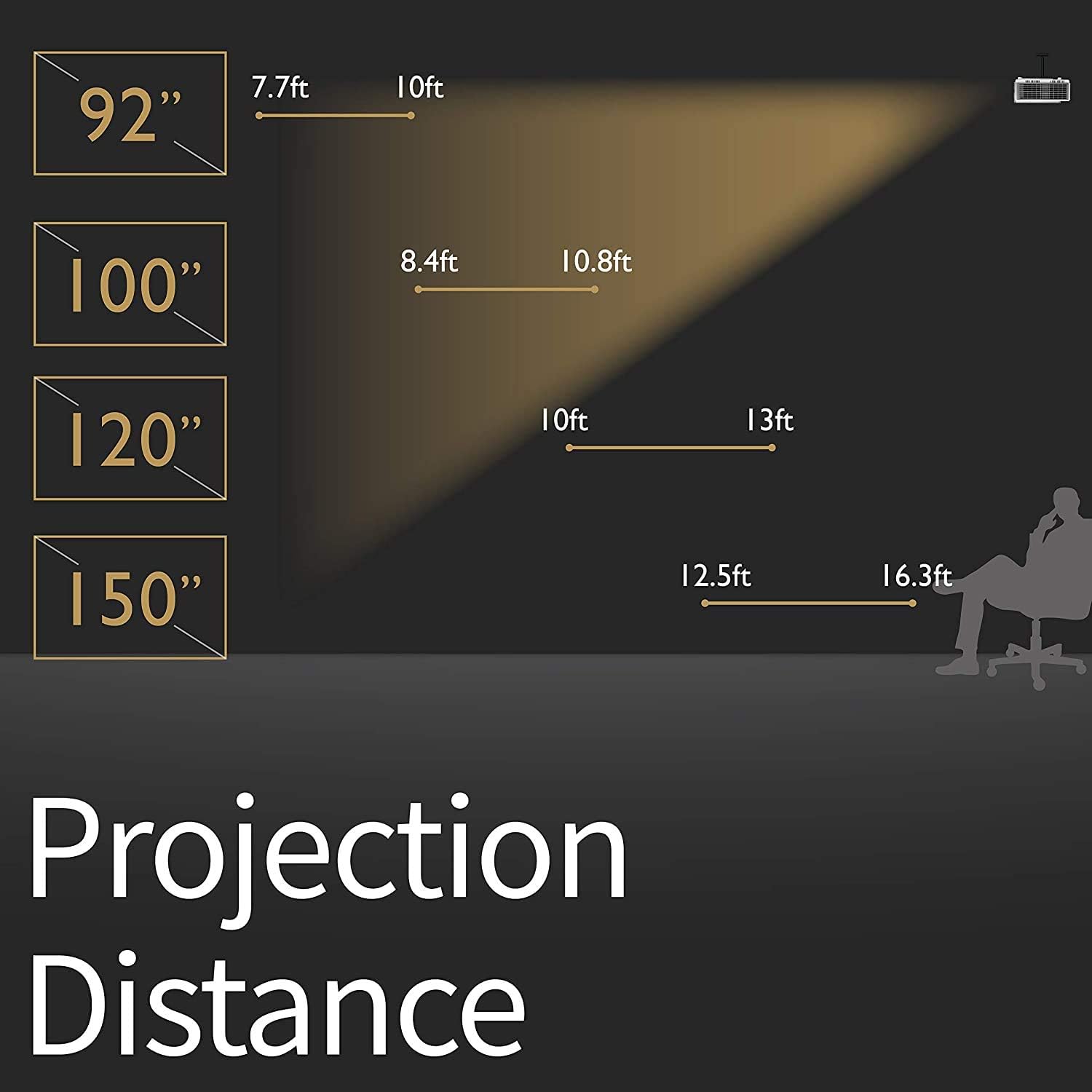
Figure 2: Recommended projection distances for various screen sizes. For a 92-inch screen, the distance is approximately 7.7-10 ft. For a 100-inch screen, 8.4-10.8 ft. For a 120-inch screen, 10-13 ft. For a 150-inch screen, 12.5-16.3 ft.
4.3. Connecting Devices
The projector features multiple input ports for various devices. Connect your source device (e.g., laptop, game console, streaming stick) to the appropriate port on the projector.

Figure 3: Rear view of the BenQ MH760 projector showing various connectivity ports. These include PC in, S-Video in, Composite Video in, Monitor Out, Audio in (x2), Microphone in, LAN (RJ-45) in, RS-232, DC 12V Trigger, Security Bar, USB Type A (power, 5V/1.5A), USB Type Mini B (FW Upgrade), and HDMI (1.4a) x 2 (for share with MHL).
5. Operating Instructions
5.1. Power On/Off
Press the power button on the projector or the remote control to turn the unit on or off. Allow a few moments for the projector to warm up or cool down.
5.2. Menu Navigation
Use the remote control or the control panel on the projector to navigate the on-screen display (OSD) menu. The OSD allows you to adjust various settings including display, image, system, and power management.

Figure 4: Top view of the BenQ MH760 projector showing the control panel buttons for power, menu navigation, source selection, and color mode.
5.3. Focus and Zoom Adjustment
Adjust the focus and zoom rings located near the lens to achieve a clear and appropriately sized image on your screen. The projector supports a wide range of screen sizes up to 300 inches.
5.4. Image Settings
Within the OSD menu, you can fine-tune image settings such as brightness, contrast, color temperature, and aspect ratio to optimize your viewing experience.
6. Maintenance
6.1. Cleaning the Lens
Use a soft, lint-free cloth and a specialized lens cleaning solution to gently clean the projector lens. Avoid abrasive materials that could scratch the lens surface.
6.2. Air Filter Cleaning/Replacement
Regularly check and clean the air filter to prevent dust buildup, which can affect performance and lamp life. Refer to the full user manual for specific instructions on accessing and cleaning/replacing the air filter.
6.3. Lamp Replacement
The projector uses a high-performance lamp. When the lamp life is nearing its end, a warning message will appear. Replace the lamp with an authorized BenQ replacement lamp to ensure optimal performance and safety. Always allow the projector to cool down completely before attempting lamp replacement.
7. Troubleshooting
- No Image: Ensure all cables are securely connected and the correct input source is selected. Check power connections.
- Blurred Image: Adjust the focus and zoom rings on the projector. Ensure the projection surface is flat.
- Image Distorted: Use the keystone correction feature in the OSD menu to adjust the image shape.
- No Sound: Check audio cable connections. Adjust the volume on the projector and your source device. Ensure the projector's internal speaker is enabled if desired.
- Overheating Warning: Ensure the projector's ventilation vents are not blocked. Clean the air filter if necessary.
8. Specifications
| Feature | Value |
|---|---|
| Brand | BenQ |
| Model Number | MH760 |
| Product Dimensions | 23.62 x 15.75 x 9.06 inches |
| Item Weight | 10.36 pounds |
| Display Resolution | 1920 x 1080 (Full HD) |
| Brightness | 5000 ANSI Lumens |
| Connectivity Technology | Ethernet, HDMI |
| Special Feature | Wireless (Optional with dongle) |
| Recommended Uses | Business, Education |
9. Support
For further assistance, technical support, or warranty information, please refer to the official BenQ website or contact their customer service. Keep your purchase receipt and product serial number handy for any inquiries.


