
Comap GC 315 AMF controller
InteliNano NT MRS COMAP
User Manual for Model GC 315 AMF Controller
Brand: Comap
1. Introduction
This manual provides essential information for the safe and efficient operation, installation, and maintenance of the Comap InteliNano NT MRS genset controller, model GC 315 AMF controller. Please read this manual thoroughly before using the device to ensure proper functionality and to prevent damage or injury.
2. Safety Information
Always observe the following safety precautions to prevent personal injury or damage to the equipment.
- Electrical Hazard: This device operates with electrical power. Installation and maintenance should only be performed by qualified personnel. Disconnect all power sources before performing any work on the controller or connected equipment.
- Proper Grounding: Ensure the controller and all connected components are properly grounded to prevent electrical shock.
- Environmental Conditions: Do not expose the controller to excessive moisture, dust, or extreme temperatures outside its specified operating range.
- Authorized Use: Use the controller only for its intended purpose as a genset controller. Any unauthorized modifications or uses may void the warranty and pose safety risks.
3. Product Overview
The InteliNano NT MRS (GC 315 AMF controller) is a compact and versatile genset controller designed for single genset applications. It provides comprehensive monitoring, control, and protection functions for both the genset and the mains supply.
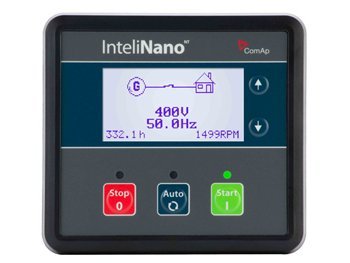
Figure 3.1: Front view of the Comap InteliNano NT MRS Genset Controller. The display shows a generator connected to a house, with readings for voltage (400V), frequency (50.0Hz), operating hours (332.1h), and RPM (1499RPM). Below the screen are three buttons: red "Stop", blue "Auto", and green "Start". A green LED indicates operational status.
Key features include automatic mains failure (AMF) functionality, engine protection, generator protection, and a user-friendly interface with a clear display and intuitive buttons.
4. Setup and Installation
Proper installation is crucial for the reliable operation of the InteliNano NT MRS controller. Refer to the detailed wiring diagrams provided in the separate installation guide for specific connections.
4.1 Mounting
Mount the controller in a secure, vibration-free location, typically within a control panel. Ensure adequate ventilation to prevent overheating. The panel cut-out dimensions are specified in the technical data sheet.
4.2 Wiring Connections
Connect the controller to the genset, mains, and other necessary sensors and actuators according to the wiring diagram. Pay close attention to:
- Power Supply: Connect the DC power supply (typically 8-36V DC) to the designated terminals.
- Mains Voltage Inputs: Connect the mains voltage sensing inputs.
- Generator Voltage Inputs: Connect the generator voltage sensing inputs.
- Current Transformer (CT) Inputs: Connect the CTs for current measurement.
- Engine Inputs/Outputs: Connect engine sensors (oil pressure, water temperature, fuel level) and actuators (start/stop solenoid, fuel pump).
- Communication Ports: If applicable, connect communication cables for remote monitoring or configuration.
All wiring must comply with local electrical codes and standards.
5. Operating Instructions
The InteliNano NT MRS controller features a simple three-button interface for primary operation modes.
5.1 Control Buttons
- STOP (Red Button): Puts the controller into STOP mode. The genset will shut down if running, and will not start automatically.
- AUTO (Blue Button): Puts the controller into AUTO mode. The genset will automatically start and stop based on mains supply conditions (AMF functionality) or remote start signals. This is the typical operating mode for unattended operation.
- START (Green Button): Initiates a manual start of the genset. The genset will run until manually stopped or an alarm occurs.
5.2 Display Information
The LCD display provides real-time information about the genset and mains status. Use the arrow buttons (up/down) next to the display to scroll through various parameters such as:
- Generator Voltage (e.g., 400V)
- Generator Frequency (e.g., 50.0Hz)
- Engine Speed (RPM)
- Engine Operating Hours (e.g., 332.1h)
- Battery Voltage
- Oil Pressure
- Coolant Temperature
- Mains Voltage and Frequency
- Active Alarms
6. Maintenance
Regular maintenance ensures the longevity and reliable performance of your InteliNano NT MRS controller.
- Cleaning: Periodically clean the controller's front panel with a soft, dry cloth. Do not use abrasive cleaners or solvents.
- Connections Check: Annually inspect all wiring connections for tightness and signs of corrosion. Loose connections can lead to erratic behavior or damage.
- Firmware Updates: Check the manufacturer's website for available firmware updates. Updates can improve performance and add new features.
- Battery Check: Ensure the genset's battery, which powers the controller, is in good condition and properly charged.
7. Troubleshooting
This section provides solutions to common issues. For more complex problems, consult a qualified technician or Comap support.
| Problem | Possible Cause | Solution |
|---|---|---|
| Controller display is blank. | No power supply; Blown fuse; Loose connection. | Check DC power supply; Inspect fuses; Verify all power connections. |
| Genset does not start in AUTO mode. | Mains supply present; Controller not in AUTO mode; Engine fault. | Check mains status; Press the AUTO button; Check engine for fuel, battery, and other faults. |
| Alarm indication on display. | Specific engine or generator fault. | Note the alarm message and refer to the detailed alarm list in the full technical manual for specific troubleshooting steps. Address the underlying fault. |
8. Specifications
Key technical specifications for the Comap InteliNano NT MRS (GC 315 AMF controller):
- Manufacturer: COMAP CZ
- Model Number: GC 315 AMF controller
- ASIN: B074DZRPV5
- Date First Available: July 31, 2017
- Product Type: Genset Controller
- (Further detailed electrical and environmental specifications can be found in the official Comap datasheet.)
9. Warranty and Support
For information regarding product warranty, technical support, or service, please contact Comap directly or your authorized distributor. Keep your purchase receipt and product serial number handy when contacting support.
You can find contact information and additional resources on the official Comap website: www.comap-control.com
Ask a question about this manual
Ask about setup, troubleshooting, compatibility, parts, safety, or missing instructions. Manuals+ will review the question and use this page’s manual context to help answer it.