
1. Product Overview
The DOKIO 100W 18V Monocrystalline Solar Panel (Model DSP-100M) is designed for high-efficiency solar energy conversion. This durable panel is suitable for various applications, including charging 12V batteries in RVs, boats, and off-grid power systems for homes and gardens. Its robust construction ensures reliable performance in diverse environmental conditions.
- High Conversion Efficiency: Utilizes high-efficiency monocrystalline solar cells for optimal power generation.
- Durable Construction: Features a corrosion-resistant aluminum frame and reinforced glass, designed to withstand high winds (2400Pa) and snow loads (5400Pa).
- Versatile Application: Ideal for 12V/24V battery charging in on-grid, off-grid, and hybrid power systems.
- Easy Installation: Pre-drilled holes on the back of the panel facilitate quick mounting and securing.
2. Safety Instructions
Please read and understand all safety instructions before installing or operating the solar panel. Failure to follow these instructions may result in electric shock, fire, or serious injury.
- Electrical Safety: Solar panels generate electricity when exposed to light. Always handle with care and avoid touching exposed wires or terminals. Cover the panel with an opaque material during installation to prevent electricity generation.
- Installation: Ensure the panel is securely mounted to prevent it from falling or being dislodged by wind. Use appropriate mounting hardware and follow local building codes.
- Handling: Do not drop, bend, or apply excessive pressure to the solar panel. Avoid scratching the glass surface.
- Waterproof Features: The junction box and connectors are IP67 waterproof, but ensure all connections are tight and properly sealed to maintain water resistance.
- Temperature: Avoid installing the panel in areas with extreme temperatures outside its operating range.
3. Package Contents
Verify that all items are present and undamaged upon opening the package.
- DOKIO 100W 18V Monocrystalline Solar Panel (Model DSP-100M)
- MC4 Output Cables (pre-attached to junction box)
- Mounting Hardware (e.g., Z-brackets, screws, washers - may vary by kit)
- Instruction Manual
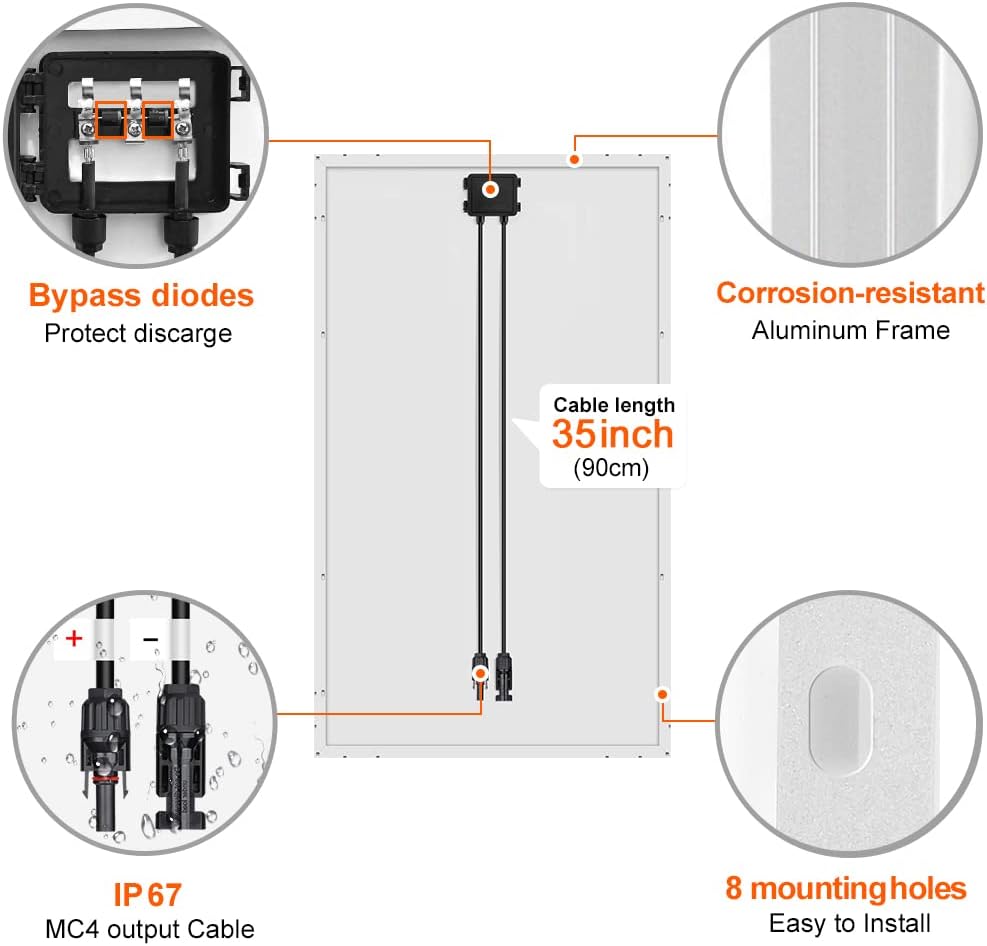
Image: Rear view of the DOKIO 100W Solar Panel, highlighting the IP67 waterproof junction box, bypass diodes, and pre-attached MC4 output cables.
Video: An unboxing and overview of a 12V/24V Monocrystalline 12 BB Cell 100 Watt Solar Panel, demonstrating its packaging and components.
4. Setup
Proper setup is crucial for optimal performance and safety. Follow these steps for installation:
- Panel Placement: Choose a location that receives maximum direct sunlight throughout the day, free from shadows. Ensure proper ventilation around the panel.
- Mounting: Securely mount the solar panel using appropriate brackets and hardware. The panel features pre-drilled holes for easy installation. Adjust the panel angle for optimal sun exposure, typically between 30-45 degrees for most applications.
- Wiring to Charge Controller: Connect the MC4 cables from the solar panel to a compatible solar charge controller. Ensure correct polarity (positive to positive, negative to negative).
- Connecting to Battery: Connect the charge controller to your 12V battery (Vented AGM Gel or similar). Again, observe correct polarity.
- Connecting to Inverter (Optional): If using an inverter for AC power, connect it to the battery terminals.

Image: A basic wiring diagram illustrating the connection sequence from the solar panel to a PWM charge controller, then to a 12V battery, and optionally to a power inverter.
Video: Demonstrates the setup of a DOKIO foldable solar panel, including connecting it to a 12V battery using alligator clips and positioning it for optimal sunlight.
5. Operating
Once the solar panel is set up and connected to a charge controller and battery, it will begin generating power when exposed to sunlight. The charge controller manages the power flow to protect the battery from overcharging or deep discharge.
- Monitoring: Use the charge controller's display to monitor battery voltage, charging current, and load status.
- Load Management: Connect your 12V DC loads directly to the charge controller's load terminals or use an inverter for AC loads connected to the battery.
- USB Charging: Many charge controllers include USB ports for direct charging of small electronic devices.
Video: A detailed guide on how to use a DOKIO solar charge controller, explaining its display icons, menu navigation, and settings for battery type, voltage, and load.
6. Maintenance
Regular maintenance ensures the longevity and efficiency of your solar panel.
- Cleaning: Periodically clean the solar panel surface with a soft cloth and mild, non-abrasive cleaner to remove dirt, dust, and debris that can reduce efficiency.
- Inspection: Regularly inspect the panel for any physical damage, such as cracks in the glass, loose connections, or corrosion on the frame.
- Connections: Check all electrical connections (MC4 connectors, charge controller terminals, battery terminals) to ensure they are tight and free from corrosion.
- Shading: Ensure no new obstructions are casting shadows on the panel, as even partial shading can significantly reduce power output.
Video: A real display test of a 100W solar panel, including a water resistance demonstration, highlighting its durability and ease of cleaning.
7. Troubleshooting
If your solar panel system is not performing as expected, consider the following common issues:
- No Power Output:
- Check for sufficient sunlight.
- Verify all electrical connections are secure and correct polarity is maintained.
- Inspect MC4 connectors for damage or loose pins.
- Ensure the charge controller is functioning correctly and is set to the appropriate battery type.
- Low Power Output:
- Clean the panel surface to remove any dirt or debris.
- Check for partial shading from trees, buildings, or other obstructions.
- Verify the panel's angle and orientation are optimized for the sun's position.
- Check for any damage to the solar cells or wiring.
- Battery Not Charging:
- Confirm the battery is properly connected to the charge controller.
- Check battery voltage; if it's too low, the charge controller might not initiate charging.
- Ensure the charge controller settings match your battery type.
8. Specifications
| Feature | Specification |
|---|---|
| Brand | DOKIO |
| Model Number | DSP-100M |
| Wattage | 100 watts |
| Amperage Capacity | 5.29 Amps |
| Maximum Voltage | 600 Volts |
| Product Dimensions | 117.5 x 53.5 x 2.5 cm (46.26 x 21.06 x 0.98 inches) |
| Item Weight | 5.67 kg (12.5 lbs) |
| Material | Aluminum |
| Efficiency | High Efficiency Monocrystalline |
| Durability | Withstands 2400Pa wind, 5400Pa snow loads |
| Waterproof Rating | IP67 (Junction Box and Connectors) |

Image: Detailed dimensions of the DOKIO 100W Solar Panel and suggested quantities for RV, boat, and home installations.

Image: An exploded view illustrating the layered construction of the solar panel, from the anti-corrosion frame to the monocrystalline cells and junction box.

Image: Visual representation of the solar panel's ability to withstand harsh weather conditions, including snow, extreme temperatures, and high wind pressure.
9. Warranty and Support
The DOKIO 100W 18V Monocrystalline Solar Panel comes with a 25-year transferable power output warranty and a 5-year material and workmanship warranty. For technical support, warranty claims, or any inquiries, please contact DOKIO customer service through the retailer or the official DOKIO website.


