
BEEM 02041
BEEM FRESH-AROMA-PERFECT Filter Coffee Machine with Grinder
Instruction Manual
Model: 02041 | Brand: BEEM
Introduction
The BEEM FRESH-AROMA-PERFECT Filter Coffee Machine with Grinder (Model 02041) is designed to provide fresh, aromatic coffee with ultimate convenience. Featuring an integrated conical burr grinder, a programmable 24-hour timer, and adjustable settings for coffee strength and grind level, this machine allows you to customize your coffee experience from bean to cup. This manual provides essential information for safe operation, setup, maintenance, and troubleshooting to ensure optimal performance and longevity of your appliance.
Safety Instructions
Please read all safety instructions carefully before using the appliance.
- Always connect the appliance to a grounded power outlet with the correct voltage (240 Volts).
- Do not immerse the appliance, power cord, or plug in water or any other liquid.
- Keep the appliance out of reach of children and pets.
- Do not operate the appliance if the power cord or plug is damaged, or if the appliance malfunctions or has been damaged in any way. Contact qualified service personnel for repair.
- Avoid contact with hot surfaces. The warming plate and glass carafe will become hot during and after operation. Use handles and oven mitts.
- Unplug the appliance from the power outlet when not in use and before cleaning. Allow it to cool down completely before handling or cleaning.
- Use only the original glass carafe provided with the appliance.
- Do not place the appliance on or near a hot gas or electric burner, or in a heated oven.
- Ensure the filter compartment is securely closed before brewing. Be aware that the filter compartment may open with some force when released.
What's in the Box
Upon unpacking your BEEM FRESH-AROMA-PERFECT coffee machine, please ensure all components are present and in good condition:
- BEEM FRESH-AROMA-PERFECT Coffee Machine with integrated coffee grinder
- Glass Carafe
- Reusable Filter Basket
- Activated Carbon Filter (may be pre-installed in the water tank)
- Measuring Spoon
- Cleaning Brush
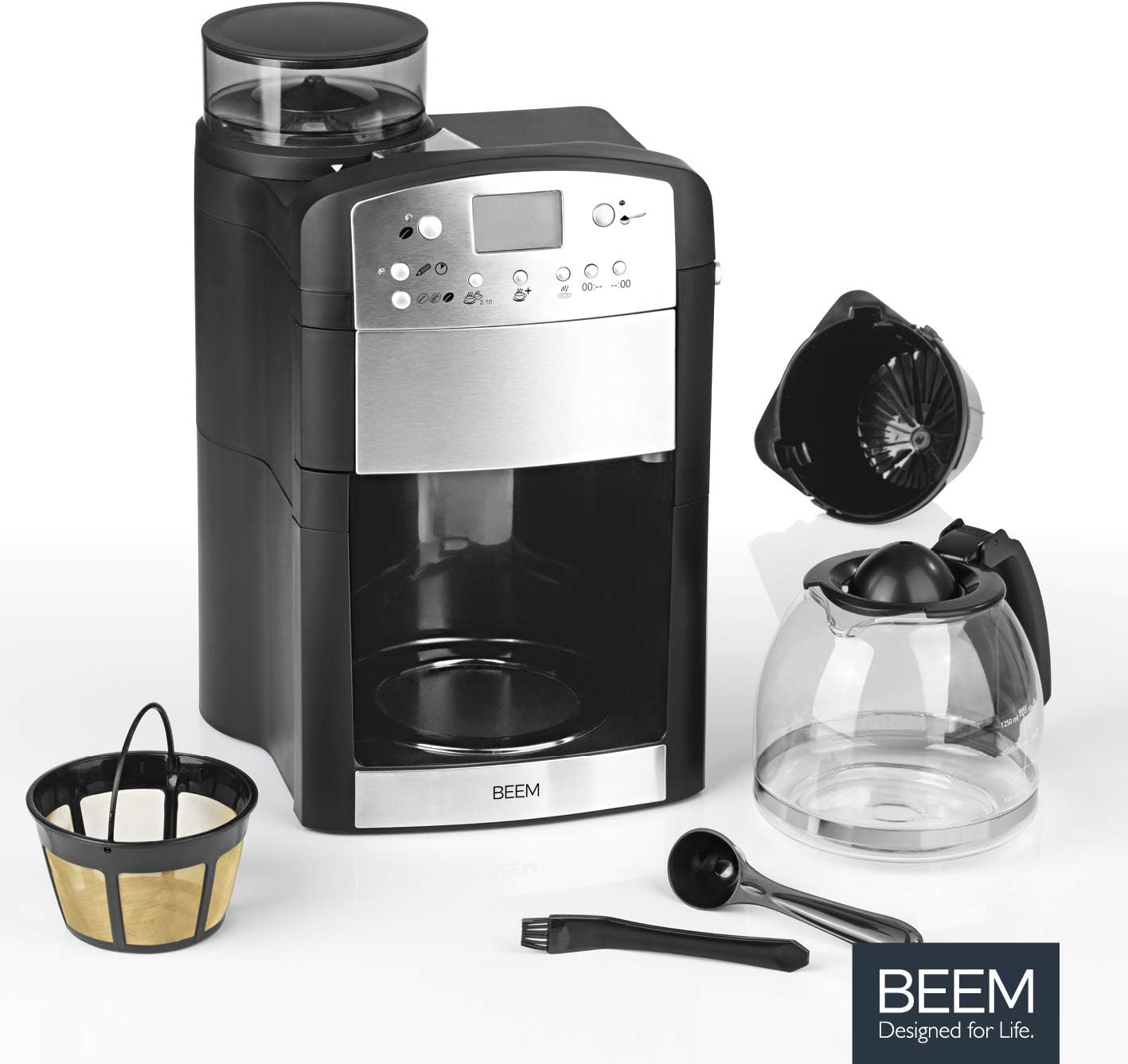
Image: All components included with the BEEM FRESH-AROMA-PERFECT coffee machine.
Product Components
Familiarize yourself with the different parts of your coffee machine:

Image: Front view of the BEEM FRESH-AROMA-PERFECT coffee machine.
- Bean Hopper: Located at the top, for storing whole coffee beans.
- Control Panel/Display: Front-facing panel with buttons and an LCD screen for settings and timer.
- Water Tank: Located on the side/rear, with markings for cup measurements (up to 1.25 liters). Contains an activated carbon filter.
- Grinder: Integrated conical burr grinder.
- Filter Holder: Removable basket for holding ground coffee or the reusable filter.
- Glass Carafe: For collecting brewed coffee, with a capacity of 1.25 liters (10 cups).
- Warming Plate: Keeps the brewed coffee warm in the carafe.

Image: Detailed views of the glass carafe, filter, bean hopper, and control panel.
Setup
- Unpack: Remove all packaging materials and check for any damage.
- Placement: Place the coffee machine on a flat, stable, heat-resistant surface, away from water sources and direct heat. Ensure there is sufficient space above the machine for filling the water tank and bean hopper.
- Initial Cleaning: Before first use, wash the glass carafe, reusable filter basket, and filter holder with warm, soapy water. Rinse thoroughly and dry. Wipe the exterior of the machine with a damp cloth.
- Activated Carbon Filter: The activated carbon filter is typically pre-installed in the water tank. If not, insert it according to the markings. This filter helps improve water quality for better coffee taste.
- First Use Cycle: Fill the water tank with cold water up to the MAX level. Do not add coffee. Place the empty glass carafe on the warming plate. Run a full brewing cycle to clean the internal components. Discard the water. Repeat this process once or twice.
Operating Instructions
Brewing Coffee with Whole Beans
- Fill Water Tank: Open the water tank lid and fill with fresh, cold water up to the desired cup marking (2 to 10 cups). The maximum capacity is 1.25 liters. Note: Filling the water tank may require careful pouring due to its design.
- Add Coffee Beans: Open the bean hopper lid and fill with fresh, whole coffee beans. Do not overfill.
- Select Grind Setting: Use the grind setting dial (usually located near the bean hopper) to choose your preferred grind level. There are 5 settings, from fine (for stronger coffee) to coarse (for milder coffee).
- Set Coffee Strength: On the control panel, select one of the three available coffee strength levels (e.g., mild, medium, strong). This adjusts the brewing time and water flow.
- Place Carafe: Ensure the glass carafe is correctly placed on the warming plate beneath the filter holder. The machine has a drip-stop mechanism that will prevent coffee from flowing if the carafe is not in place.
- Start Brewing: Press the 'Start' or 'Brew' button. The machine will first grind the selected amount of beans, then proceed with the brewing process.
- Warming Plate: The warming plate will keep the coffee warm after brewing. It automatically shuts off after approximately 2 hours.
Brewing Coffee with Pre-Ground Coffee
- Follow step 1 from 'Brewing Coffee with Whole Beans' to fill the water tank.
- Do not add beans to the bean hopper. Instead, open the filter holder and add the desired amount of pre-ground coffee directly into the reusable filter basket. Use the provided measuring spoon for accurate dosing.
- Close the filter holder securely.
- Follow steps 4-6 from 'Brewing Coffee with Whole Beans' to set coffee strength, place carafe, and start brewing.
Using the 24-Hour Timer Function
- Prepare the machine for brewing as described above (fill water, add beans/ground coffee, set strength).
- Press the 'Timer' button on the control panel.
- Use the 'Hour' and 'Minute' buttons to set the desired start time for brewing.
- Confirm the timer setting (refer to your specific model's manual for confirmation steps, usually by pressing the timer button again or a dedicated 'Set' button).
- The machine will automatically start brewing at the programmed time.
Cleaning and Maintenance
Regular cleaning is essential for maintaining the performance and taste of your coffee. Always unplug the machine before cleaning.
Daily Cleaning
- Glass Carafe and Filter Holder: After each use, remove the glass carafe and filter holder. Discard used coffee grounds. Wash these parts with warm, soapy water or place them in the dishwasher. Rinse thoroughly.
- Drip-Stop Mechanism: Clean the drip-stop mechanism located beneath the filter holder regularly, as coffee residue can accumulate here and affect its function.
- Warming Plate: Wipe the warming plate with a damp cloth. Do not use abrasive cleaners.
Regular Maintenance
- Grinder Chute: Periodically clean the coffee grinder chute with the provided cleaning brush. Moist coffee grounds can accumulate and cause blockages. Access the chute by opening the filter compartment.
- Water Tank: Clean the water tank regularly. The activated carbon filter should be replaced approximately every 2 months, or as indicated by the machine (if applicable).
- Descaling: Despite the activated carbon filter, mineral deposits (limescale) can build up over time, especially in hard water areas. Descale the machine regularly (e.g., every 1-3 months) using a commercial descaling solution suitable for coffee machines, following the product's instructions.
- Exterior: Wipe the exterior surfaces, especially the stainless steel parts, with a soft, damp cloth to remove fingerprints and spills.
Troubleshooting
| Problem | Possible Cause | Solution |
|---|---|---|
| Coffee is too weak. | Incorrect grind setting, insufficient coffee quantity, low strength setting. | Adjust grind to finer setting, increase coffee quantity, select higher strength level. |
| Coffee is too strong. | Grind setting too fine, too much coffee, high strength setting. | Adjust grind to coarser setting, reduce coffee quantity, select lower strength level. |
| Machine does not brew. | No water in tank, carafe not in place, power issue. | Fill water tank, ensure carafe is correctly positioned, check power connection. |
| Grinder is very loud. | Normal operation. | The conical burr grinder operates with a noticeable sound level, which is normal for this type of appliance. |
| Coffee overflows from filter. | Carafe not in place, filter clogged, too much coffee. | Ensure carafe is correctly placed, clean filter, reduce coffee quantity. |
| Water tank difficult to fill. | Design constraint. | Ensure sufficient clearance above the machine and pour water carefully. |
| Filter compartment opens forcefully. | Design characteristic. | Exercise caution when opening the filter compartment. |
Specifications
| Feature | Detail |
|---|---|
| Brand | BEEM |
| Model Number | 02041 |
| Dimensions (L x W x H) | 44.5 x 35 x 29.5 cm |
| Weight | 4 Kilograms |
| Volume | 1.25 Liters (approx. 10 cups) |
| Voltage | 240 Volts |
| Automatic Shut-off | No (for machine operation, warming plate auto-off after 2 hours) |
| Grinder Type | Integrated Conical Burr Grinder (5 settings) |
| Filter Type | Reusable Filter |
| Special Features | 24-hour Timer, Warming Plate, Activated Carbon Filter in Water Tank, Adjustable Coffee Strength (3 levels) |

Image: Product dimensions for the BEEM coffee machine.
Warranty and Support
For warranty claims, technical support, or service inquiries, please refer to the warranty card included with your purchase or contact BEEM customer service directly. Keep your proof of purchase (receipt or invoice) as it will be required for any warranty validation.
You can find contact information for BEEM customer support on their official website or through your retailer.
Related documents02041


Ask a question about this manual
Ask about setup, troubleshooting, compatibility, parts, safety, or missing instructions. Manuals+ will review the question and use this page’s manual context to help answer it.