
1. Introduction
The Astralpool Micro pH Pacific is an automatic peristaltic dosing pump designed for precise pH regulation in swimming pools. This device helps maintain optimal water balance by automatically adding pH minus solution, ensuring a clean and safe swimming environment. It is suitable for pools up to 100 m³. This manual provides essential information for the safe and effective installation, operation, and maintenance of your pH regulator.
2. Safety Information
Please read all safety instructions carefully before installing or operating the device. Failure to follow these instructions may result in injury or damage to the equipment.
- Ensure the power supply is disconnected before any installation or maintenance work.
- Handle pH solutions with care. Always wear appropriate personal protective equipment, such as gloves and eye protection.
- Keep the device and chemicals out of reach of children and pets.
- Install the unit in a dry, well-ventilated area, protected from direct sunlight and extreme temperatures.
- If you are unsure about any installation steps, consult a qualified professional.
3. Package Contents
Verify that all components are present in the package before proceeding with installation.
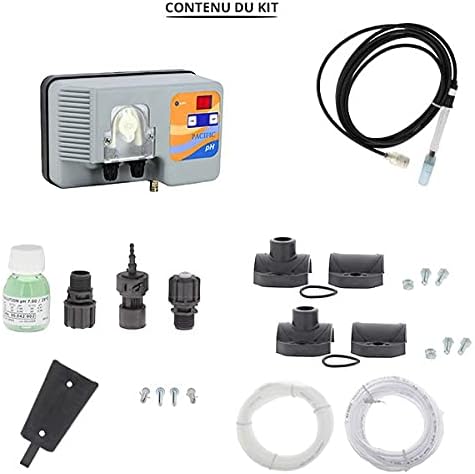
Image 3.1: Overview of the Astralpool Micro pH Pacific regulator and its complete set of accessories.
- Peristaltic Dosing Pump Micro pH Pacific (Main Unit)
- pH Probe
- Suction Strainer
- Discharge Tube
- Suction Tube
- Probe Holder
- Wall Mounting Kit
- Injection Valve
- pH Calibration Solutions
- Clamp Collars (x2, Ø50)

Image 3.2: The main unit of the Astralpool Micro pH Pacific regulator.
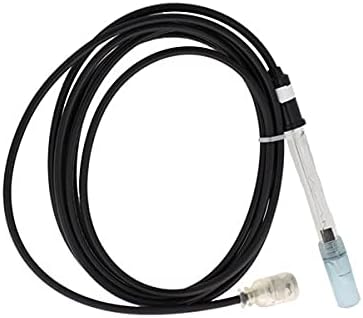
Image 3.3: The pH probe, essential for measuring water acidity.

Image 3.4: Bottle of pH calibration solution for accurate sensor readings.

Image 3.5: Components of the wall mounting kit for securing the unit.

Image 3.6: Suction tube for drawing pH minus solution.

Image 3.7: Discharge tube for injecting pH minus solution into the pool.
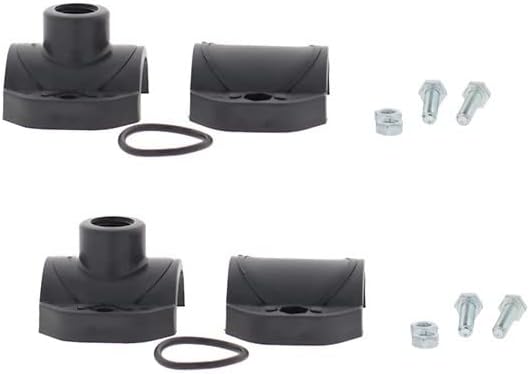
Image 3.8: Injection valve for controlled release of solution.
Image 3.9: Two clamp collars (Ø50) for securing tubes.
4. Specifications
| Feature | Specification |
|---|---|
| Product Type | Peristaltic Dosing Pump |
| Regulation Type | pH Minus Only |
| Maximum Pool Volume | 100 m³ |
| Casing Protection | IP65 |
| Dimensions (L x H x D) | 115 x 183 x 109 mm |
| Power Supply | 230V |
| Max Flow Rate | 1.6 l/h |
| Max Pressure | 1 bar |
| Measurement Range | 0 to 9.90 pH |
| Calibration Type | Semi-automatic |
| Model Number | 500425 |
5. Setup and Installation
Follow these steps carefully to install your Astralpool Micro pH Pacific regulator.
- Mounting the Regulator: Install the Micro pH Pacific regulator on a wall using the provided wall mounting kit. Choose a location that is dry, easily accessible, and close to the pool's filtration system.
- Connecting Tubes:
- Connect the suction strainer to one end of the suction tube. Place the strainer into the container of pH minus solution.
- Connect the other end of the suction tube to the inlet port of the dosing pump.
- Connect the discharge tube to the outlet port of the dosing pump.
- Install the injection valve into the pool's return line (after the filter and heater, if applicable) using one of the Ø50 clamp collars. Connect the discharge tube to this injection valve.
- pH Probe Installation:
- Attach the probe holder to the pool's circulation pipe using the second Ø50 clamp collar.
- Carefully insert the pH probe into the probe holder, ensuring it is immersed in the pool water flow according to recommended depth guidelines.
- Connect the pH probe cable to the designated port on the Micro pH Pacific unit.
- Power Connection: Connect the dosing pump to a 230V power supply. Ensure the connection is secure and protected from moisture.
- Initial Calibration: Before first use, the pH probe must be calibrated.
- Refer to the detailed calibration instructions in the operating section of this manual.
- Use the provided pH calibration solutions for accurate calibration.
6. Operating Instructions
Once installed and calibrated, the Astralpool Micro pH Pacific operates semi-automatically to maintain your pool's pH level.
- Power On: Turn on the power to the dosing pump. The LED display will show the current pH reading.
- Setting the Desired pH: Use the "SET" button on the unit to adjust your desired pH level. The recommended pH range for swimming pools is typically between 7.0 and 7.4.
- Monitoring pH: The unit continuously monitors the pool's pH level. If the pH rises above your set point, the pump will automatically inject pH minus solution until the desired level is reached.
- Calibration Procedure (Semi-Automatic):
- Prepare the pH calibration solutions (e.g., pH 7.0 and pH 4.0).
- Remove the pH probe from the pool water and rinse it with distilled water.
- Immerse the probe in the first calibration solution (e.g., pH 7.0). Press the "CAL" button and follow the on-screen prompts. Wait for the unit to stabilize and confirm the reading.
- Rinse the probe again and immerse it in the second calibration solution (e.g., pH 4.0). Repeat the calibration process.
- Once calibration is complete, return the probe to the pool water.
- Regular calibration (e.g., monthly or as recommended by the manufacturer) is crucial for accurate pH readings.
- Refilling pH Minus Solution: Regularly check the level of your pH minus solution container. Refill as needed to ensure continuous operation.
7. Maintenance
Regular maintenance ensures the longevity and accurate performance of your pH regulator.
- pH Probe Cleaning: Periodically clean the pH probe to remove any deposits or algae that may affect its accuracy. Use a soft brush and a mild cleaning solution specifically designed for pH probes. Rinse thoroughly with distilled water after cleaning.
- Tube Inspection: Inspect the suction and discharge tubes for any signs of wear, cracks, or blockages. Replace them if necessary.
- Peristaltic Pump Tube: The peristaltic pump tube (inside the main unit) is a wear part and may need replacement over time, depending on usage. Consult the manufacturer's guidelines for replacement intervals.
- General Cleaning: Keep the exterior of the dosing pump clean and free from dust and chemical spills.
- Winterization: If you winterize your pool, ensure the dosing pump and probe are properly drained, cleaned, and stored in a frost-free environment.
8. Troubleshooting
This section addresses common issues you might encounter with your pH regulator.
| Problem | Possible Cause | Solution |
|---|---|---|
| Inaccurate pH Readings |
|
|
| Pump Not Dosing |
|
|
| pH Level Not Changing |
|
|
9. Warranty and Support
For warranty information, please refer to the documentation provided at the time of purchase or contact your retailer. AstralPool products are designed for reliability, but should you encounter any issues not covered in this manual, please contact AstralPool customer support or your authorized service center for assistance.
Brand: AstralPool
Model: Micro pH Pacific (500425)