
COMICA CVM-VM10II
COMICA CVM-VM10II Professional Video Microphone User Manual
Model: CVM-VM10II
Introduction
This manual provides comprehensive instructions for the setup, operation, maintenance, and troubleshooting of your COMICA CVM-VM10II Professional Video Microphone. Designed for optimal audio recording with various devices, this compact shotgun microphone enhances sound quality for your video content.
What's in the Box
Verify that all components are present in your package:
- CVM-VM10II Microphone
- Shock-Mount
- Wind Screen (Foam)
- Wind Muff (Deadcat)
- TRS Camera Cable (3.5mm)
- TRRS Smartphone Cable (3.5mm)
- Carry Case

Image: All components included in the COMICA CVM-VM10II package, neatly arranged in the carry case.
Features
- Universal Compatibility: Includes 3.5mm TRS and TRRS cables for broad device support (DSLR cameras, camcorders, smartphones).
- Battery-Free Design: Operates directly from device power, eliminating the need for external batteries.
- Mini Cardioid Directional Pattern: Effectively captures target sound while minimizing background noise.
- Noise-Canceling Construction: Built with 100% aluminum material to reduce interference and vibration noise.
- Rycote Lyre Shock Mount: Designed to prevent noise from handling and movement during video recording.
- Compact and Lightweight: Easy to carry and integrate into various recording setups.

Image: The COMICA CVM-VM10II microphone highlighting its compact, plug-and-play, and cardioid features.
Setup
- Attach Microphone to Shock Mount: Gently slide the CVM-VM10II microphone into the Rycote Lyre Shock Mount until it is securely held.
- Mount to Device: Attach the shock mount (with microphone) to your camera's hot shoe or a smartphone rig using the integrated cold-shoe mount.
- Connect Cable:
- For DSLR Cameras/Camcorders: Use the 3.5mm TRS Camera Cable.
- For Smartphones: Use the 3.5mm TRRS Smartphone Cable.
- Adapter Notes:
- For iPhone 7 or above: An original iPhone adapter cable (e.g., Lightning to 3.5mm) is required.
- For new Samsung mobile phones or updated Samsung systems: Use Samsung's original Type-C adapter. Third-party Type-C adapters may not be supported.
- For Android devices: Use in recording mode. For video mode, a third-party video app may be necessary as most phones are not compatible with the native video app.
- Canon Rebel T5/T5i/T6/T7/T7i/HFR800: An additional adapter cord may be required.

Image: The compact and lightweight design of the CVM-VM10II microphone, emphasizing its portability and battery-free operation.
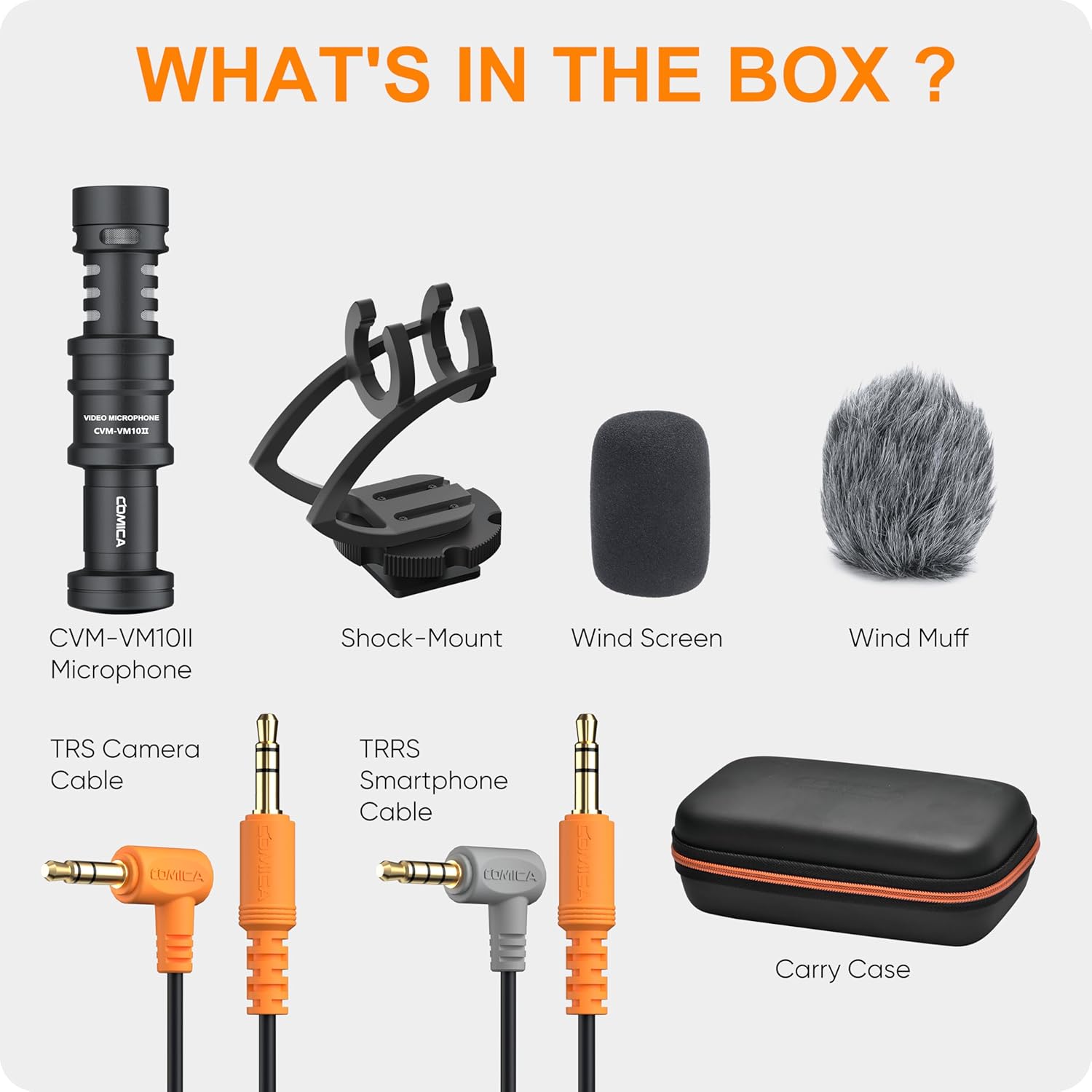
Image: A visual guide illustrating which adapters are needed for different devices, including 3.5mm TRS for cameras and TRRS for smartphones.
Video: An overview of the Comica VM10II Professional shotgun camera microphone, demonstrating its features and basic setup.
Operating Instructions
- Positioning: Due to its cardioid directional pattern, aim the microphone directly at your sound source for optimal audio capture and background noise reduction.
- Windscreen Usage:
- Foam Wind Screen: Ideal for indoor use or light breeze conditions to reduce plosives and minor wind noise.
- Wind Muff (Deadcat): Recommended for outdoor use in windy conditions to significantly minimize wind noise interference.
- Monitoring Audio: If your recording device allows, monitor your audio in real-time to ensure optimal levels and clarity.

Image: A diagram illustrating the cardioid polar pattern of the microphone, showing its directional sound pickup.
Video: An actual sound quality demonstration of the microphone in various environments, without unboxing.
Video: A sound comparison between the built-in iPhone microphone and the Comica CVM-VM10II.
Video: A test of the Comica CVM-VM10II microphone with a DJI Osmo Action Camera, demonstrating its performance in a real-world scenario.
Maintenance
- Cleaning: Wipe the microphone body with a soft, dry cloth. Avoid using harsh chemicals or abrasive materials.
- Windscreen Care: Gently clean foam windscreens with mild soap and water, then air dry completely. The deadcat can be gently shaken or brushed to remove debris.
- Storage: Store the microphone and its accessories in the provided carry case to protect them from dust, moisture, and physical damage.
Troubleshooting
- No Audio/Poor Audio Quality:
- Ensure the correct 3.5mm cable (TRS for camera, TRRS for smartphone) is used and fully inserted.
- Verify that any required adapters (e.g., Lightning to 3.5mm for iPhone, original Type-C for Samsung) are correctly connected and functional.
- Check device audio input settings to ensure the external microphone is selected and input levels are appropriate.
- For Android devices, try using a third-party video recording app if the native app does not support external microphones.
- Excessive Wind Noise:
- For outdoor recording, ensure the Wind Muff (Deadcat) is properly installed over the microphone.
- For indoor recording, use the Foam Wind Screen to reduce minor air disturbances.
- Handling Noise:
- Ensure the microphone is securely seated in the Rycote Lyre Shock Mount to minimize vibrations from handling.
- Avoid excessive movement of the camera or rig during recording.
Specifications
| Feature | Detail |
|---|---|
| Brand | COMICA |
| Model Name | CVM-VM10IIBlak |
| Polar Pattern | Unidirectional (Cardioid) |
| Connectivity Technology | Auxiliary |
| Connector Type | 3.5 mm TRRS, 3.5 mm TRS |
| Compatible Devices | Camcorder, Camera, Smartphone |
| Material | Aluminum |
| Power Source | Plug and Play (Battery-free) |
| Item Weight | 7.8 ounces (220 Grams) |
| Product Dimensions (L x W x H) | 4.02 x 2.52 x 7.48 inches |
| Audio Sensitivity | 10 Decibels |
| Signal-to-Noise Ratio | 75 |
| Frequency Response | 18 KHz |
Warranty and Support
For warranty information, technical support, or service inquiries, please refer to the official COMICA website or contact their customer service directly. Keep your purchase receipt as proof of purchase for warranty claims.
Related documentsCVM-VM10II


Ask a question about this manual
Ask about setup, troubleshooting, compatibility, parts, safety, or missing instructions. Manuals+ will review the question and use this page’s manual context to help answer it.