
Introduction
This manual provides detailed instructions for the safe and proper installation and operation of your iMounTEK Tilting TV Wall Mount Bracket. Please read this manual thoroughly before installation and retain it for future reference. This mount is designed to securely hold LED, LCD, OLED, and Plasma flat screen TVs ranging from 37 to 70 inches and weighing up to 99 lbs.
Important Safety Information
WARNING: Failure to read and follow these instructions may result in serious personal injury, property damage, or voiding of your warranty. If you do not understand these instructions or have doubts about the safety of the installation, please contact a qualified installer.
- Do not install this product on walls that are not structurally sound.
- Ensure the mounting surface can safely support the combined weight of the mount and the TV.
- Always use a stud finder to locate wall studs for secure mounting.
- Do not exceed the maximum weight capacity of 99 lbs (45 kg).
- This product is intended for indoor use only.
- Keep children and pets away during installation.
- Use appropriate personal protective equipment during installation.
Package Contents
Verify that all components are present and undamaged before beginning installation. If any parts are missing or defective, contact iMounTEK customer service.

Image: All components included in the iMounTEK TV wall mount package. This includes the main wall plate, two vertical TV brackets, and multiple bags containing different sizes of screws, washers, spacers, and wall anchors for various TV models and wall types.
Included Hardware:
- Wall Plate Assembly
- TV Bracket Arms (2)
- Various Lag Bolts and Anchors for wall mounting
- Assorted M4, M6, M8 TV Screws and Washers
- Spacers
- Hex Key
Setup & Installation
Tools Required: Stud finder, drill, level, pencil, measuring tape, Phillips head screwdriver, socket wrench.
Step 1: Prepare the Wall Plate
- Determine the desired height for your TV.
- Use a stud finder to locate two adjacent wooden studs in your wall. Mark the center of each stud.
- Position the wall plate against the wall, aligning the mounting holes with the marked stud centers. Use a level to ensure it is perfectly horizontal.
- Mark the drill points through the wall plate holes.
- Drill pilot holes into the wall studs. The size of the drill bit will depend on the lag bolts provided.
- Secure the wall plate to the wall using the lag bolts and washers. Tighten firmly but do not overtighten.

Image: The main wall plate component of the TV mount, featuring its articulating arms. This part attaches directly to the wall studs.
Step 2: Attach Brackets to TV
- Carefully place your TV face down on a soft, clean surface to prevent screen damage.
- Identify the VESA mounting holes on the back of your TV.
- Select the appropriate screws, washers, and spacers from the provided hardware kit that fit your TV's VESA pattern.
- Attach the two vertical TV bracket arms to the back of your TV. Ensure they are securely fastened and evenly spaced.

Image: The TV mount's wall plate and the two vertical TV brackets. The brackets are shown attached to the back of a TV, illustrating how the TV connects to the mount.
Step 3: Mount the TV to the Wall Plate
- With assistance, carefully lift the TV with the attached brackets.
- Align the hooks on the TV brackets with the corresponding slots on the wall plate.
- Gently lower the TV, ensuring the brackets engage securely with the wall plate.
- Once the TV is hanging, secure it in place using the safety screws or locking mechanisms on the bottom of the TV brackets.
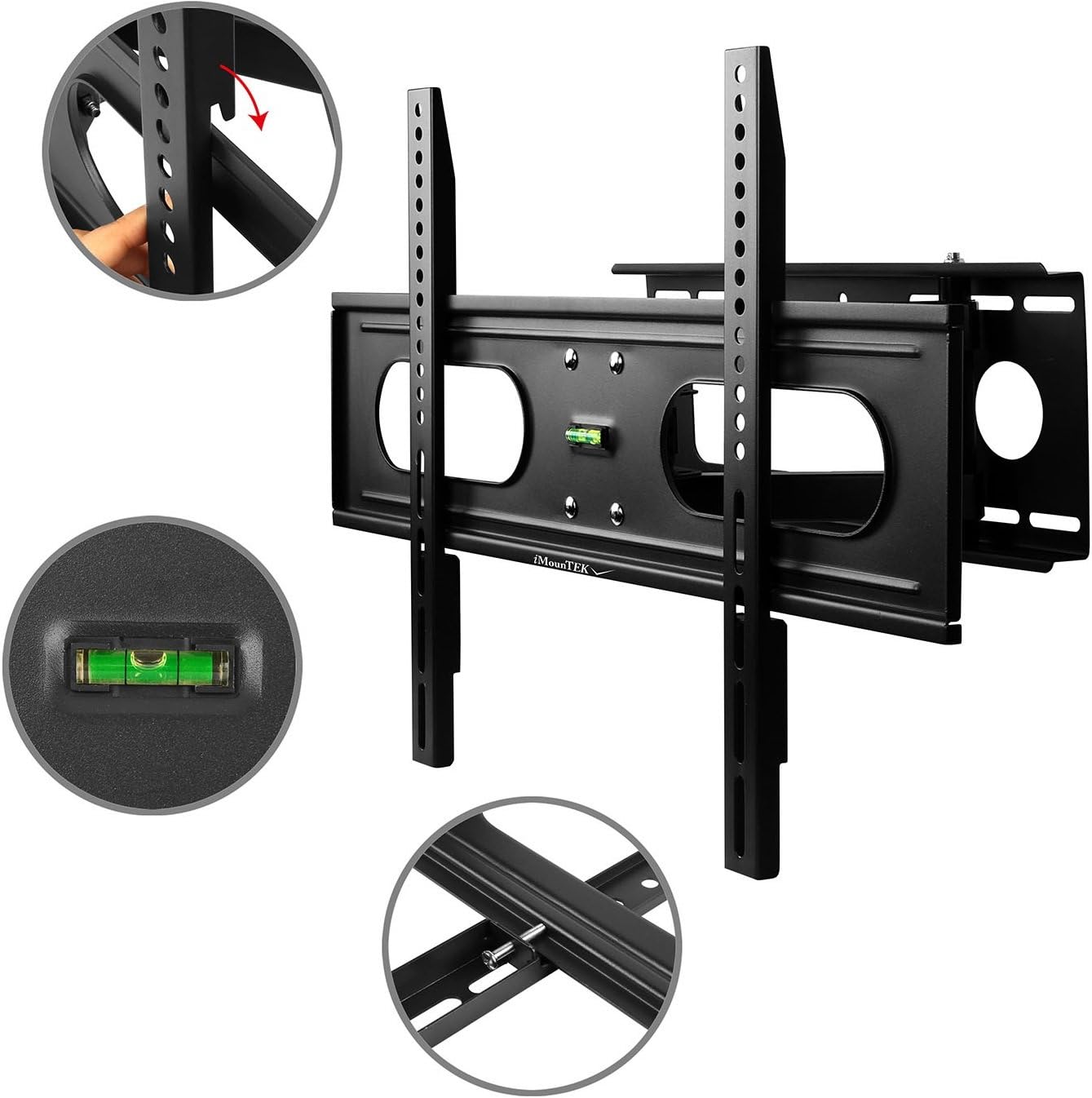
Image: A flat-screen TV securely mounted on the iMounTEK wall mount. The mount is extended from the wall, demonstrating its articulating capabilities, allowing the TV to be positioned for optimal viewing.
Operating Instructions
This full-motion TV mount allows for flexible positioning of your television to achieve the best viewing angle.
- Extension: Gently pull the TV away from the wall to extend the articulating arms. The mount extends up to 18 inches.
- Retraction: Push the TV gently back towards the wall until it folds to a 3-inch depth.
- Swivel: Carefully pivot the TV left or right to adjust the horizontal viewing angle. The mount allows for 90° rotation for landscape or portrait viewing.
- Tilt: Loosen the tilt adjustment knobs on the TV brackets, adjust the TV to the desired vertical angle (up to +/-20° forward), and then re-tighten the knobs to secure the position.
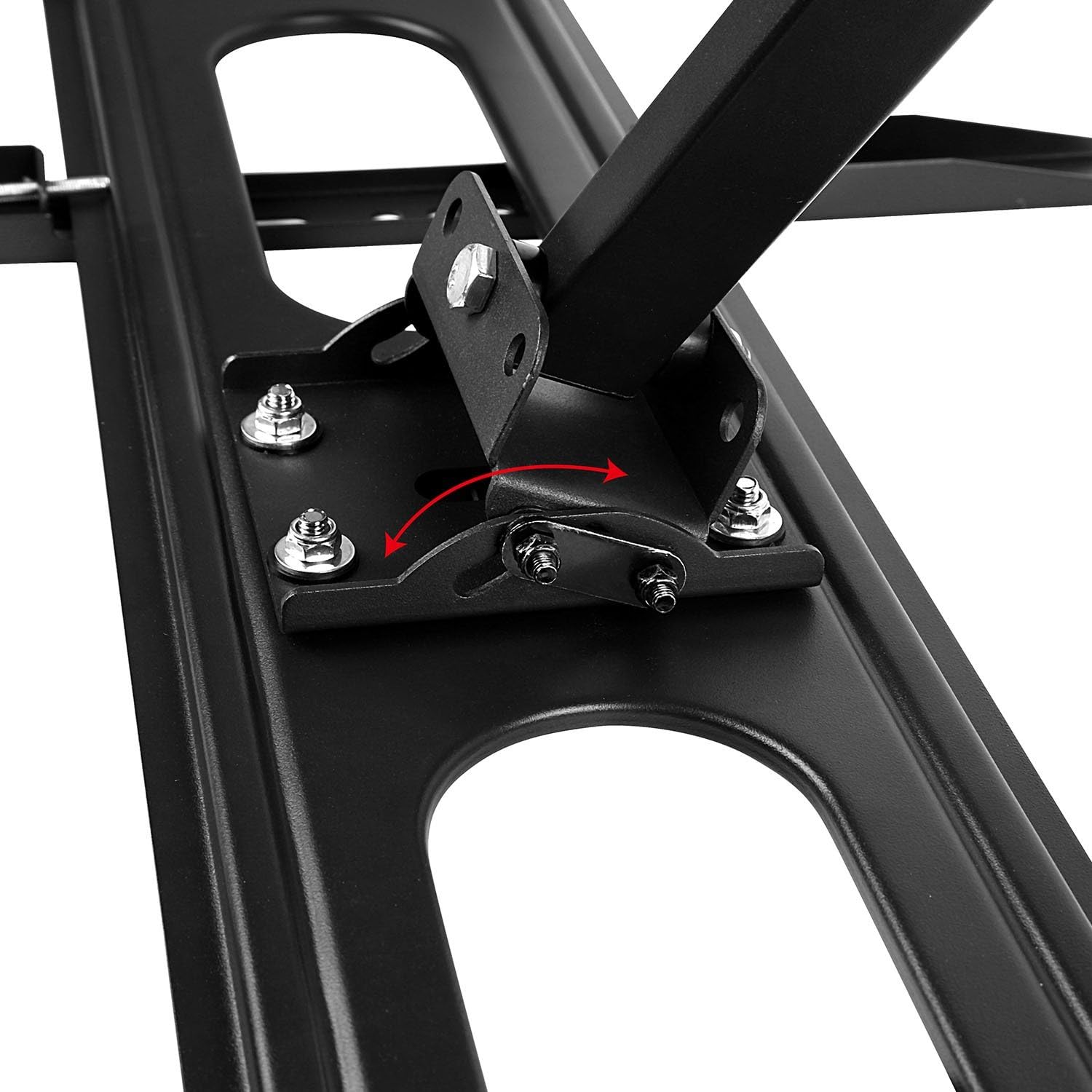
Image: A detailed view of the tilting mechanism on the iMounTEK TV mount. An arrow illustrates the range of motion for tilting the TV up or down, highlighting the adjustable bolts that secure the tilt angle.
Maintenance
Regular maintenance ensures the longevity and safe operation of your TV mount.
- Periodic Inspection: Annually, check all screws and bolts to ensure they are securely tightened. Re-tighten if necessary.
- Cleaning: Wipe the mount with a soft, dry cloth. Avoid using abrasive cleaners or solvents.
- Lubrication: The articulating joints are designed for smooth movement. If movement becomes stiff, a small amount of silicone-based lubricant can be applied to the pivot points.
Troubleshooting
If you encounter issues with your TV mount, refer to the following common problems and solutions.
- TV is not level:
- Check the wall plate installation with a level. If the wall plate is not level, it may need to be re-installed.
- Some mounts have a post-installation leveling adjustment. Refer to the specific mechanism on your mount.
- Mount feels wobbly:
- Ensure all lag bolts securing the wall plate to the wall studs are fully tightened.
- Verify that the TV is correctly seated on the wall plate and secured with safety screws.
- Confirm that the wall studs are solid and capable of supporting the weight.
- Difficulty adjusting tilt/swivel:
- For tilt, ensure the tilt adjustment knobs are sufficiently loosened before attempting to adjust, then re-tighten.
- For swivel/extension, ensure no cables are snagged or restricting movement.
- Missing hardware:
- Review the "Package Contents" section. If parts are genuinely missing, contact iMounTEK customer support.
Product Specifications
| Feature | Detail |
|---|---|
| Brand | iMounTEK |
| Model Number | 4330178596 |
| Compatible TV Sizes | 37" to 70" |
| Maximum Weight Capacity | 99 lbs (45 kg) |
| Mounting Type | Wall Mount |
| Movement Type | Articulating, Rotate, Swivel, Tilt |
| Tilt Angle | +/-20° forward |
| Extension from Wall | 3" (retracted) to 18" (extended) |
| Material | Alloy Steel |
| Color | Black |
| Item Weight | 11.16 pounds (5.06 kg) |
| Product Dimensions | 27 x 7.48 x 3.03 inches |
| UPC | 616043300498 |
Warranty & Customer Support
For warranty information or technical assistance, please contact iMounTEK customer service. Keep your purchase receipt as proof of purchase.
Contact Information: Refer to the contact details provided with your product packaging or visit the official iMounTEK website for the most up-to-date support information.