
1. Introduction
This manual provides essential information for the safe and efficient use of your Brondi Window flip phone. Please read it carefully before using the device and keep it for future reference.

Image 1.1: Brondi Window Flip Phone (Open, Front View). This image displays the phone in its open position, showing the main display, keypad, and the outer window.
2. Getting Started: Setup
2.1 Package Contents
Ensure your package contains the following items:
- Brondi Window Mobile Phone
- Mains Charger
2.2 Installing the Battery and SIM Cards
To install the battery and SIM cards:
- Carefully remove the back cover of the phone.
- Insert your SIM card(s) into the designated slot(s). This phone supports Dual SIM functionality.
- Insert the battery, ensuring the contacts align correctly.
- Replace the back cover until it clicks into place.

Image 2.1: Brondi Window Flip Phone (Back View). This image shows the rear of the phone, including the camera lens and speaker grille, where the back cover is located for battery and SIM access.
2.3 Charging the Phone
Before first use, fully charge the phone battery. Connect the charger to the phone's charging port and plug it into a power outlet. The charging indicator will show the charging status.
2.4 Powering On/Off
To power on the phone, press and hold the Power/End Call button until the screen lights up. To power off, press and hold the same button and select 'Power off' from the options.
2.5 Initial Settings
Upon first power-on, you may be prompted to set the language, date, and time. Follow the on-screen instructions to configure these basic settings.
3. Operating Your Phone
3.1 Making and Receiving Calls
- Making a Call: Enter the phone number using the keypad and press the Call button (green).
- Receiving a Call: Open the flip to answer an incoming call. Close the flip to end a call.
3.2 Keypad Functions
The keypad includes numerical keys, navigation keys, and dedicated function keys. Refer to the on-screen prompts for specific key functions within menus.
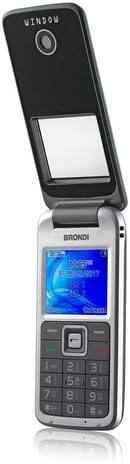
Image 3.1: Brondi Window Flip Phone (Open, Keypad View). This image highlights the phone's keypad and navigation buttons, crucial for dialing and menu interaction.
3.3 Display Information
The 1.77-inch color display shows network signal strength, battery level, time, date, and caller ID information through the outer window when the phone is closed.
3.4 Menu Navigation
Use the navigation keys to scroll through menu options. Press the central selection key to confirm an option. The menu allows access to contacts, messages, call history, settings, and other features.
3.5 Camera Usage
Access the camera from the main menu. Use the navigation keys to frame your shot and the central selection key to capture photos. The phone features a 1.3 MP optical sensor resolution.
3.6 Bluetooth Connectivity
To pair with a Bluetooth device, go to the Bluetooth settings in the menu, turn Bluetooth on, and search for available devices. Select your device and follow the pairing instructions.
3.7 Dual SIM Management
If you have two SIM cards installed, you can manage them through the SIM management settings in the phone's menu. This allows you to select which SIM to use for calls, messages, or data (if applicable).
4. Maintenance
4.1 Cleaning
Clean the phone with a soft, dry cloth. Avoid using liquid cleaners or aerosols, as they may damage the device.
4.2 Battery Care
To prolong battery life, avoid exposing the phone to extreme temperatures. Do not leave the phone charging for extended periods after it is fully charged.
4.3 Storage
Store the phone in a dry place, away from direct sunlight and moisture, when not in use for extended periods.
4.4 Water Resistance
The Brondi Window phone is not water resistant. Avoid contact with liquids to prevent damage.
5. Troubleshooting
If you encounter issues with your phone, try the following solutions:
- Phone does not power on: Ensure the battery is correctly installed and sufficiently charged. Connect the charger and try again.
- No network signal: Check if your SIM card is properly inserted. Move to an area with better network coverage.
- Cannot make or receive calls: Verify network signal. Check if call barring is enabled in settings. Ensure your SIM card is active.
- Charging issues: Ensure the charger is correctly connected to both the phone and the power outlet. Try a different power outlet or charger if available.
- Screen is unresponsive or frozen: Try restarting the phone by removing and reinserting the battery, then powering it on again.
6. Specifications
| Feature | Specification |
|---|---|
| Brand | Brondi |
| Model Name | Window |
| Operating System | Android (Basic Phone OS) |
| Screen Size | 1.77 Inches |
| Resolution | 128 x 160 Pixels |
| Cellular Technology | GSM |
| Connectivity | Bluetooth |
| Wireless Network Technology | GSM, Wi-Fi |
| SIM Slots | Dual SIM |
| Camera Resolution | 1.3 MP |
| Weight | 78 Grams |
| Dimensions | 5 x 1.7 x 10.3 cm |
| Talk Time | 2 Hours |
| Average Battery Life (in use) | 2 Hours |
| Video Capture Resolution | 1280 x 720 |
| Headphone Jack | 3.5 mm |
| Water Resistance | Not Water Resistant |
| Package Contents | Mobile Phone, Mains Charger |
7. Warranty Information
The Brondi Window flip phone comes with a 2-year product warranty from the date of purchase. Please retain your proof of purchase for warranty claims. The warranty covers manufacturing defects but does not cover damage caused by misuse, accidents, or unauthorized repairs.
8. Support
For further assistance, technical support, or warranty inquiries, please contact Brondi customer service. Refer to the official Brondi website or product packaging for contact details.
