
1. Introduction
Thank you for choosing the ROBOTIME AM481-Bunny 3D Wooden Puzzle Music Box. This DIY kit offers a unique and engaging building experience, culminating in a charming musical automaton. Designed with laser-cut precision, this model features intricate details and provides an enjoyable crafting process for enthusiasts.
The completed model is a delightful rabbit-themed music box that plays a melody when activated. This manual will guide you through the assembly, operation, and care of your new wooden puzzle.

Image 1.1: The fully assembled ROBOTIME AM481-Bunny 3D Wooden Puzzle Music Box, showcasing its intricate design and musical notes.
2. Safety Information
Please read and understand the following safety guidelines before beginning assembly:
- Age Recommendation: This product is not suitable for children under 8 years of age due to small parts. The manufacturer recommends an age range of 14-75 years.
- Small Parts: The kit contains small components that may pose a choking hazard. Keep all parts out of reach of young children and pets.
- Sharp Edges: While laser-cut for precision, some wooden pieces may have slightly sharp edges. Handle with care to avoid minor cuts or splinters.
- Adhesive Use: If glue is included or required, use it in a well-ventilated area and follow the adhesive manufacturer's safety instructions. Avoid contact with skin and eyes.
- Force: Do not force pieces together. If a piece does not fit, re-check the instructions and ensure correct orientation. Forcing parts can cause damage.
3. Parts List
Before starting assembly, verify that all components listed below are present in your kit. Refer to the included English manual for a detailed visual parts breakdown.

Image 3.1: An overview of the components included in the kit, such as the musical movement, metal tray, key, screws, round stick, hollow ball, wooden beads, bell, rings, tweezers, glue, screwdriver, and pre-cut wood sheets.
- Pre-cut Wooden Sheets (116 pieces)
- Musical Movement
- Metal Tray
- Winding Key
- Screws
- Round Stick
- Hollow Ball (for head dome)
- Wooden Beads
- Bells
- Rings
- Tweezers (for small parts)
- Glue (if provided, or use wood glue)
- Screwdriver
- Detailed English Manual

Image 3.2: The package contents laid out, showing the musical generator, manual, wooden sheets, and the product packaging.
4. Assembly Instructions (Setup)
Follow the step-by-step instructions provided in the included English manual. The assembly process typically takes several hours. Patience and attention to detail are key.
- Preparation: Carefully remove all wooden pieces from their sheets. Use the provided tweezers or a craft knife if necessary to detach smaller or more delicate parts. Organize pieces by number or type as indicated in the manual.
- Initial Assembly: Begin by assembling the base structure of the bunny robot, following the numerical sequence in the manual. Pay close attention to the orientation of each piece.
- Gear and Movement Installation: Install the musical movement and associated gears as instructed. Ensure all gears are properly aligned and can rotate freely. This step is crucial for the music box functionality.
- Detailing: Attach smaller decorative elements, such as the ears, facial features, and any other embellishments.
- Final Assembly: Complete the remaining sections, ensuring all connections are secure. Apply glue sparingly where indicated in the manual for added stability. Allow sufficient drying time for any glued parts before proceeding.
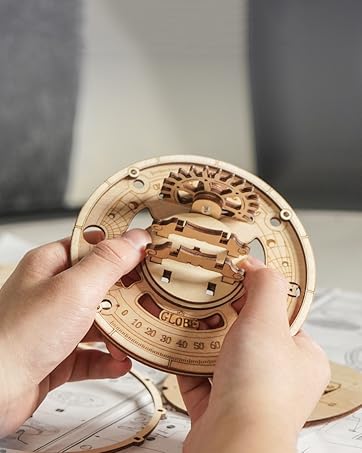
Image 4.1: A close-up of hands carefully assembling a wooden gear, demonstrating the precision required for the puzzle.
Tip: Some pieces may require gentle sanding or waxing for smoother movement, especially for gears. Do not rush the process; enjoy the craftsmanship.
5. Operating Instructions
Once fully assembled, your ROBOTIME AM481-Bunny Music Box is ready for operation.
- Winding the Music Box: Locate the winding key, typically positioned on the side or back of the model. Gently turn the key clockwise until you feel slight resistance. Do not overwind, as this can damage the musical mechanism.
- Activating the Melody: The music box is designed to play a melody, often "Little Bunny Foo Foo," when the internal gearbox is activated. This usually occurs by lifting a specific part of the model, such as the head or a lever, as indicated in your detailed manual.
- Enjoying the Display: Observe the intricate gears and the bunny's head rotating as the music plays. The model serves as both a functional music box and a decorative piece.
6. Maintenance
To ensure the longevity and proper function of your wooden puzzle music box, follow these maintenance guidelines:
- Cleaning: Dust the model regularly with a soft, dry cloth. Avoid using water or chemical cleaners, as these can damage the wood.
- Storage: Store the music box in a dry environment, away from direct sunlight and extreme temperature fluctuations, which can cause the wood to warp or crack.
- Handling: Handle the model gently. Avoid dropping it or applying excessive force to any parts, especially the delicate gears and musical mechanism.
- Lubrication: If any moving parts, particularly gears, become stiff over time, a very small amount of dry lubricant (e.g., graphite powder) can be applied. Avoid oil-based lubricants.
7. Troubleshooting
If you encounter any issues with your ROBOTIME AM481-Bunny Music Box, refer to the following common problems and solutions:
| Problem | Possible Cause | Solution |
|---|---|---|
| Music box does not play. | Not wound; mechanism jammed; incorrect assembly of musical movement. | Ensure the key is fully wound (without over-winding). Check for any obstructions in the gears. Review assembly steps for the musical movement. |
| Pieces do not fit together. | Incorrect orientation; burrs on edges; wrong piece. | Double-check the manual for correct piece orientation and number. Gently sand any rough edges if necessary. Ensure you are using the correct piece for the step. |
| Gears are stiff or not moving smoothly. | Friction; misalignment; dust accumulation. | Ensure all gears are properly aligned. Apply a small amount of dry lubricant (e.g., graphite powder) to contact points. Clean any dust from the mechanism. |
| Model is unstable. | Loose connections; insufficient glue. | Check all connections and apply glue where specified in the manual. Allow adequate drying time. |
If you continue to experience issues, please contact ROBOTIME customer support for further assistance.
8. Specifications
- Model Number: AM481-Bunny
- Brand: ROBOTIME
- Material: Wood
- Number of Pieces: 116 (as per product title, 160 as per specifications) - Note: Please refer to your specific product packaging for the exact piece count.
- Assembled Dimensions: Approximately 14.8 x 20.8 x 13.1 cm
- Recommended Age: 14 - 75 years
- Educational Objective: Patience, Motor Skills, Problem Solving
- Theme: Robots (Bunny)
- Assembly Required: Yes
9. Warranty and Support
ROBOTIME products are manufactured with high-quality standards. While specific warranty details are not provided in this manual, please retain your proof of purchase. In case of missing parts, defects, or assembly difficulties, please contact ROBOTIME customer support through their official website or the retailer where the product was purchased.
For additional support and to explore other ROBOTIME products, visit the official ROBOTIME store:


