
ZENY ZENY1589
ZENY Dining Chair Set (Model ZENY1589) Instruction Manual
Model: ZENY1589
1. Safety Information
Please read all instructions carefully before assembly and use. Keep this manual for future reference.
- Maximum Weight Capacity: The ZENY Dining Chair is designed to support a maximum weight of 250 pounds (113 kg). Do not exceed this limit to prevent damage or injury.
- Ensure all screws and bolts are securely tightened before use. Periodically check and re-tighten fasteners as needed.
- Do not stand on the chair or use it as a step stool.
- Avoid leaning back excessively, as this can stress the chair's frame and lead to breakage.
- Keep small parts away from children during assembly.
2. Package Contents
Before beginning assembly, ensure all parts are present and undamaged. If any parts are missing or damaged, please contact customer support.
- Chair Backrest (2)
- Seat Cushion (2)
- Front Legs (4)
- Back Legs (4)
- Hardware Bag (Screws, Washers, Allen Wrench) (1)
- Assembly Instructions (1)
3. Assembly Instructions
Assembly is required. Follow these steps carefully for proper installation.
- Attach Legs to Seat Cushion:
Align the chair legs with the grooves on the back of the seat cushion. Insert the screws into the pre-drilled holes.
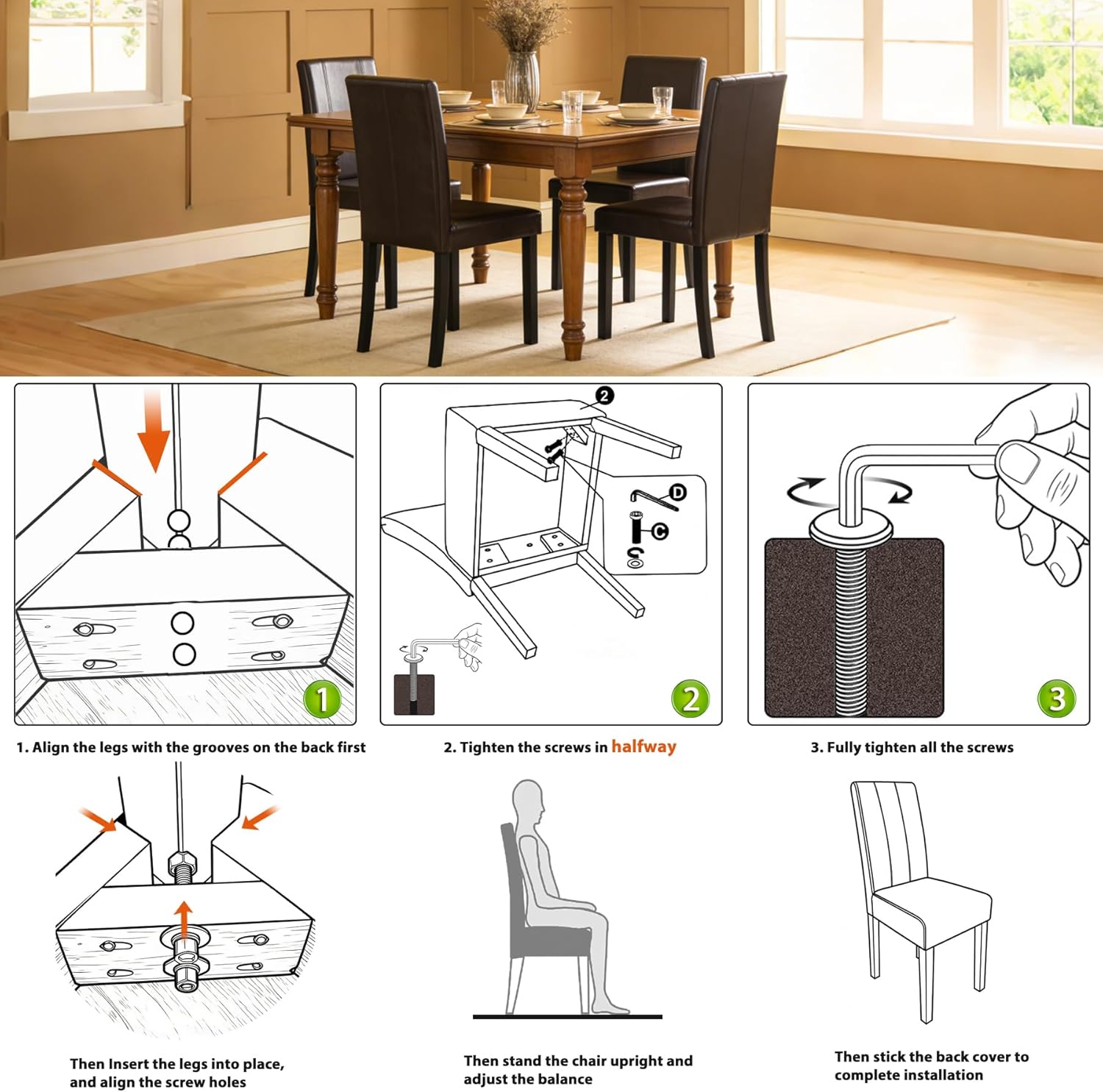
Image: Diagram showing how to align the legs with the seat cushion and insert screws.
- Partially Tighten Screws:
Using the provided Allen wrench, tighten all screws to about 90% of their full tightness. This allows for minor adjustments to ensure stability.
Image: Diagram illustrating the partial tightening of screws.
- Adjust Balance and Fully Tighten:
Once all legs are attached, stand the chair upright and gently press down on the seat to ensure it is balanced and does not wobble. Then, fully tighten all screws until secure. Do not overtighten.
Image: Diagram showing how to check for wobbling and fully tighten screws.
- Attach Backrest:
Finally, attach the backrest to the seat cushion using the remaining hardware. Ensure it is firmly secured.
Note: If you encounter any difficulties or if the chair wobbles after full assembly, loosen the screws slightly, adjust the chair on a flat surface, and then re-tighten.
4. Operating Instructions
The ZENY Dining Chair is designed for comfortable seating in dining rooms, kitchens, or office spaces.
- Use the chair on a flat, stable surface to prevent tipping.
- The chair features a high sloped back and double foam cushioning for enhanced comfort and support.
- The armless design allows for easy movement and versatility in various settings.
- The solid pine wood legs are equipped with foot pads to prevent scratching hard floors.

Image: Two individuals seated at a dining table, demonstrating the comfortable use of the ZENY dining chairs.
5. Maintenance and Care
Proper care will extend the life and appearance of your ZENY Dining Chairs.
- Cleaning: Wipe clean with a damp cloth. The PU leatherette is waterproof and easy to clean. Avoid harsh chemicals or abrasive cleaners.
- Fasteners: Periodically check all screws and bolts to ensure they remain tight. Re-tighten as necessary to maintain stability and prevent wobbling.
- Wood Care: The pine wood frame is designed for durability. Avoid prolonged exposure to direct sunlight or extreme humidity to prevent warping or cracking.
- Foot Pads: Ensure the foot pads on the legs are intact to protect your floors from scratches. Replace if worn.
6. Troubleshooting
If you encounter any issues with your ZENY Dining Chairs, refer to the following common problems and solutions:
| Problem | Possible Cause | Solution |
|---|---|---|
| Chair wobbles after assembly. | Screws are not evenly tightened or the chair is not balanced. | Loosen all screws slightly, place the chair on a flat surface, apply gentle pressure to the seat to balance it, then fully re-tighten all screws. |
| Screws come loose or wood splinters around screw holes. | Overtightening during assembly or excessive stress during use. | Avoid overtightening. If wood is damaged, contact customer support for replacement parts or guidance. Do not exceed the 250 lb weight limit. |
| Legs feel unstable or break. | Improper assembly, exceeding weight capacity, or excessive force (e.g., leaning back). | Ensure all assembly steps are followed correctly and screws are tight. Adhere to the 250 lb weight limit. Avoid leaning back forcefully. If damage occurs, contact customer support. |
| Difficulty cleaning stains from upholstery. | Using incorrect cleaning agents. | Use only a damp cloth for cleaning. For stubborn stains, a mild soap solution can be used, followed by wiping with a clean damp cloth. Test on an inconspicuous area first. |
7. Specifications

Image: Detailed diagram showing the dimensions of the ZENY Dining Chair. Note: The diagram indicates 300 lbs, but official specifications state 250 lbs. Please adhere to the 250 lbs limit.
| Feature | Detail |
|---|---|
| Model Number | ZENY1589 |
| Brand | ZENY |
| Color | Brown |
| Frame Material | Pine Wood |
| Seat Material | PU Leather |
| Fill Material | Foam |
| Overall Dimensions (D x W x H) | 23" x 17" x 36" (58.4 cm x 43.2 cm x 91.4 cm) |
| Seat Height | 19.3" (49 cm) |
| Seat Depth | 18" (45.7 cm) |
| Seat Length | 16.5" (41.9 cm) |
| Chair Backrest Width | 16.5" (41.9 cm) |
| Item Weight (per chair) | Approx. 35 lbs (15.9 kg) (Total 70 lbs for 2 chairs) |
| Maximum Weight Capacity | 250 lbs (113 kg) |
| Assembly Required | Yes |
| Product Care | Wipe Clean |
8. Warranty Information
Specific warranty details for the ZENY Dining Chair Set are not provided in the product information. For warranty inquiries, please contact ZENY customer support directly.
9. Customer Support
For any questions, missing parts, or assistance with your ZENY Dining Chair Set, please contact ZENY Direct customer service.
Ask a question about this manual
Ask about setup, troubleshooting, compatibility, parts, safety, or missing instructions. Manuals+ will review the question and use this page’s manual context to help answer it.