
1. Introduction and Overview
Thank you for choosing the Maxima MTT-450 Commercial Conveyor Toaster. This professional-grade appliance is designed for high-volume toasting, capable of producing up to 450 pieces per hour, including bread and buns. Its robust stainless steel construction and American design ensure durability and efficient performance in commercial kitchen environments. This manual provides important information for the safe and effective use of your toaster.
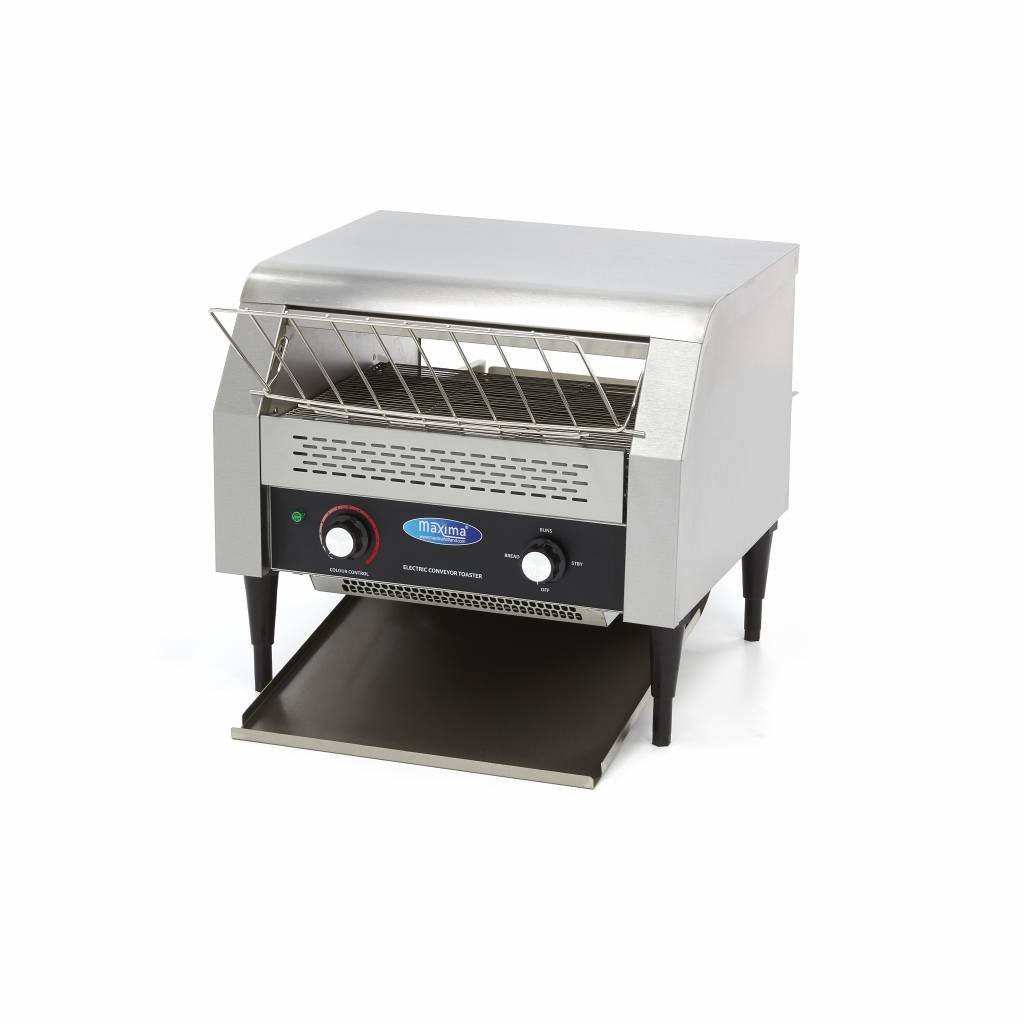
Figure 1: Maxima MTT-450 Commercial Conveyor Toaster - Front View
2. Safety Instructions
Please read all safety instructions carefully before operating the appliance to prevent injury or damage. Keep this manual for future reference.
- Electrical Safety: Ensure the appliance is connected to a grounded power outlet with the correct voltage (230V/50Hz/1 phase) and wattage (2640W). Do not use extension cords or adapters. Disconnect power before cleaning or maintenance.
- Hot Surfaces: The toaster's exterior and interior surfaces become extremely hot during operation. Always use caution and avoid direct contact. Allow the appliance to cool completely before handling or cleaning.
- Ventilation: Place the toaster on a stable, heat-resistant surface with adequate clearance around it for proper ventilation. Do not operate near flammable materials.
- Cleaning: Never immerse the appliance in water or other liquids. Use a damp cloth for exterior cleaning. Ensure the appliance is unplugged and cool before cleaning.
- Supervision: This appliance is not intended for use by persons with reduced physical, sensory, or mental capabilities, or lack of experience and knowledge, unless they have been given supervision or instruction concerning use of the appliance by a person responsible for their safety. Children should be supervised to ensure that they do not play with the appliance.
- Foreign Objects: Do not insert metal objects or other foreign materials into the toaster slots or conveyor mechanism.
3. Product Components
Familiarize yourself with the main components of your Maxima MTT-450 toaster:
- Stainless Steel Housing: Durable and easy to clean exterior.
- Conveyor Belt: Transports bread through the heating elements.
- Heating Elements: Provide consistent heat for toasting.
- Colour Control Knob: Adjusts the conveyor belt speed, influencing toast darkness.
- Speed Regulator: Fine-tunes the conveyor belt speed.
- Temperature Indicator Light: Illuminates when the toaster reaches operating temperature.
- Crumb Tray: Collects crumbs for easy disposal. Located at the bottom front.
- Adjustable Feet: For stable placement on uneven surfaces.

Figure 2: Control Panel and Input Area

Figure 3: Side View with Crumb Tray
4. Setup
Follow these steps to set up your toaster for the first time:
- Unpacking: Carefully remove the toaster from its packaging. Retain packaging materials for future transport or storage.
- Placement: Place the toaster on a stable, level, and heat-resistant surface. Ensure there is sufficient space (at least 10 cm) around the appliance for proper air circulation and heat dissipation. Avoid placing it near walls or other heat-sensitive objects.
- Adjusting Feet: Use the adjustable feet to ensure the toaster is level and stable.
- Power Connection: Plug the power cord into a dedicated, grounded 230V/50Hz/1 phase electrical outlet. Verify that the electrical supply matches the appliance's requirements.
- Initial Cleaning: Before first use, wipe down the exterior with a damp cloth. Remove and clean the crumb tray. Run the toaster empty for approximately 10-15 minutes on a medium setting to burn off any manufacturing residues. This may produce a slight odor; ensure the area is well-ventilated.
5. Operating Instructions
Operating the Maxima MTT-450 is straightforward:
- Power On: Turn the main power switch to the 'ON' position. The temperature indicator light will illuminate, indicating the toaster is heating up.
- Preheating: Allow the toaster to preheat for approximately 5-10 minutes until the temperature indicator light stabilizes or turns off (depending on model behavior, indicating readiness).
- Adjusting Toasting Level: Use the 'Colour Control' knob and 'Speed' regulator to adjust the conveyor belt speed. A slower speed results in darker toast, while a faster speed results in lighter toast. Experiment with different settings to achieve your desired browning level.
- Loading Bread: Place slices of bread, buns, or other suitable items onto the conveyor belt at the input opening. Ensure items are placed flat and do not overlap. The maximum front opening height is 85 mm.
- Toasting Process: The conveyor belt will automatically transport the items through the heating elements. Toasted items will exit the toaster at the output tray.
- Unloading: Carefully remove toasted items from the output tray. Be aware that items will be hot.
- Power Off: After use, turn the main power switch to the 'OFF' position and unplug the appliance from the power outlet. Allow the toaster to cool down completely before cleaning.

Figure 4: Toaster Output Tray
6. Maintenance and Cleaning
Regular cleaning and maintenance will ensure the longevity and optimal performance of your toaster.
- Always Disconnect Power: Before any cleaning or maintenance, ensure the toaster is unplugged from the power outlet and has cooled down completely.
- Crumb Tray: The crumb tray should be emptied and cleaned daily, or more frequently depending on usage. Pull out the tray from the front of the toaster, discard crumbs, and wash the tray with warm, soapy water. Rinse thoroughly and dry completely before reinserting.
- Exterior Cleaning: Wipe the stainless steel exterior with a damp cloth and a mild detergent. Do not use abrasive cleaners, steel wool, or harsh chemicals, as these can damage the finish. Dry thoroughly with a soft cloth.
- Interior Cleaning: For internal cleaning, ensure the toaster is cool. Use a soft brush or vacuum cleaner to remove any accumulated crumbs or food particles from the heating elements and conveyor mechanism. Do not spray water directly into the interior.
- Conveyor Belt: Periodically inspect the conveyor belt for any debris or signs of wear. Clean gently with a soft brush if necessary.

Figure 5: Rear View (for internal access/cleaning reference)
7. Troubleshooting
If you encounter issues with your Maxima MTT-450 toaster, refer to the following common problems and solutions:
| Problem | Possible Cause | Solution |
|---|---|---|
| Toaster does not turn on | No power supply; Power switch off; Faulty outlet/fuse | Check power cord connection; Ensure power switch is ON; Check circuit breaker/fuse; Try a different outlet. |
| Bread not toasting or unevenly toasted | Conveyor speed too fast; Heating elements dirty or faulty; Incorrect bread placement | Adjust 'Colour Control' knob to a slower speed; Clean heating elements (when cool and unplugged); Ensure bread is flat on the conveyor. |
| Smoke or burning smell | Food particles inside; First use residue; Over-toasting | Unplug and allow to cool, then clean interior and crumb tray; Ensure adequate ventilation during first use; Adjust conveyor speed to prevent over-toasting. |
If the problem persists after attempting these solutions, please contact Maxima technical service.
8. Specifications
| Feature | Specification |
|---|---|
| Model Number | 09300057 (MTT-450) |
| Brand | Maxima |
| Power | 2640 Watts |
| Voltage | 230 Volts / 50 Hz / 1 Phase |
| Capacity | 450 pieces per hour |
| Material | Alloy Steel (Stainless Steel) |
| Product Dimensions (L x W x H) | 390 x 470 x 420 mm (15.35 x 18.5 x 16.54 inches) |
| Net Weight | 20.5 kg (45.19 lbs) |
| Front Opening Height | 85 mm (3.35 inches) |
| Conveyor Belt Width | 360 mm (14.17 inches) |
| Special Features | Convenient speed regulator, practical crumb tray |
9. Warranty and Support
Maxima is committed to providing high-quality kitchen equipment. We maintain our own technical service department to ensure prompt assistance in the event of any issues with your toaster. If you experience a problem, please do not hesitate to contact us. Our goal is to get your Maxima appliance operational as quickly as possible.
For further assistance or to view our range of products, you may visit our showroom where our employees are available to provide detailed advice and support.
Please refer to your purchase documentation for specific warranty terms and contact information.

