
1. Introduction
Welcome to the user manual for your Kechaoda K66 mobile phone. This device is designed for portability and ease of use, featuring a slim, credit card-sized form factor. This manual will guide you through the setup, operation, and maintenance of your new phone.
2. Product Overview
The Kechaoda K66 is a compact mobile phone equipped with a 1.44-inch QQVGA display, single SIM support, and Bluetooth connectivity. It is ideal for users seeking a basic, highly portable communication device.
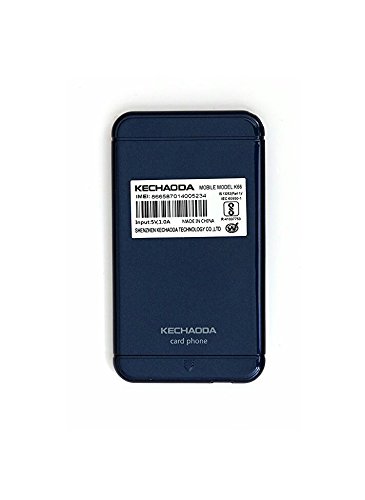
Figure 1: Front view of the Kechaoda K66 mobile phone, displaying its screen and keypad.
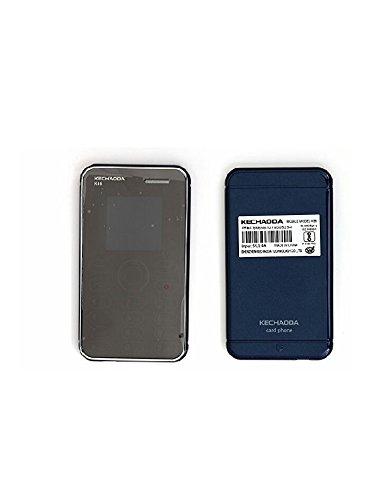
Figure 2: Back view of the Kechaoda K66 mobile phone, featuring the product label with essential information.
3. What's in the Box
Upon opening your Kechaoda K66 package, you should find the following items:
- One (1) Kechaoda K66 Mobile Phone
- One (1) Charging Cable (Micro USB)
Please note: A wall charger and earphones are not included in the box.
4. Setup Guide
4.1 Inserting the SIM Card
- Locate the SIM card slot, typically on the side or under the battery cover.
- Carefully insert your GSM Single SIM card into the designated slot. Ensure it is correctly oriented.
- If applicable, replace the battery and battery cover.
4.2 Charging the Device
- Connect the provided Micro USB charging cable to the phone's charging port.
- Connect the other end of the cable to a compatible USB power adapter (not included) or a computer's USB port.
- The phone will indicate charging status on its display. Allow the phone to charge fully before first use.
4.3 Powering On/Off
- To Power On: Press and hold the Power/End Call button until the screen lights up.
- To Power Off: Press and hold the Power/End Call button until the power-off options appear, then select 'Power Off'.
5. Operating Instructions
5.1 Basic Navigation
Use the keypad for input and navigation. The directional keys (up, down, left, right) are used to move through menus, and the center key typically acts as a selection or confirmation button.
5.2 Making and Receiving Calls
- To Make a Call: Enter the phone number using the keypad and press the Call button (usually a green phone icon).
- To Receive a Call: When the phone rings, press the Call button to answer.
- To End a Call: Press the End Call button (usually a red phone icon).
5.3 Messaging
Access the 'Messages' menu to compose and send SMS messages. Use the keypad to type your message and select the recipient.
5.4 Bluetooth Connectivity
The Kechaoda K66 supports Bluetooth for connecting to other devices, such as headsets or for using the BT Dialer feature. To enable Bluetooth:
- Go to the 'Settings' menu and select 'Bluetooth'.
- Turn Bluetooth 'On'.
- Search for available devices and pair with your desired device.
The BT Dialer feature allows you to sync with your smartphone, enabling you to make and receive calls on the K66 while using your smartphone for other functions.
5.5 Multimedia Features
The phone supports MP3 and MP4 playback. You can store media files on an external memory card (up to 8GB) and access them through the respective media players. An FM radio is also included for listening to local broadcasts.
6. Specifications
| Brand | KECHAODA |
| Model Name | K66 |
| Screen Size | 1.44 Inches QQVGA |
| Display Type | LCD |
| SIM Card Slot Count | Single SIM |
| Cellular Technology | 2G (GSM) |
| Network Connectivity | Bluetooth, GPRS |
| Processor | MTK6261D Chipset |
| Memory Storage Capacity | Expandable up to 8 GB |
| Battery Capacity | 400 mAh Lithium-Ion |
| Connector Type | Micro USB |
| Human Interface Types | Keypad |
| Form Factor | Smartphone (Basic Mobile) |
| Item Dimensions | 9.1 x 1.4 x 12.2 Centimeters |
| Item Weight | 150 Grams |
7. Maintenance and Care
- Keep the phone dry. Moisture can damage the device.
- Use only approved accessories.
- Do not attempt to disassemble or repair the phone yourself. This may void your warranty.
- Clean the screen and body with a soft, dry cloth. Avoid harsh chemicals.
8. Troubleshooting
8.1 Phone Does Not Power On
- Ensure the battery is charged. Connect the phone to a charger and wait a few minutes before attempting to power on again.
- Verify the battery is properly inserted.
8.2 No Network Signal
- Check if the SIM card is correctly inserted.
- Ensure you are in an area with network coverage.
- Restart the phone.
8.3 Bluetooth Connection Issues
- Ensure Bluetooth is enabled on both the K66 and the device you are trying to connect to.
- Make sure both devices are within close proximity.
- Try unpairing and re-pairing the devices.
9. Product Video Overview
This video provides a brief overview of the Kechaoda K66 mobile phone, highlighting its key features such as display, memory, processor, and special functionalities like single SIM, Bluetooth connectivity, and slim credit card size. It also shows what is included in the box.
10. Warranty and Support
Your Kechaoda K66 mobile phone comes with a standard brand warranty. For specific warranty terms, conditions, and support, please refer to the warranty card included with your product or visit the official Kechaoda support website. For further product information, you may also visit the product detail page on Amazon.in.
