
1. Introduction
The Clint H4 is an intelligent DAB/DAB+ and FM radio adapter designed to upgrade your existing Hi-Fi system. It allows you to enjoy a wide range of digital and analog radio stations through your current audio setup. This manual provides essential information for setting up, operating, and maintaining your Clint H4 adapter.
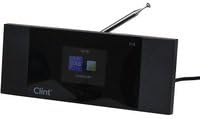
Image 1: Clint H4 DAB+/FM Radio Adapter. This image shows the compact black unit with a display screen and a telescopic antenna extended from the rear. The device is designed to integrate with existing audio systems.
2. Setup
- Unpacking: Carefully remove all components from the packaging. Ensure the Clint H4 adapter, remote control, and cinch (RCA) cable are present.
- Antenna Connection: The telescopic antenna is integrated at the rear of the unit. Extend it fully for optimal reception. No external antenna installation is typically required.
- Audio Connection: Connect the included cinch (RCA) cable from the "Line Out" ports on the Clint H4 to the "Line In" or "AUX In" ports on your existing Hi-Fi amplifier or receiver. Ensure the red plug connects to the red port (right channel) and the white/black plug connects to the white/black port (left channel).
- Power Connection: Connect the power adapter (not explicitly mentioned but implied for electronic devices) to the Clint H4 and then to a suitable power outlet.
- Initial Power On: Press the power button on the unit or the remote control to turn on the Clint H4. Follow any on-screen prompts for initial setup, such as language selection or automatic station scanning.
3. Operating Instructions
3.1 Basic Navigation
- The Clint H4 is operated using the included remote control.
- Use the arrow keys on the remote to navigate through menus and lists.
- Press the "OK" or "Enter" button to confirm selections.
- The "Back" or "Menu" button allows you to return to previous screens or access the main menu.
3.2 DAB/DAB+ Radio
- Switch to DAB Mode: Select DAB from the main menu or press the dedicated DAB button on the remote (if available).
- Scan for Stations: The unit may automatically scan for DAB stations upon first use. If not, navigate to the "Scan" or "Auto Tune" option in the DAB menu and initiate a scan.
- Select a Station: Once the scan is complete, a list of available DAB stations will appear. Use the arrow keys to highlight your desired station and press "OK" to listen.
- Preset Stations: Refer to the remote control's specific buttons or menu options to save your favorite DAB stations as presets for quick access.
3.3 FM Radio
- Switch to FM Mode: Select FM from the main menu or press the dedicated FM button on the remote (if available).
- Scan for Stations: Navigate to the "Scan" or "Auto Tune" option in the FM menu to find available FM stations.
- Manual Tuning: If desired, you can manually tune to specific FM frequencies using the remote control's tuning buttons.
- Preset Stations: Save your favorite FM stations as presets for easy recall.
3.4 Alarm Function
- The Clint H4 features an alarm clock function, allowing you to set up to two independent alarms.
- Access the "Alarm" settings through the main menu.
- Configure each alarm with desired time, source (DAB/FM), and volume level.
- Ensure the unit is powered on or in standby mode for the alarm to activate.
4. Maintenance
- Cleaning: Use a soft, dry cloth to clean the exterior of the unit. Do not use liquid cleaners, aerosols, or abrasive materials, as these can damage the finish or internal components.
- Antenna Care: Handle the telescopic antenna gently. Avoid bending or forcing it, as this can impair reception.
- Storage: If storing the unit for an extended period, disconnect it from power and store it in a cool, dry place away from direct sunlight and extreme temperatures.
5. Troubleshooting
| Problem | Possible Cause | Solution |
|---|---|---|
| No power | Power cable not connected; power outlet faulty. | Ensure the power cable is securely connected to the unit and a working power outlet. |
| No sound | Audio cables not connected correctly; Hi-Fi system input not selected; volume too low. | Check cinch cable connections. Select the correct AUX/Line In input on your Hi-Fi system. Increase volume on both the Clint H4 and your Hi-Fi system. |
| Poor DAB/FM reception | Antenna not fully extended; unit placed near interference sources; weak signal area. | Fully extend the telescopic antenna. Move the unit away from other electronic devices. Try repositioning the unit for better signal reception. Perform a new station scan. |
| Remote control not working | Batteries depleted; obstruction between remote and unit. | Replace remote control batteries. Ensure a clear line of sight between the remote and the Clint H4. |
6. Specifications
- Brand: Clint
- Model: CLINT-H4DAB
- Radio Bands Supported: DAB, DAB+, FM
- Connector Type: AUX (RCA)
- Special Features: Built-in clock, Alarm function (2 alarms)
- Batteries Required: No (for main unit)
- Approximate Dimensions (Package): 24.38 x 18.29 x 5.84 cm (L x W x H)
- Approximate Weight (Package): 349.27 g
- First Available: January 15, 2020
7. Warranty and Support
The Clint H4 DAB+/FM Radio Adapter comes with a 2-year warranty from the date of purchase. Please retain your proof of purchase for warranty claims.
For technical support, troubleshooting assistance beyond this manual, or warranty inquiries, please contact your retailer or the manufacturer directly. Refer to the product packaging or the manufacturer's official website for contact details.
Manufacturer: Clint


