
Introduction
This manual provides comprehensive instructions for the installation, operation, and maintenance of your Yale Zuri Smart Door Lock. Please read this manual thoroughly before installation and use to ensure proper function and safety.

Image: The Yale Zuri Smart Door Lock in Antique Bronze finish, installed on a wooden door, with a smartphone displaying the Yale Home application interface.
Important Safety Information
Observe the following guidelines to ensure safe and correct operation of your Yale Zuri Smart Door Lock:
- Door Compatibility: This lock is designed for use ONLY with wooden doors.
- Door Thickness: Suitable for doors with a thickness ranging from 40 mm to 65 mm.
- Door Type: Ideal for main doors and internal doors in both commercial and residential settings.
- Incompatible Doors: DO NOT install on metal doors, double doors, sliding doors, or grill gates.
- Environmental Conditions: Avoid exposing the lock to extreme temperatures or direct water spray.
Product Overview and Features
The Yale Zuri Smart Door Lock offers multiple secure access methods and smart functionalities:
- Five Unlocking Methods: Fingerprint, PIN Code, RFID Card, Manual Key, and Bluetooth via the Yale Home App.
- 360° Fingerprint Recognition: Stores up to 100 unique fingerprints, recognizing them from any angle.
- PIN Code Access: Supports up to 100 unique PINs, each 4 to 9 digits long for enhanced security.
- RFID Card Access: Allows registration of up to 100 RFID cards for convenient entry.
- Built-in Bluetooth: Enables direct control and management through the Yale SmartLife mobile application.
- Remote Access: Unlock and lock your door remotely via the WiFi-enabled mobile application.
- Triple Bolt Locking: Features a robust 3-bolt locking mechanism for increased security.
- Low Power Indication: Provides an alert when battery levels drop below 15%, prompting replacement.

Image: An illustration of the Yale Zuri Smart Door Lock highlighting its five primary unlocking methods: Yale Home App, Built-in Bluetooth, Fingerprint, PIN Code, RFID Card, and Mechanical Key.

Image: A close-up view of the Yale Zuri Smart Door Lock's internal mechanism, showcasing the robust multi-bolt locking system designed for enhanced security.
Installation and Setup
Professional installation is recommended for optimal performance. Ensure your door meets the compatibility requirements before proceeding.
Pre-Installation Checks:
- Verify door material (wooden only).
- Confirm door thickness is between 40mm and 65mm.
- Ensure the door is suitable for right or left, inside/outside opening.

Image: Detailed technical dimensions of the Yale Zuri Smart Door Lock's exterior and interior panels, indicating measurements in millimeters for installation planning.
Initial Setup with Yale SmartLife App:
- Download the Yale SmartLife mobile application from your device's app store.
- Follow the in-app instructions to pair your lock via Bluetooth.
- Register administrator fingerprints, PIN codes, and RFID cards as prompted by the application.
- Connect the lock to your home WiFi network through the app for remote access functionality.
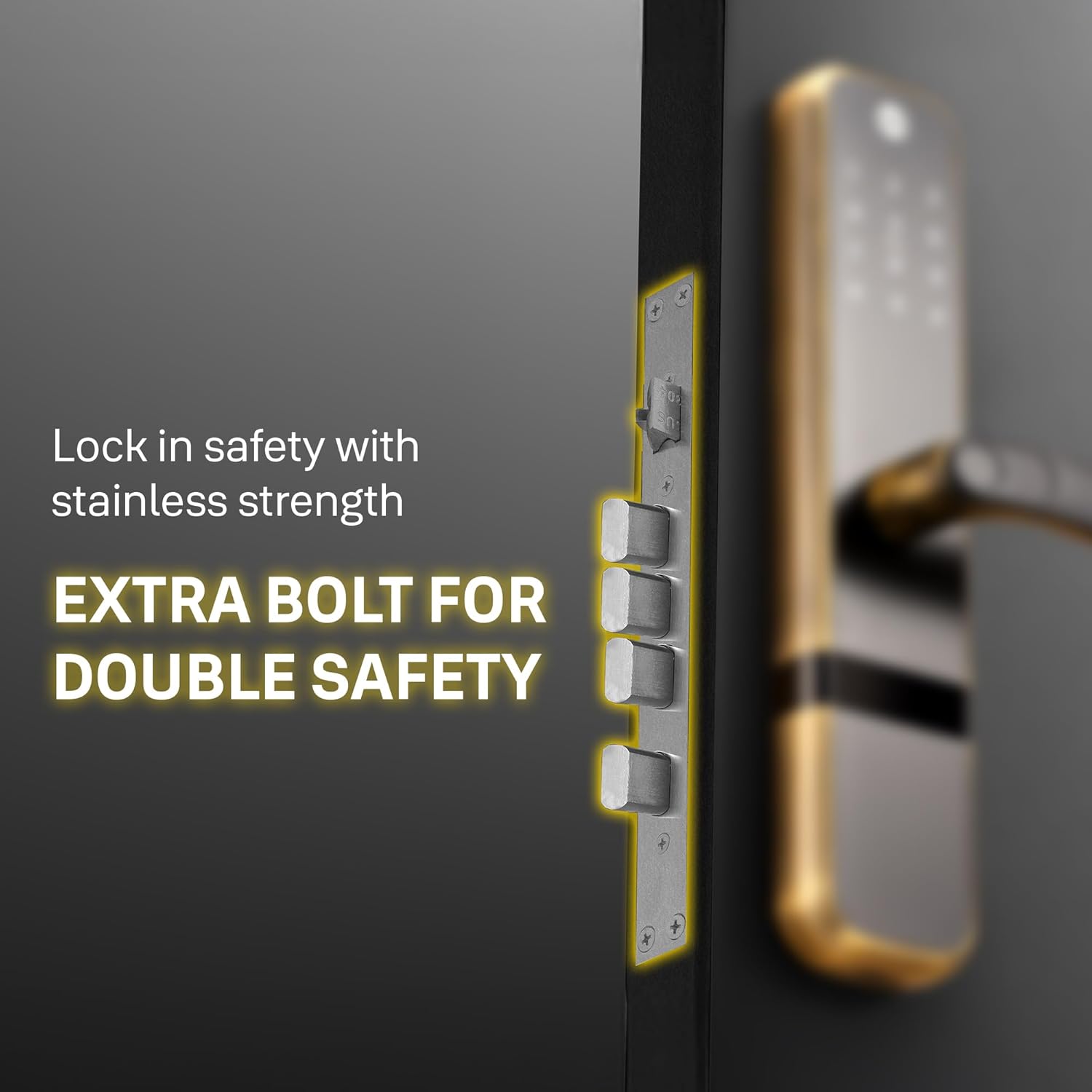
Image: A side profile view of the Yale Zuri Smart Door Lock installed on a wooden door, illustrating the compatible door thickness range of 35mm to 65mm and emphasizing its suitability for wooden doors.
Operating Instructions
Unlocking the Door:
- Fingerprint: Place a registered finger on the fingerprint sensor. The lock will unlock upon successful recognition.
- PIN Code: Enter your registered 4-9 digit PIN code on the keypad, then press the '#' key.
- RFID Card: Present a registered RFID card to the card reader area on the lock.
- Manual Key: Insert the physical key into the emergency keyhole and turn to unlock.
- Yale Home App (Bluetooth): Open the Yale Home App on your smartphone, ensure Bluetooth is enabled, and tap the unlock icon when within range.
- Yale Home App (Remote/WiFi): Open the Yale Home App on your smartphone and tap the unlock icon. This method requires the lock to be connected to your home WiFi network.
Locking the Door:
- Automatic Locking: The lock can be configured to automatically lock after a set period once the door is closed.
- Manual Locking: From the inside, turn the thumb-turn or lift the handle (if applicable). From the outside, press the '#' key or use the Yale Home App.
User Management (via Yale Home App):
The Yale Home App allows you to add, modify, or delete user fingerprints, PIN codes, and RFID cards. Refer to the app's interface for detailed instructions on user management.
Maintenance
Battery Replacement:
The lock will provide a low power indication when the battery level drops below 15%. Replace all batteries promptly to ensure continuous operation. Use high-quality alkaline batteries of the specified type.
Cleaning:
Wipe the lock's surface with a soft, dry cloth. Avoid using abrasive cleaners, solvents, or chemical sprays, as these can damage the finish and electronic components.
Regular Checks:
Periodically check that all screws are tight and that the lock operates smoothly. If you notice any issues, refer to the troubleshooting section or contact customer support.
Troubleshooting
| Problem | Possible Cause | Solution |
|---|---|---|
| Lock does not respond. | Dead batteries. | Replace all batteries with new ones. |
| Fingerprint not recognized. | Finger not placed correctly; unregistered fingerprint; dirty sensor. | Ensure finger is clean and covers the sensor completely. Re-register fingerprint if necessary. Clean sensor with a soft cloth. |
| PIN code not working. | Incorrect PIN entered; unregistered PIN. | Verify the PIN code. Ensure the PIN is registered in the system. |
| Remote unlocking fails. | No internet connection; lock not connected to WiFi; Bluetooth off. | Check home internet and lock's WiFi connection. Ensure Bluetooth is active on your phone for local app control. |
| Lock is difficult to operate. | Misalignment during installation; obstruction. | Check for any physical obstructions. Re-evaluate installation alignment if issues persist. Contact professional installer if needed. |
Specifications
| Feature | Detail |
|---|---|
| Brand | Yale |
| Model Number | Zuri AB |
| Lock Type | Biometric Smart Door Lock |
| Unlocking Methods | Fingerprint, PIN Code, RFID Card, Manual Key, Bluetooth App, Remote App |
| Fingerprint Capacity | Up to 100 |
| PIN Code Capacity | Up to 100 (4-9 digits) |
| RFID Card Capacity | Up to 100 |
| Connectivity | Bluetooth, Wi-Fi |
| Control Method | App, Remote |
| Material | Metal |
| Product Dimensions (L x W x H) | 27 x 70 x 322 Millimeters |
| Item Weight | 10 Kilograms |
| Door Thickness Compatibility | 40 mm to 65 mm |
| Recommended Use | Home (Wooden Doors) |
Warranty and Support
For warranty information, technical assistance, or service requests, please contact Yale customer support:
- Toll-Free Number: 1800-103-5606
- Email: customercare1.india@assaabloy.com
- Service Availability: Support and installation services are available in over 70 cities. Please contact support for specific service area details.

Image: A visual representation of Yale's service network, listing numerous cities where support is available, alongside the toll-free customer care number and email address.


