
1. Introduction
This manual provides comprehensive instructions for the installation, operation, and maintenance of the EASYGUARD ES002-P3 Push Engine Start button Module. This system is designed to integrate with your vehicle's existing alarm or keyless entry system, offering a convenient push-button start and keyless go experience.
The ES002-P3 is compatible with most DC12V vehicles, including both diesel and petrol cars, and vehicles with manual or automatic transmissions.
2. Product Contents
Please verify that all components are present in the package:
- Control Module x 1
- Push Button x 1
- 6P Ignition Harness x 1
- Wire Harness x 1

Figure 2.1: All components included in the EASYGUARD ES002-P3 kit.
3. Key Features
- Push Button Start/Stop: Conveniently start or stop your vehicle with a single button press.
- ACC-ON-OFF Switching: Cycle through accessory, ignition on, and off modes.
- Engine Start Function: Press and hold the button to start the car.
- Optional Remote Engine Start & Stop: Available for automatic transmission cars when integrated with an existing remote/key fob that provides 3 locking pulses upon repeated lock button presses.
- Keyless Go System: Enhances vehicle access and operation.
4. Important Installation Notes
Professional installation by a certified car alarm installer is highly recommended to ensure correct functionality and avoid damage to your vehicle.
- Steering Wheel Lock: During installation, the vehicle's steering wheel lock must be released, unlocked, or removed.
- Remote Engine Start (Automatic Transmission): This feature is only available for automatic transmission vehicles.
- Remote Engine Start Requirement: To utilize remote engine start, your existing remote (key fob) must provide three locking pulses when the lock button is pressed three consecutive times.
- No Included Remote: This kit does not include a remote/key fob. It is designed to work with your vehicle's existing factory or aftermarket remote.
- Central Locking System: The system requires integration with your vehicle's power locking or central locking system.
- Immobilizer Bypass: If your original car remote control (key) contains a chip immobilizer, an extra bypass module (e.g., ASIN B00MEHBVIC or B07NSLPBG7) is required.
- Button LED Color: The engine start button LED illuminates red when the system is disarmed, ACC is on, ignition is on, and the vehicle is started.
5. Setup and Installation Overview
This section provides a general overview. Refer to the detailed wiring diagram and instructions provided with the product for specific connections.
5.1 Control Module

Figure 5.1: EASYGUARD ES002-P3 Control Module.

Figure 5.2: Control Module with DIP Switches.
The control module is the central unit of the system. It connects to your vehicle's ignition, power, and other relevant systems. Ensure all connections are secure and insulated.
5.2 Push Start Button Installation
The push start button can be installed in a convenient location on your dashboard. A hole saw is provided for this purpose.

Figure 5.3: ES002-P3 Push Button Dimensions.

Figure 5.4: Hole Saw and Cap Dimensions.
Carefully select a mounting location, drill the appropriate size hole using the provided hole saw, and secure the push button. The outer ring of the button is detachable for easier installation.
6. Operating Instructions
6.1 Starting the Car
There are two methods to start the car once the system is disarmed:
- Method 1: Step on the foot brake pedal and short press the push start button once.
- Method 2: Step on the foot brake pedal and keep holding the push start button for 3 seconds.
6.2 Shutting Off the Car
Once the car is started, step on the foot brake pedal and short press the push start button once to shut off the engine.
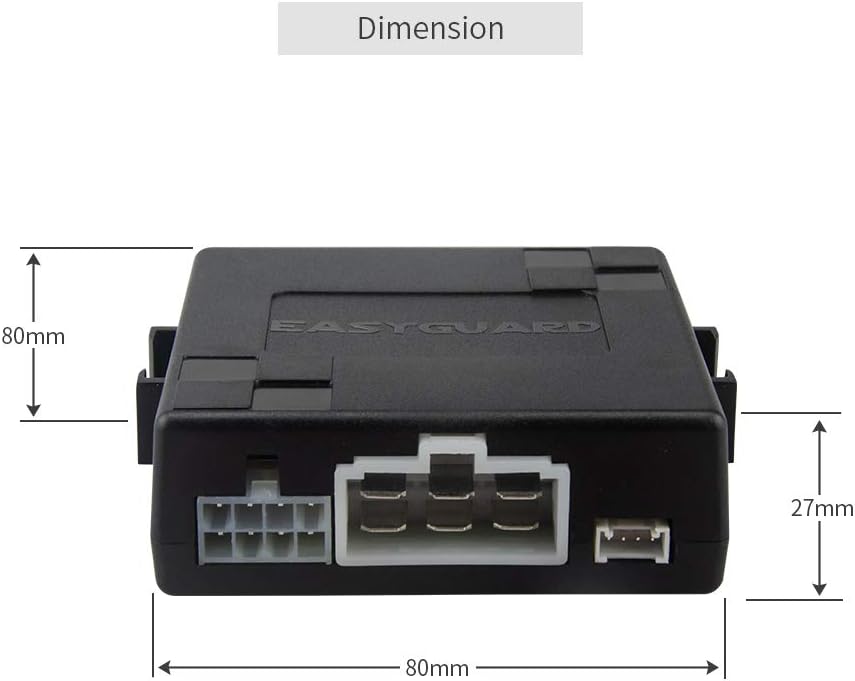
Figure 6.1: Car Start and Stop Procedures.
6.3 ACC and ON Modes
Without pressing the brake pedal, short press the button to cycle through ACC (Accessory), ON (Ignition), and OFF modes.
7. Product Specifications
| Specification | Detail |
|---|---|
| Model Number | ES002-P3 |
| Item Weight | 14.9 ounces (approx. 422 grams) |
| Product Dimensions | 6.69 x 5.71 x 1.97 inches (approx. 17 x 14.5 x 5 cm) |
| Control Module Dimensions | 80mm x 80mm x 27mm (approx. 3.15 x 3.15 x 1.06 inches) |
| Compatible Devices | DC12V cars (diesel and petrol, manual and automatic transmission) |
| UPC | 716294407691 |
| Date First Available | June 21, 2017 |

Figure 7.1: Control Module Dimensions.
8. Troubleshooting
If you encounter issues, consider the following general troubleshooting steps. For complex problems, consult a professional installer.
- System Not Responding: Check all wiring connections for looseness or corrosion. Ensure the vehicle's battery has sufficient charge.
- Remote Start Not Working: Verify that your vehicle is an automatic transmission. Confirm your existing remote provides three locking pulses as required. Ensure the steering wheel lock is properly disengaged.
- Engine Cranks but Doesn't Start: If your vehicle has a chip immobilizer, confirm that a bypass module is correctly installed and functioning.
- Button LED Issues: Ensure the system is properly armed/disarmed. The LED should be red when disarmed, ACC/ON, or started.
- Professional Assistance: Due to the complexity of vehicle electrical systems, it is always recommended to seek assistance from a qualified car alarm installer for diagnosis and repair.
9. Maintenance
The EASYGUARD ES002-P3 system requires minimal maintenance. Follow these guidelines to ensure longevity and optimal performance:
- Regular Inspection: Periodically check visible wiring for any signs of wear, damage, or loose connections.
- Keep Dry: Ensure the control module and push button are kept dry and free from moisture.
- Cleanliness: Keep the push button free from dirt and debris to ensure smooth operation. Use a soft, dry cloth for cleaning.
- Avoid Harsh Chemicals: Do not use abrasive cleaners or solvents on any part of the system.
10. Warranty and Support
For warranty information, technical support, or further inquiries, please contact EASYGUARD directly.
- Website: www.ieasyguard.com
- Email: sales@ieasyguard.com
- Manufacturer: Zhongshan Easyguard Electronics Co., Ltd
- Amazon Store: Visit the EASYGUARD Store on Amazon


