
1. Introduction
Thank you for choosing the OMOTON Adjustable Cell Phone Stand. This manual provides essential information for setting up, operating, and maintaining your new stand. Designed for convenience and durability, this stand offers a stable and adjustable viewing solution for your smartphone.
2. Product Features
- Adjustable Angle Viewing: The stand features a 270-degree rotating hinge, allowing you to easily adjust the viewing angle to suit your needs for watching videos, playing games, or making video calls.
- Superior Stability: Constructed from thicker (3mm) aluminum material with a larger base (4.1 x 3 x 4.4 inches), this stand provides exceptional stability, preventing your device from tipping over.
- Heavy Case Compatible: The extended hook design ensures that the stand can securely hold all sizes of cell phones, even with heavy cases attached. There is no need to remove your phone case for charging.
- Anti-Scratch & Anti-Slippery: Equipped with large silicone pads on the cradle and base, the stand protects your device from scratches and prevents it from slipping on surfaces.
- Excellence in Details: Utilizing CNC technology similar to that used in MacBooks, the stand boasts a premium finish and comfortable tactile feel, even on its edges.
3. Setup
The OMOTON Adjustable Cell Phone Stand requires no assembly. Simply remove it from its packaging and place it on a flat, stable surface where you intend to use your device.
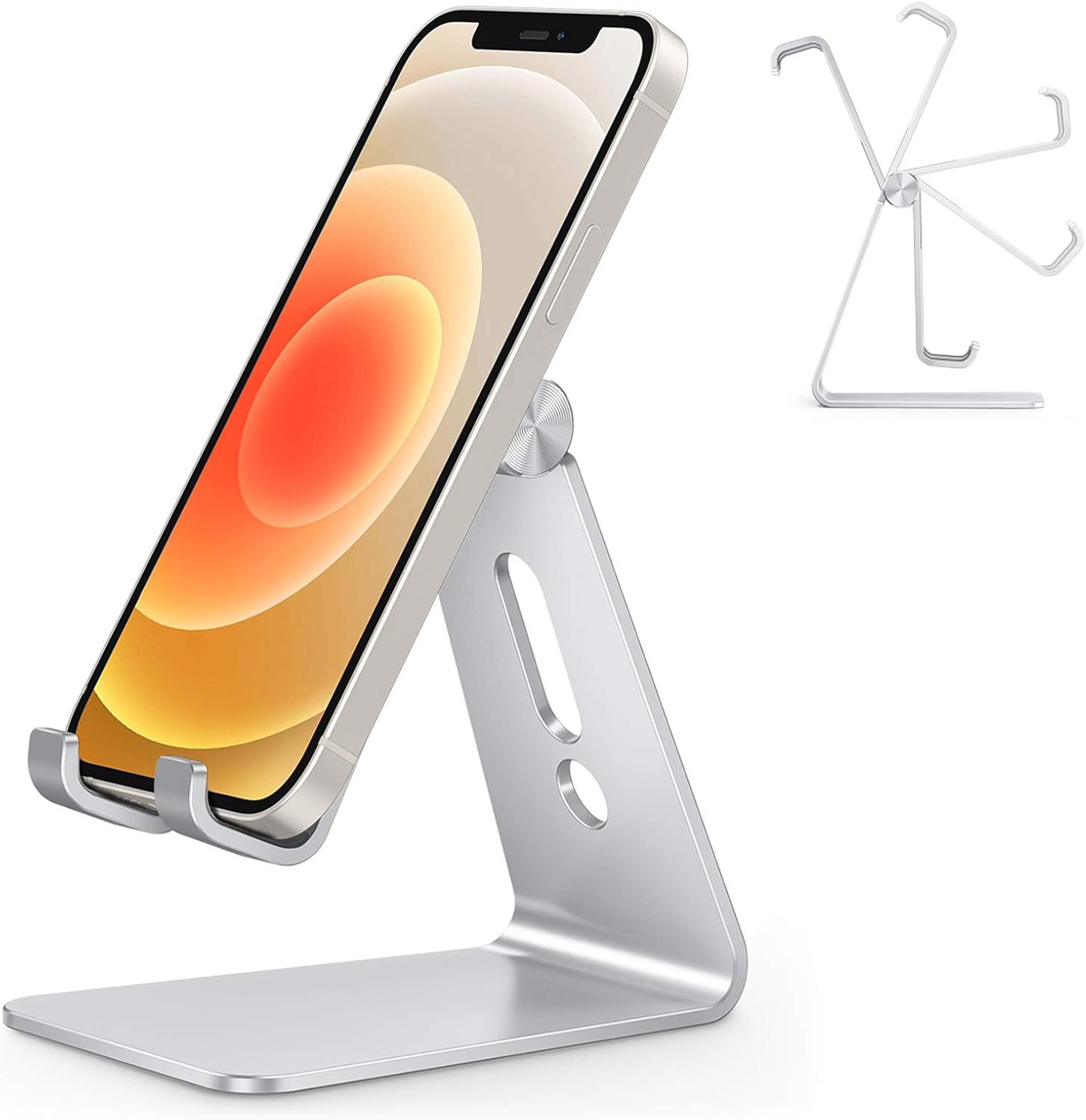
Figure 3.1: OMOTON Adjustable Cell Phone Stand ready for use.
4. Operating Instructions
4.1 Placing Your Device
Gently place your smartphone onto the stand's cradle. The stand is designed to hold devices in both portrait and landscape orientations. Ensure the device rests securely against the silicone pads.
4.2 Adjusting the Viewing Angle
To adjust the viewing angle, hold the base of the stand firmly with one hand and gently push or pull the upper arm of the stand to your desired angle. The 270-degree rotating hinge allows for a wide range of positions.

Figure 4.1: Adjusting the stand's viewing angle.
4.3 Using the Charging Port
The stand features a convenient cutout at the bottom of the cradle, allowing you to connect a charging cable to your device while it is on the stand. This design helps keep your workspace tidy and your device powered.

Figure 4.2: Device charging while on the stand.
4.4 Heavy Case Compatibility
The stand's design, including the length of the hooks and the overall stability, ensures compatibility with various phone sizes and cases, including heavy-duty ones. Your phone will remain secure whether placed vertically or horizontally.

Figure 4.3: Stand supporting devices with heavy cases.
5. Maintenance
To maintain the appearance and functionality of your OMOTON stand, wipe it regularly with a soft, dry cloth. For stubborn marks, a slightly damp cloth can be used, followed by immediate drying. Avoid using abrasive cleaners or solvents, as these may damage the finish or silicone pads.
6. Troubleshooting
- Stand feels unstable: Ensure the stand is placed on a completely flat and solid surface. The stand's design provides inherent stability, but uneven surfaces can affect balance.
- Device slips on the cradle: Verify that the silicone pads on the cradle are clean and free of dust or debris. Clean them with a soft, damp cloth if necessary.
- Hinge is too stiff/loose: The hinge is designed to be firm to maintain the set angle. If it feels excessively stiff, gentle, consistent pressure should allow adjustment. If it becomes too loose over time, contact customer support.
7. Specifications
| Attribute | Detail |
|---|---|
| Brand | OMOTON |
| Model Number | 4336677068 |
| Product Dimensions | 3.58 x 2.36 x 3.54 inches |
| Item Weight | 6.3 ounces |
| Color | Silver |
| Material | Aluminum with Silicone Pads |
| Adjustable Angle | 270 degrees |
| Compatible Devices | All Smartphones (e.g., iPhone Xs Max XR Xs X, iPhone 8 / 8 Plus / 7 / 7 Plus / 6s / 6s Plus / 6 / 6 Plus / SE, Samsung Galaxy Note 8 / Note 5 / Note 4 / Note 3) |

Figure 7.1: Product dimensions and anti-slip features.
8. Warranty and Support
For warranty information and customer support, please refer to the documentation included with your purchase or visit the official OMOTON website. You can also find more information on the OMOTON Brand Store on Amazon.
Please note: No official seller videos were available for embedding in this manual.
