
1. Introduction
The QK-A021 is a channel-hopping, receive-only USB dongle AIS receiver. It utilizes a patented algorithm to alternately monitor both channels of AIS information (161.975 MHz and 162.025 MHz) and then outputs this data via USB. This device is designed for ease of use and provides reliable AIS data reception for various applications.
This manual provides detailed instructions for setting up, operating, and maintaining your QK-A021 AIS Receiver Dongle, along with troubleshooting tips and product specifications.
2. Key Features
- Receiving on dual channels (161.975 MHz and 162.025 MHz) alternately.
- Auto-hopping channel algorithm improves captured message rate by 4%.
- Manually adjustable hopping interval rates (0.25 sec, 1 sec, 30 sec and auto-hopping).
- Sensitivity down to -104 dBm@30% PER.
- Up to 12 nautical miles receiving range.
- USB 2.0 powered (<26mA@5.0V).
- Serial output: 38400 bps baud rate over USB.
- Message output in NMEA-0183 format.
- SMA connector for 50 Ohm VHF antenna.
- SMA to BNC coaxial adaptor included.
- Compatible with Windows, Mac, and Linux operating systems.
3. Product Overview
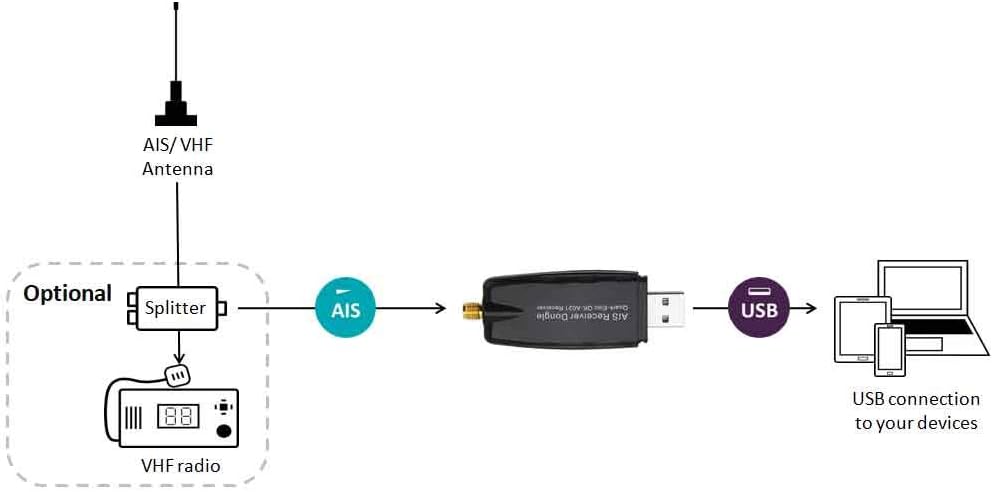
Figure 1: The QK-A021 AIS Receiver Dongle, a compact USB device with an SMA antenna connector.
The QK-A021 is a compact USB dongle designed for receiving AIS signals. It features an SMA connector for connecting to a VHF antenna and a standard USB-A connector for power and data output to a computer or compatible device.
4. Setup Guide
4.1. Components Required
- QK-A021 AIS Receiver Dongle
- VHF Antenna (50 Ohm, with SMA connector or BNC adapter)
- Computer or device with a USB port (Windows, Mac, or Linux)
- Optional: AIS/VHF antenna splitter, VHF radio
4.2. Connection Diagram Overview
The QK-A021 connects to an AIS/VHF antenna to receive signals. The received AIS data is then transmitted via USB to your computing device. An optional splitter can be used if you wish to share a single antenna with a VHF radio.
The typical connection flow is as follows:
- Connect the AIS/VHF Antenna to the QK-A021 dongle's SMA connector. If using a BNC antenna, utilize the included SMA to BNC coaxial adapter.
- (Optional) If sharing an antenna with a VHF radio, connect the AIS/VHF Antenna to a splitter. Connect one output of the splitter to the QK-A021 dongle and the other output to your VHF radio.
- Plug the USB end of the QK-A021 dongle into an available USB port on your computer (laptop, tablet, or desktop).
Figure 2: Conceptual diagram illustrating the connection of the QK-A021 AIS Receiver Dongle. The diagram shows an AIS/VHF Antenna connected to an optional splitter, which then feeds into both a VHF radio and the AIS Receiver Dongle. The dongle then connects via USB to various computing devices such as a laptop, tablet, or smartphone.
4.3. Driver Installation
For Windows, Mac, and Linux systems, the necessary drivers for the QK-A021 are typically installed automatically when the device is first connected to a USB port. If automatic installation does not occur, or for specific configuration software, drivers and application notes can be downloaded from the Quark-Elec website or found on the CD included in the package (if applicable).
Note: Optional configuration, such as adjusting hopping intervals, must be completed using Windows software.
4.4. Software Configuration
The QK-A021 outputs NMEA-0183 messages at a baud rate of 38400 bps. To view and utilize the AIS data, you will need compatible navigation software.
- OpenCPN: We advise using openCPN for map data, as this device does not come pre-loaded with map data. Ensure the software is configured to receive data from the correct USB serial port at 38400 bps.
- iOS Apps: Some iOS applications may charge for map usage. Verify compatibility and data input settings within your chosen app.
5. Operating Instructions
Once connected and drivers are installed, the QK-A021 will begin receiving AIS signals. The device operates as a receive-only unit, meaning it listens for AIS transmissions but does not transmit any data itself.
5.1. Channel Hopping
The QK-A021 employs a patented auto-hopping algorithm to monitor both AIS channels (161.975 MHz and 162.025 MHz) alternately. This improves the rate of captured messages. You can manually adjust the hopping interval rates to 0.25 seconds, 1 second, 30 seconds, or keep it on auto-hopping mode using the configuration software (Windows only).
5.2. Data Output
The AIS data is output in standard NMEA-0183 format over the USB connection at a fixed baud rate of 38400 bps. Your navigation software will interpret these messages to display vessel information, positions, and other relevant AIS data.
6. Maintenance
The QK-A021 AIS Receiver Dongle is designed for durability and requires minimal maintenance. Follow these general guidelines to ensure its longevity:
- Keep Dry: Protect the device from moisture and extreme temperatures.
- Clean Gently: If cleaning is necessary, use a soft, dry cloth. Avoid abrasive cleaners or solvents.
- Secure Connections: Ensure all antenna and USB connections are secure to prevent signal loss or damage.
- Software Updates: Periodically check the Quark-Elec website for any firmware or driver updates that may improve performance or add features.
7. Troubleshooting
If you encounter issues with your QK-A021, consider the following troubleshooting steps:
- No AIS Data Received:
- Antenna Connection: Ensure the VHF antenna is securely connected to the dongle. A loose connection can significantly reduce reception.
- Antenna Position: The position of the antenna is critical for optimal reception. Ensure it is clear of obstructions (e.g., shrouds, other clutter) and has a clear line of sight. Experiment with different antenna placements to improve range.
- Antenna Quality: If reception range is lower than expected, consider upgrading to a better quality VHF antenna.
- Driver Installation: Verify that the correct drivers are installed on your computer. Check Device Manager (Windows) or equivalent system information (Mac/Linux) to ensure the device is recognized.
- Software Settings: Confirm that your navigation software is configured to use the correct serial port (COM port on Windows, /dev/ttyUSBx on Linux/Mac) and the correct baud rate (38400 bps).
- Device Not Recognized by Computer:
- Try plugging the dongle into a different USB port.
- Restart your computer.
- Manually install drivers from the Quark-Elec website if automatic installation failed.
- Intermittent Data:
- Check for loose antenna or USB connections.
- Ensure no other devices are causing electromagnetic interference.
8. Specifications
| Feature | Detail |
|---|---|
| Model Number | QK-A021 |
| Brand | Quark-Elec |
| Product Dimensions | 7.6 x 2.7 x 1.25 cm |
| Weight | 300 g |
| Antenna Connector | SMA (50 Ohm) |
| Included Adapter | SMA to BNC coaxial adaptor |
| Receiving Channels | 161.975 MHz and 162.025 MHz (alternately) |
| Sensitivity | -104 dBm@30% PER |
| Receiving Range | Up to 12 nautical miles (approx. 15000 Metres) |
| Power Supply | USB 2.0 powered (<26mA@5.0V) |
| Data Output Format | NMEA-0183 |
| Baud Rate | 38400 bps (over USB) |
| Compatibility | Windows, Mac, Linux |
| First Available Date | 19 July 2017 |
9. Warranty Information
Specific warranty terms and conditions for the QK-A021 AIS Receiver Dongle are provided by Quark-Elec. Please refer to the documentation included with your product or visit the official Quark-Elec website for detailed warranty information. It is recommended to retain your proof of purchase for warranty claims.
10. Support
For any technical questions, support, or further assistance regarding your QK-A021 AIS Receiver Dongle, please visit the official Quark-Elec forum:
You may find answers to common questions or solutions to issues that have already been addressed by the community or Quark-Elec support staff.

