
1. Introduction
This manual provides essential information for the safe and efficient installation, operation, and maintenance of your PATLITE ST-301T-RYG 3-Light Signal Tower. Please read this manual thoroughly before using the product and retain it for future reference. Proper understanding of these instructions will ensure optimal performance and longevity of your signal tower.
2. Safety Information
Always observe the following safety precautions to prevent injury to personnel and damage to the equipment.
- Electrical Safety: Ensure power is disconnected before installation or maintenance. All wiring must comply with local electrical codes and be performed by qualified personnel.
- Mounting: Mount the signal tower securely on a stable surface capable of supporting its weight. Improper mounting can lead to the unit falling and causing injury or damage.
- Operating Environment: Do not expose the unit to conditions beyond its specified operating temperature and humidity ranges. Avoid direct exposure to corrosive gases or liquids.
- Inspection: Regularly inspect the unit for any signs of damage, loose connections, or wear. Do not operate a damaged unit.
3. Package Contents
Verify that all items listed below are present in the package:
- PATLITE ST-301T-RYG 3-Light Signal Tower (1 unit)
- Mounting Hardware (e.g., screws, washers, nuts)
- User Manual (this document)
If any items are missing or damaged, please contact your supplier immediately.
4. Product Overview
The PATLITE ST-301T-RYG is a robust 3-light signal tower designed for industrial applications, providing clear visual status indications. It features Red, Yellow, and Green light modules, often used to signify different operational states such as error, warning, and normal operation.
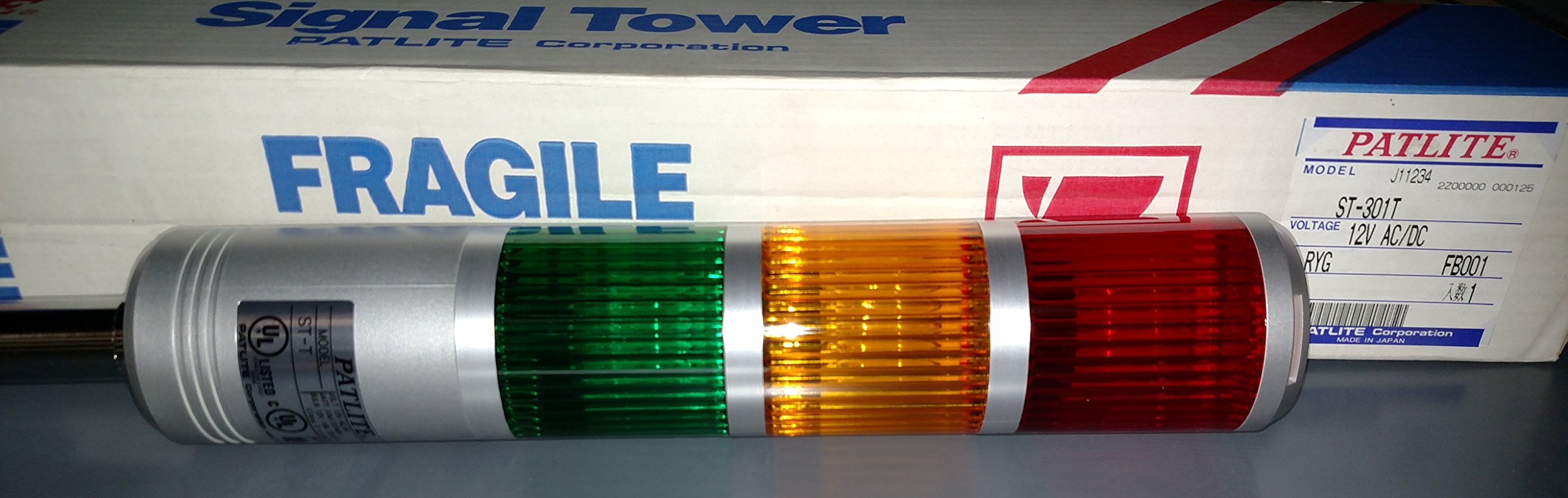
Figure 1: PATLITE ST-301T-RYG 3-Light Signal Tower. This image shows the complete signal tower assembly with its distinct red, yellow, and green light sections.
Key Features:
- 3-Light Signal Tower (Red, Yellow, Green)
- Integrated Strobe Light function for enhanced visibility
- Durable construction for industrial environments
- Clear visual indication for various operational statuses
5. Setup and Installation
Follow these steps for proper installation of your signal tower:
- Power Disconnection: Ensure that all power to the installation area is turned off and locked out before beginning any work.
- Mounting Location: Select a mounting location that is stable, free from excessive vibration, and allows for clear visibility of the signal tower. Ensure adequate space for wiring and maintenance.
- Secure Mounting: Use the provided mounting hardware to securely attach the signal tower to the chosen surface. Refer to the product's technical drawings for specific mounting hole patterns and dimensions.
- Wiring: Connect the signal tower to the appropriate power supply and control circuits. Consult the wiring diagram provided with the product for correct terminal connections. Ensure all connections are tight and insulated.
- Power Restoration: Once installation and wiring are complete and verified, restore power to the system.
6. Operating Instructions
The PATLITE ST-301T-RYG signal tower operates by receiving electrical signals from your control system to illuminate its individual light modules. Each color typically corresponds to a specific status:
- Red Light: Often indicates an emergency, critical error, or machine stop condition.
- Yellow Light: Typically signifies a warning, caution, or a non-critical fault requiring attention.
- Green Light: Usually indicates normal operation, machine running, or a safe condition.
The strobe light function provides an intermittent flash for increased visibility, particularly useful in noisy environments or for urgent alerts. The activation of each light and the strobe function is controlled by your external system's wiring and logic.
7. Maintenance
Regular maintenance ensures the reliable operation and extends the lifespan of your signal tower.
- Cleaning: Periodically clean the outer surface of the signal tower with a soft, damp cloth. Do not use abrasive cleaners, solvents, or harsh chemicals, as these can damage the lens or housing.
- Inspection: Regularly check for any physical damage, such as cracks in the lens or housing. Inspect wiring for signs of wear, fraying, or loose connections.
- Power Cycle: If the unit is not functioning as expected, try cycling the power (turn off, wait 10 seconds, then turn on) to reset the internal electronics.
No user-serviceable parts are inside the sealed light modules. Do not attempt to open or repair these components.
8. Troubleshooting
If you encounter issues with your PATLITE ST-301T-RYG signal tower, refer to the table below for common problems and solutions.
| Problem | Possible Cause | Solution |
|---|---|---|
| No lights illuminate | No power supply; Incorrect wiring; Faulty control signal | Check power connection; Verify wiring against diagram; Confirm control signal is active |
| Only one light illuminates | Incorrect wiring for other lights; Faulty control signal for specific light | Check wiring for the non-illuminating lights; Verify control signals for each light |
| Strobe function not working | Strobe control signal not active; Internal fault | Ensure strobe control signal is provided; If problem persists, contact support |
| Intermittent operation | Loose wiring connection; Unstable power supply | Inspect and tighten all wiring connections; Verify power supply stability |
If troubleshooting steps do not resolve the issue, please contact Patlite customer support.
9. Specifications
The following are the general specifications for the PATLITE ST-301T-RYG 3-Light Signal Tower:
| Feature | Specification |
|---|---|
| Model | ST-301T-RYG |
| Light Colors | Red, Yellow, Green |
| Product Dimensions | 4 x 26 x 4 inches |
| Item Weight | 5 pounds |
| Manufacturer | PATLITE |
| ASIN | B0742MKD16 |
| Date First Available | July 19, 2017 |
10. Warranty and Support
PATLITE products are manufactured to high-quality standards. For specific warranty terms and conditions, please refer to the warranty card included with your product or visit the official Patlite website. In case of technical issues, questions, or to obtain service, please contact your local Patlite distributor or customer support. When contacting support, please have your product model number (ST-301T-RYG) and purchase information readily available.


