
Introduction
This manual provides comprehensive instructions for the ECONTROLLY EN-22652A replacement remote control. Designed for ease of use, this remote offers a direct replacement solution for various Hisense TV models without requiring any complex programming or setup. Please read this manual thoroughly to ensure proper operation and longevity of your remote control.
Product Overview
The ECONTROLLY EN-22652A is a dedicated replacement remote control for Hisense televisions. It is designed to function immediately upon battery installation, providing access to all standard TV functions.
Compatible Hisense TV Models:
- 32A300M
- 32K20N
- 32K360
- 32K26NUS
- 50K360G
- 32K26
- 50K362
- LHD32K20NUS
- LHD32A300MUS
- LTDN42K26US
- LTDN50K360GUS
- LTDN55K362GUS
- LHD32K360US
- LTDN39K310US
- LTDN39V77NUS
- LTDN40K360US
- LTDN42A300US
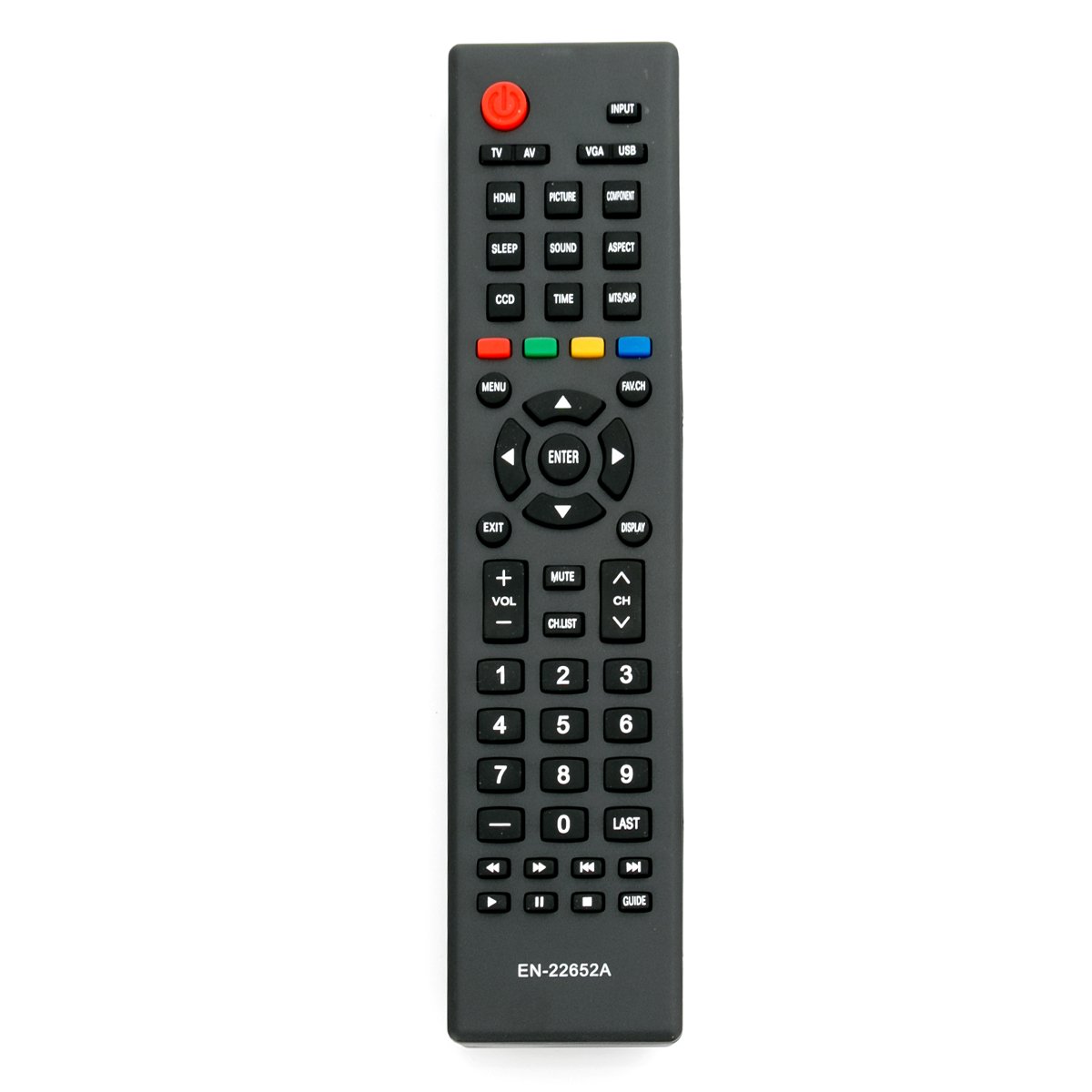
Figure 1: Front view of the ECONTROLLY EN-22652A remote control, showing all buttons including power, input, number pad, navigation, volume, and channel controls.
Setup
Battery Installation:
- Locate the battery compartment on the back of the remote control.
- Slide the battery cover downwards to open it.
- Insert two (2) new AAA alkaline batteries, ensuring the positive (+) and negative (-) terminals align correctly with the markings inside the compartment.
- Slide the battery cover back into place until it clicks securely.
The remote control is now ready for use. No programming or pairing is required.

Figure 2: Back view of the remote control with the battery compartment open, illustrating the correct orientation for AAA battery insertion.
Operating Instructions
Point the remote control directly at your Hisense TV's infrared sensor. Ensure there are no obstructions between the remote and the TV.
- Power Button (● Power): Press to turn the TV on or off.
- Input Button (INPUT): Cycles through available input sources (HDMI, AV, USB, VGA, Component).
- Number Buttons (0-9): Directly select channels.
- Volume Up/Down (VOL +/-): Adjusts the TV's volume level.
- Channel Up/Down (CH +/-): Changes the TV channel.
- Mute Button (MUTE): Mutes or unmutes the TV's audio.
- Menu Button (MENU): Accesses the TV's main menu for settings adjustments.
- Navigation Buttons (Up, Down, Left, Right Arrows): Navigate through menus and options.
- Enter Button (ENTER): Confirms selections in menus.
- Exit Button (EXIT): Exits the current menu or function.
- Display Button (DISPLAY): Shows current channel information or other on-screen data.
- FAV.CH Button: Accesses favorite channels.
- Sleep Button (SLEEP): Sets a sleep timer for the TV.
- Picture Button (PICTURE): Adjusts picture modes.
- Sound Button (SOUND): Adjusts sound modes.
- Aspect Button (ASPECT): Changes the screen aspect ratio.
- CCD Button: Activates Closed Captioning.
- Time Button (TIME): Accesses time-related settings.
- MTS/SAP Button: Selects Multi-channel Television Sound/Secondary Audio Program.
- Colored Buttons (Red, Green, Yellow, Blue): Functionality varies depending on the TV model and current menu/application.
- Playback Controls (Rewind, Play/Pause, Fast Forward, Stop, Previous, Next): Control media playback when using compatible input sources (e.g., USB).
- GUIDE Button: Accesses the electronic program guide (if available).
- LAST Button: Returns to the previously viewed channel.
Maintenance
Battery Replacement:
When the remote control's performance degrades or it becomes unresponsive, it is likely time to replace the batteries. Follow the battery installation steps outlined in the "Setup" section. Always replace both batteries simultaneously with new AAA alkaline batteries.
Cleaning:
To clean the remote control, gently wipe its surface with a soft, dry cloth. For stubborn dirt, slightly dampen the cloth with water or a mild, non-abrasive cleaner. Avoid using harsh chemicals or excessive moisture, as this can damage the remote's electronics.
Storage:
If the remote control will not be used for an extended period, it is recommended to remove the batteries to prevent leakage and potential damage to the device.
Troubleshooting
| Problem | Possible Cause | Solution |
|---|---|---|
| Remote is not working. |
|
|
| Some buttons are unresponsive. |
|
|
| Remote works intermittently. |
|
|
Specifications
| Brand | ECONTROLLY |
| Model Number | Remote-EN-22652A |
| Compatible Devices | Hisense Televisions |
| Number of Buttons | 20 |
| Maximum Range | Up to 300 meters (optimal performance typically closer) |
| Product Dimensions (L x W x H) | 17.78 x 5.08 x 1.65 cm (approximately 7 x 2 x 0.65 inches) |
| Product Weight | 28.35 g (approximately 1 ounce) |
| Batteries | 2 x AAA Alkaline Batteries (not included) |
Warranty and Support
Information regarding product warranty and customer support was not provided in the available product data. For any inquiries or support needs, please refer to the retailer or the manufacturer's official website if available.
