
DRAGONN DN-CH-K01B
DRAGONN Ergonomic Kneeling Chair Instruction Manual
Model: DN-CH-K01B
Brand: DRAGONN
Introduction
Thank you for choosing the DRAGONN Ergonomic Kneeling Chair. This chair is designed to promote a natural, upright posture, distributing your weight evenly and aligning your spine. By shifting your body's center of gravity, it helps reduce pressure on your lower back, making it an excellent choice for home and office use. Please read this manual thoroughly before assembly and use to ensure proper setup and safe operation.
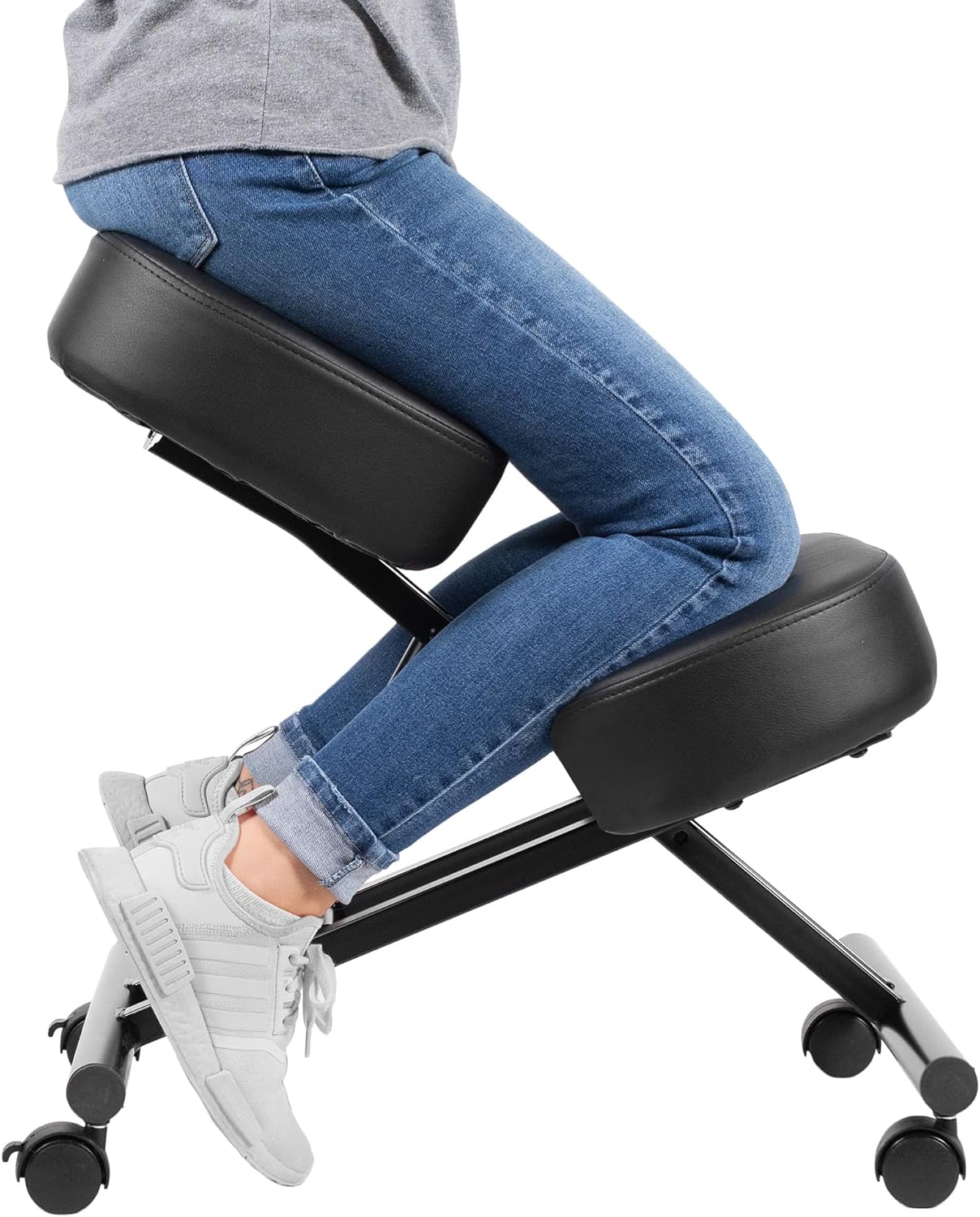
Image: A person demonstrating the correct seating position on the DRAGONN Ergonomic Kneeling Chair, highlighting its design for improved posture.
Important Safety Information
To ensure your safety and prolong the life of your chair, please observe the following:
- Do not exceed the maximum weight capacity of 250 lbs (113 kg).
- Ensure all bolts and screws are securely tightened before use. Periodically check and re-tighten as needed.
- Use the chair on a flat, stable surface.
- Keep hands and fingers clear of moving parts during adjustment.
- This chair is designed for indoor use only.
- Acclimate yourself gradually to the kneeling chair, as it engages different muscles than traditional chairs. Switch positions throughout the day if necessary.
Package Contents
Before assembly, verify that all components are present and undamaged:
- Main Frame (1)
- Seat Cushion (1)
- Knee Cushion (1)
- Casters (4) - 2 with brakes, 2 without
- Adjustment Knob (1)
- Assembly Hardware (Bolts, Washers, Allen Wrench)

Image: An illustration showing the individual parts of the kneeling chair before assembly, including the frame, cushions, and casters.
Setup and Assembly
Step-by-Step Assembly Instructions
Follow these steps to assemble your DRAGONN Ergonomic Kneeling Chair:
- Unpack all components and lay them out on a clean, flat surface.
- Attach the four casters to the base of the main frame. Ensure the two casters with brakes are placed on the front side of the chair (the side where your knees will rest).
- Secure the seat cushion to the upper frame using the provided bolts and Allen wrench. Ensure it is oriented correctly.
- Attach the knee cushion to the lower frame using the provided bolts and Allen wrench.
- Insert the height adjustment rod into the designated opening on the frame and secure it with the adjustment knob.
- Once assembled, double-check all connections to ensure they are tight and secure.

Image: A visual guide demonstrating the assembly steps, including attaching the cushions and casters to the chair frame.
Operating Instructions
Adjusting Height
The DRAGONN Kneeling Chair features an adjustable height mechanism to suit various users and desk heights. To adjust the height:
- Loosen the adjustment knob located on the side of the chair's frame.
- Carefully raise or lower the seat to your desired height. The chair can be adjusted from 21 inches to 31 inches.
- Once the desired height is reached, firmly tighten the adjustment knob to secure the chair in place.

Image: A visual representation of the chair's height adjustment capabilities, indicating the minimum and maximum heights, along with details of the adjustment mechanism and locking casters.
Proper Seating Posture
To maximize the ergonomic benefits of the kneeling chair:
- Sit with your buttocks on the main seat cushion.
- Place your shins and knees comfortably on the lower knee cushion.
- Maintain an upright posture, allowing your spine to align naturally. The angled seat will encourage this position.
- Ensure your feet are relaxed and not bearing significant weight.

Image: A user seated correctly on the kneeling chair, illustrating the natural alignment of the back and the distribution of weight.
Using Casters
The chair is equipped with four casters for easy mobility. Two of these casters include brakes for stability:
- To move the chair, ensure the brakes on the front casters are disengaged.
- To keep the chair stationary, press down on the lever on the two front casters to engage the brakes.
Care and Maintenance
Cleaning Instructions
- Wipe clean with a damp cloth.
- Do not use harsh chemicals or abrasive cleaners, as they may damage the finish or upholstery.
- For spills, blot immediately with a clean, dry cloth.
General Maintenance
- Periodically check all bolts and screws to ensure they remain tight. Re-tighten if necessary.
- Inspect casters for any debris or hair that might impede smooth rolling. Clean as needed.
- Avoid exposing the chair to direct sunlight or extreme temperatures, which can cause material degradation.
Troubleshooting
Refer to the table below for common issues and their solutions:
| Problem | Possible Cause | Solution |
|---|---|---|
| Chair feels wobbly or unstable. | Loose assembly bolts. | Check and tighten all assembly bolts and screws. |
| Difficulty adjusting height. | Adjustment knob is too tight or mechanism is stiff. | Loosen the adjustment knob completely. Apply a small amount of silicone lubricant to the adjustment rod if needed. |
| Casters not rolling smoothly. | Debris caught in casters or brakes engaged. | Check if brakes are disengaged. Remove any hair or debris from caster wheels. |
| Discomfort when first using the chair. | Muscles adjusting to new posture. | This is normal. Gradually increase usage time. Switch between the kneeling chair and a traditional chair if needed. |
Product Specifications
| Feature | Detail |
|---|---|
| Brand | DRAGONN |
| Model Name | DRAGONN DN-CH-K01B |
| Color | Black |
| Product Dimensions | 26.2"D x 18.7"W x 8"H |
| Adjustable Height Range | 21" to 31" |
| Maximum Weight Recommendation | 250 Pounds |
| Material | Foam (Cushions), Metal (Frame) |
| Special Features | Adjustable Height, Cushion Availability, Lightweight, Portable, Rolling |
| Item Weight | 18.4 pounds |
| UPC | 818538027402 |
Warranty and Support
The DRAGONN Ergonomic Kneeling Chair comes with a 1-year warranty from the date of purchase, covering manufacturing defects. This warranty does not cover damage caused by misuse, accidents, unauthorized modifications, or normal wear and tear.
For warranty claims, technical support, or any questions regarding your product, please contact DRAGONN customer service through the official DRAGONN Store on Amazon or refer to the contact information provided with your purchase.
Related documentsDN-CH-K01B


Ask a question about this manual
Ask about setup, troubleshooting, compatibility, parts, safety, or missing instructions. Manuals+ will review the question and use this page’s manual context to help answer it.