
Introduction
Thank you for choosing the HANGSUN MG400 Handheld Double Head Percussion Massager. This manual provides essential information for the safe and effective use of your device. Please read it thoroughly before operation and retain it for future reference.
The HANGSUN MG400 is designed to provide deep tissue percussion massage for various body parts, including the neck, back, shoulders, legs, and feet, aiming to relieve muscle tension and promote relaxation.
Safety Information
For your safety and to prevent damage to the device, please observe the following precautions:
- Always use the massager on the lowest speed setting when first using it.
- Do not use the massager on broken skin or areas with inflammation.
- Keep the power cord away from heat sources and liquids to prevent electrical shock.
- Do not use the massager while sleeping or taking a bath.
- Always unplug the massager when not in use.
- Consult a physician before use if you have any medical conditions or are pregnant.
Statements regarding dietary supplements have not been evaluated by the FDA and are not intended to diagnose, treat, cure, or prevent any disease or health condition.
Package Contents
Verify that all items are present in the package:
- HANGSUN MG400 Handheld Percussion Massager
- 3 Sets of Interchangeable Massage Nodes (Round, Point, Needle)
- User Manual (This document)
Product Features
- Powerful Motor: Delivers up to 3500 pulses per minute for deep tissue massage.
- Dual Head Percussion: Two massage heads provide effective, targeted massage for muscle pain relief and relaxation.
- Variable Speed Control: Adjustable speed settings to customize massage intensity.
- Interchangeable Massage Nodes: Includes three types of nodes for varied massage experiences.
- Ergonomic Design: Features a comfortable handle and an extra-long power cord (98 inches) for ease of use and extended reach.
Components Overview

Figure 1: HANGSUN MG400 Handheld Percussion Massager with its various interchangeable massage heads.
This image displays the main unit of the massager, featuring its ergonomic handle, control panel, dual massage heads, and the three distinct types of massage attachments included.

Figure 2: Labeled components of the HANGSUN MG400 massager.
This diagram highlights key parts including the massage head, speed control button, ON/OFF button, and handle, along with the product dimensions (16.9 inches / 43 cm length, 6.5 inches / 16.5 cm width, 5.3 inches / 13.4 cm height).
- Massage Head: The part containing the dual percussion nodes.
- Speed Control Button: A sliding switch to adjust the massage intensity.
- ON/OFF Button: Powers the device on or off.
- Handle: Ergonomically designed for comfortable grip and reach.
- Power Cord: Connects the massager to an electrical outlet.
Setup
- Unpack: Carefully remove the massager and all accessories from the packaging.
- Inspect: Check the device and power cord for any signs of damage. Do not use if damaged.
- Attach Massage Head: Select the desired massage node (Round, Point, or Needle) and firmly attach it to the dual massage heads. Ensure it clicks securely into place.
- Connect Power: Plug the power cord into a standard electrical outlet. Ensure the ON/OFF button is in the "OFF" position before plugging in.
Operating Instructions
- Power On: Press the ON/OFF button to turn on the massager. The device will start at the lowest intensity.
- Adjust Intensity: Use the speed control button (sliding switch) to increase or decrease the massage intensity to your preference. Start with a low setting and gradually increase as desired.

Figure 3: Variable speed control for customizing massage intensity.
This image illustrates the sliding switch used to adjust the massage speed and intensity, allowing for a personalized massage experience.
- Apply to Body: Gently apply the massage heads to the desired area of your body (neck, back, shoulders, legs, feet, muscles). Move the massager slowly over the area, applying light pressure.

Figure 4: User applying the massager to the shoulder area.
This image demonstrates the ergonomic handle allowing easy reach to areas like the shoulder for self-massage.

Figure 5: User holding the MG400 massager, illustrating its full body application.
This image shows the massager being held, emphasizing its design for stimulating circulation and relaxing deep-lying muscles.
- Duration: It is recommended to use the massager for 10-15 minutes per session on each body area. Avoid prolonged use on a single spot.
- Power Off: After use, set the speed control to the lowest setting, then press the ON/OFF button to turn off the massager. Unplug the device from the electrical outlet.
Interchangeable Massage Heads
The HANGSUN MG400 comes with three sets of interchangeable massage nodes, allowing you to customize your massage experience:

Figure 6: Round Massage Head.
Ideal for general relaxation and larger muscle groups.
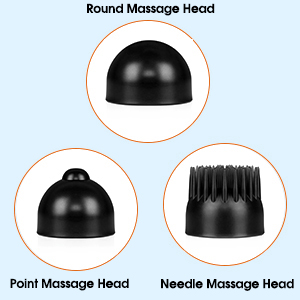
Figure 7: Point Massage Head.
Designed for targeted deep tissue massage and trigger points.

Figure 8: Needle Massage Head.
Provides a stimulating massage, often used for circulation or gentle exfoliation.
To change massage heads, simply pull the current heads off the massager and firmly push the desired heads onto the dual percussion posts until they are securely seated.
Maintenance and Care
- Cleaning: Always unplug the massager before cleaning. Wipe the surface of the massager with a soft, damp cloth. Do not use abrasive cleaners or immerse the device in water.
- Storage: Store the massager in a cool, dry place, away from direct sunlight and moisture. Keep the power cord untangled and avoid wrapping it tightly around the device.
- Cord Care: Regularly inspect the power cord for any damage, fraying, or exposed wires. If any damage is found, discontinue use immediately and contact customer support.
Troubleshooting
| Problem | Possible Cause | Solution |
|---|---|---|
| Massager does not turn on. |
|
|
| Weak or inconsistent massage. |
|
|
| Unusual noise or vibration. |
|
|
If you encounter any issues not listed here, or if the problem persists after attempting the solutions, please contact HANGSUN customer support.
Specifications
| Brand | HANGSUN |
| Model Number | VD-836GT (MG400) |
| Power Source | Corded Electric |
| Material | Plastic |
| Item Weight | 654 Grams (1.44 Pounds) |
| Product Dimensions | 5.3 x 6.5 x 16.9 inches (13.4 x 16.5 x 43 cm) |
| Max Pulses Per Minute | 3500 |
| Intended Use | Back, Leg, Shoulder, Whole Body |
Warranty and Support
The HANGSUN MG400 Handheld Double Head Percussion Massager typically comes with a manufacturer's warranty. Please refer to your purchase documentation or contact HANGSUN customer support for specific warranty details and duration.
For technical assistance, troubleshooting, or warranty claims, please contact HANGSUN customer service through their official website or the retailer where the product was purchased.