
Introduction
This manual provides instructions for the PDP Faceoff Deluxe Wired Pro Controller for Nintendo Switch, model 500-069-NA-SM00. This controller is designed to enhance your gaming experience on the Nintendo Switch console, offering customizable features and a comfortable design. Please read this manual thoroughly before use to ensure proper setup and operation.
Package Contents
Verify that all items listed below are included in your package:
- PDP Faceoff Deluxe Wired Pro Controller
- Detachable 10-foot USB Cable
- 2 Interchangeable Faceplates (Super Mario and Luigi designs)

Image: The PDP Faceoff Deluxe Wired Pro Controller, its detachable cable, and the two included interchangeable faceplates (Super Mario and Luigi designs).
Setup
To begin using your PDP Faceoff Deluxe Wired Pro Controller:
- Connect the USB Cable: Insert the smaller end of the detachable 10-foot USB cable into the port on the top of the controller.
- Connect to Nintendo Switch Dock: Plug the larger USB end of the cable into an available USB port on your Nintendo Switch dock.
- Connect to Nintendo Switch Console (Handheld Mode): If playing in handheld mode, you will need a USB-C to USB-A adapter (not included) to connect the controller directly to the Nintendo Switch console's USB-C port.
- Verify Connection: The controller should be automatically recognized by your Nintendo Switch. You may need to navigate to the 'Controllers' menu on your Switch to confirm the connection.
Operating Instructions
The PDP Faceoff Deluxe Wired Pro Controller features a standard layout for intuitive gameplay on your Nintendo Switch.
Basic Controls
- Analog Sticks: Use the left and right analog sticks for movement and camera control. These feature responsive low-friction metal analog sticks for smooth and precise input.
- D-Pad: For directional input in games that utilize it.
- A/B/X/Y Buttons: Action buttons as defined by your game.
- L/R/ZL/ZR Buttons: Shoulder and trigger buttons for various in-game actions.
- Plus (+) / Minus (-) Buttons: Typically used for Pause/Start and Select functions.
- Home Button: Returns to the Nintendo Switch HOME Menu.
- Capture Button: Takes screenshots or video clips (if supported by the game).

Image: Detail of the analog stick with low friction rings for enhanced performance.
Customization
Interchangeable Faceplates
The Faceoff Deluxe Wired Pro Controller allows you to swap out faceplates to customize its appearance. Your controller comes with two Super Mario themed faceplates (Mario and Luigi designs).
- Remove Current Faceplate: Gently lift the edges of the current faceplate from the controller body. It is designed to snap on and off.
- Attach New Faceplate: Align the new faceplate with the controller body and press down firmly until it snaps securely into place.

Image: Detaching a red Super Mario faceplate from the controller.
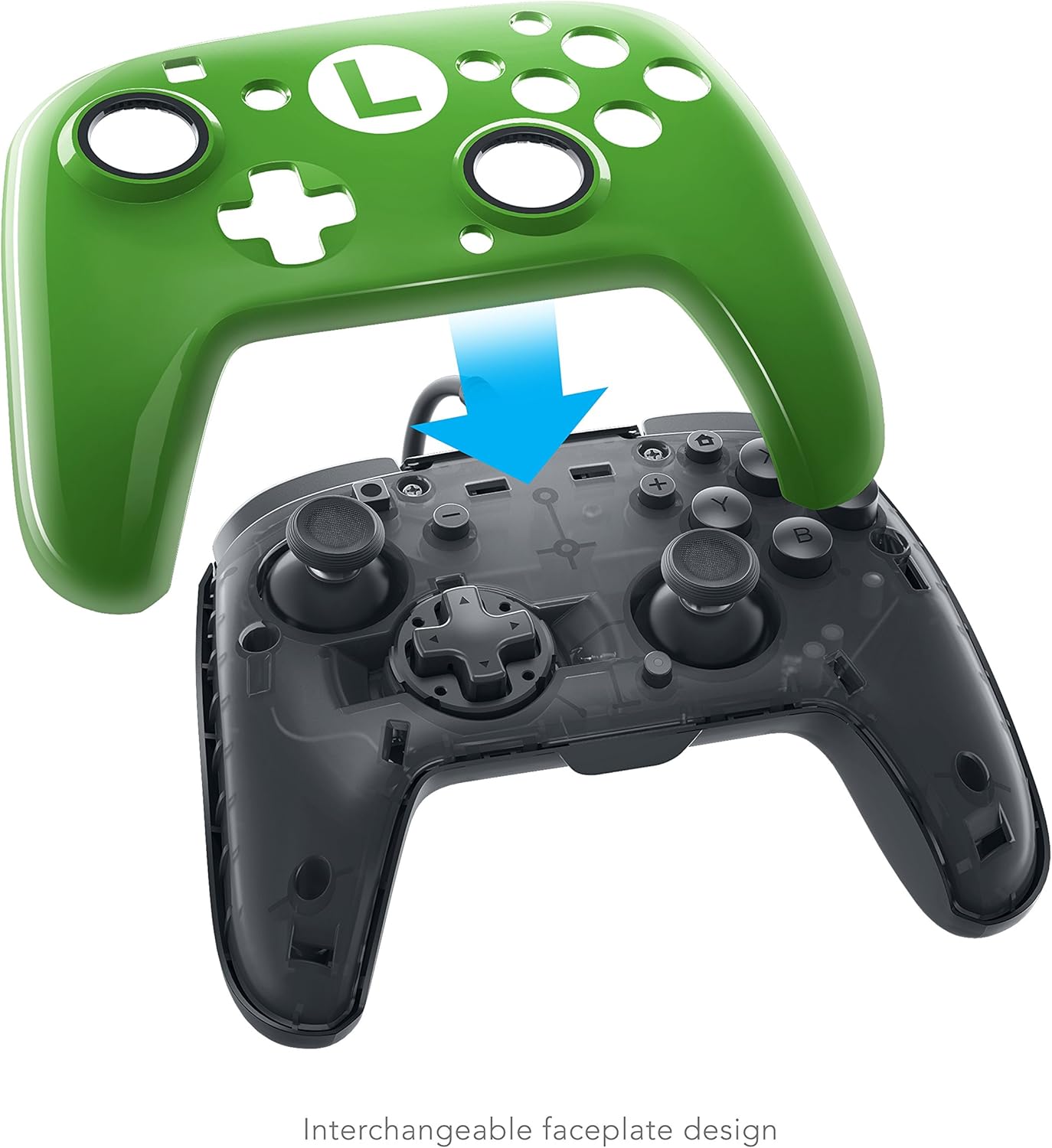
Image: Attaching a green Luigi faceplate to the controller.
Programmable Paddle Buttons
The controller features two programmable paddle-style buttons on the back for customizable play. These buttons can be mapped to replicate other button inputs, allowing for quicker access to frequently used actions without moving your thumbs from the analog sticks.
Programming Instructions:
- Enter Programming Mode: Locate the programming button (often a small button or switch) on the back of the controller. Press and hold this button until the indicator light (if present) changes or flashes.
- Select Paddle: Press the paddle button (left or right) you wish to program.
- Select Input: Press the button on the front of the controller (e.g., A, B, X, Y, L, R, ZL, ZR, D-pad direction) that you want the paddle to mimic.
- Exit Programming Mode: Press the programming button again to save the setting and exit programming mode. The indicator light should return to its normal state.
Refer to the specific programming instructions included with your controller packaging for detailed steps, as programming methods can vary slightly.

Image: The back of the controller showing the programmable paddle buttons and textured grip.
Maintenance
Proper care will extend the life of your controller.
- Cleaning: Use a soft, dry cloth to wipe down the controller. For stubborn dirt, slightly dampen the cloth with water. Avoid using harsh chemicals or abrasive cleaners.
- Storage: Store the controller in a cool, dry place away from direct sunlight and extreme temperatures.
- Cable Care: Avoid sharply bending or twisting the detachable USB cable. Always grasp the plug, not the cable, when disconnecting.
Troubleshooting
If you encounter issues with your PDP Faceoff Deluxe Wired Pro Controller, try the following steps:
- Controller Not Responding:
- Ensure the USB cable is securely connected to both the controller and the Nintendo Switch dock.
- Try plugging the USB cable into a different USB port on the dock.
- Restart your Nintendo Switch console.
- Test the controller on another Nintendo Switch console if available, to determine if the issue is with the controller or the console.
- Buttons or Analog Sticks Not Working Correctly:
- Ensure no debris is lodged around the buttons or analog sticks.
- Perform a controller calibration through the Nintendo Switch system settings (System Settings > Controllers and Sensors > Calibrate Control Sticks / Calibrate Gyro Controls).
- Faceplate Issues:
- If a faceplate does not fit correctly, ensure it is aligned properly before pressing down. Do not force it.
For further assistance, please refer to the support section on the official PDP website.
Specifications
| Model Number | 500-069-NA-SM00 |
| Brand | PDP |
| Compatibility | Nintendo Switch |
| Connectivity | Wired USB |
| Cable Length | 10 feet (detachable) |
| Dimensions | 0.8 x 15.8 x 15.2 cm |
| Weight | 399.16 g |
| Features | Interchangeable faceplates, programmable paddle buttons, low-friction metal analog sticks |
Warranty and Support
PDP products are designed for quality and reliability. For information regarding warranty coverage, please refer to the warranty card included with your product or visit the official PDP website. For technical support, FAQs, or to contact customer service, please visit www.pdp.com/support.


