
1. Introduction
This user manual provides essential information for the safe and efficient installation, operation, and maintenance of your Vimar 19292.B Arké USB Wall Socket Power Supply Unit. This unit is designed to provide a convenient USB charging port for electronic devices directly from your electrical system.
Key features include:
- Single front USB output for charging.
- Compatible with 120-230V, 50/60 Hz electrical systems.
- Provides 5V 1.5A power output.
- Modular design suitable for recessed and wall installations within the Arké civil series.
2. Safety Information
WARNING: Risk of Electric Shock.
- Installation must be performed by a qualified electrician in accordance with all local and national electrical codes.
- Always disconnect power at the circuit breaker or fuse box before installation, maintenance, or servicing.
- Do not install in wet or damp locations.
- Do not exceed the specified electrical ratings of the unit.
- Ensure proper grounding where required.
Read all instructions carefully before beginning installation or operation.
3. Package Contents
Verify that all components are present before installation:
- 1 x Vimar 19292.B Arké USB Wall Socket Power Supply Unit (White)
4. Setup and Installation
The Vimar 19292.B unit is designed for recessed and wall installations within the Vimar Arké series. Follow these general steps for installation. Consult a qualified electrician if you are unsure about any part of the process.
- Prepare the Installation Area: Ensure the electrical box or mounting location is clean and free of debris.
- Disconnect Power: Crucially, turn off power to the circuit at the main electrical panel before proceeding. Verify power is off using a voltage tester.
- Wiring Connections: Connect the electrical wires to the terminals on the back of the USB power supply unit. The unit accepts 120-230V AC input. Refer to the wiring diagram on the back of the unit for correct Live (L) and Neutral (N) connections. Ensure all connections are secure.
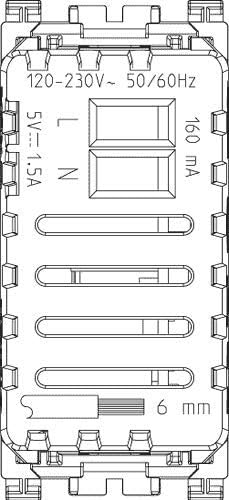
Figure 4.1: Back view of the Vimar 19292.B unit, illustrating the wiring terminals for Live (L) and Neutral (N) connections, along with input voltage specifications (120-230V~ 50/60Hz).
- Mounting: Carefully insert the unit into the wall box or mounting frame. Secure it using the appropriate screws or clips provided with your Vimar Arké mounting system.

Figure 4.2: Side view of the Vimar 19292.B unit, demonstrating its compact design suitable for standard wall box installations.
- Install Faceplate: Attach the decorative faceplate (sold separately, part of the Arké series) over the installed unit.
- Restore Power: Once installation is complete and all connections are secure, restore power at the circuit breaker.
5. Operating Instructions
The Vimar 19292.B USB Wall Socket is designed for simple operation.
- Connect Device: Plug a standard USB-A cable into the front USB output port of the unit.

Figure 5.1: Front view of the Vimar 19292.B unit, highlighting the accessible USB-A charging port.
- Begin Charging: Connect the other end of the USB cable to your electronic device (e.g., smartphone, tablet, USB-powered gadget). The unit will automatically begin providing 5V 1.5A power for charging.
- Charging Indicator: The unit does not feature a dedicated charging indicator light. Refer to your device's screen or indicator for charging status.
- Disconnect Device: Once your device is charged, simply unplug the USB cable from the unit and your device.
The unit is always active when power is supplied to the circuit.
6. Maintenance
The Vimar 19292.B USB Wall Socket requires minimal maintenance.
- Cleaning: To clean the surface of the unit, wipe with a soft, dry cloth. Do not use abrasive cleaners, solvents, or excessive moisture, as these can damage the finish or internal components.
- Inspection: Periodically inspect the unit for any signs of damage, loose connections, or discoloration. If any issues are observed, disconnect power and consult a qualified electrician.
- No User-Serviceable Parts: There are no user-serviceable parts inside this unit. Do not attempt to open or repair the device yourself.
7. Troubleshooting
If you experience issues with your Vimar 19292.B USB Wall Socket, try the following troubleshooting steps:
- No Power/No Charging:
- Check the circuit breaker or fuse for the circuit. Reset if tripped.
- Ensure the unit is properly wired and all connections are secure. (Consult a qualified electrician if unsure).
- Test the USB cable and the device you are trying to charge with another known working charger to rule out cable or device issues.
- Slow Charging:
- Ensure your device is compatible with 5V 1.5A charging. Some devices may require higher amperage for faster charging.
- Check the quality of your USB cable. Damaged or low-quality cables can impede charging speed.
- Audible Noise (e.g., Whistling/Humming):
- Some electronic power supplies may emit a faint coil whine or hum, especially under certain load conditions. If the noise is loud, persistent, or accompanied by other issues (e.g., heat, burning smell), immediately disconnect power and contact a qualified electrician or Vimar support.
If these steps do not resolve the issue, contact Vimar customer support or a qualified electrician.
8. Specifications
| Attribute | Value |
|---|---|
| Brand | Vimar |
| Model Number | 19292.B |
| Manufacturer | Vimar |
| Input Voltage | 120-230V AC, 50/60 Hz |
| Output Voltage/Current | 5V DC, 1.5A |
| Wattage | 5 watts |
| Connectivity Technology | USB (Type-A) |
| Mounting Type | Wall Mount |
| Color | White (Bianco) |
| Material | Copper |
| Product Dimensions | 2.09 x 1.1 x 2.36 inches |
| Item Weight | 1.41 ounces |
| Certification | CE |
| Special Features | 1 x Front USB output |
| Compatible Devices | Smartphones, Tablets, Laptops, USB-powered Gadgets |
9. Warranty and Support
For information regarding the warranty period and terms for your Vimar 19292.B USB Wall Socket Power Supply Unit, please refer to the documentation provided with your purchase or visit the official Vimar website. Warranty terms may vary by region and retailer.
If you require technical assistance, troubleshooting beyond this manual, or have questions about your product, please contact Vimar customer support through their official channels. Keep your purchase receipt and product model number (19292.B) readily available when contacting support.
For additional resources and product information, you may visit the Vimar official website.


