
1. Introduction
The Brennenstuhl RC CE1 4001 radio switch set provides convenient wireless control for electrical appliances and lamps indoors. This set includes four wireless sockets and one handheld remote control, offering a practical solution for managing your devices with ease. The system features self-learning coding for simple setup and reliable operation.
2. Important Safety Information
- This product is designed for indoor use only. Do not expose to moisture or extreme temperatures.
- Ensure the total connected load does not exceed 1000 W per wireless socket. Overloading can cause damage or fire.
- Always connect the wireless socket to a properly grounded wall outlet.
- Do not open or attempt to repair the devices. Refer servicing to qualified personnel.
- Keep batteries out of reach of children. Dispose of used batteries responsibly.
- The sockets feature increased contact protection. Do not insert foreign objects into the socket openings.
Important Note on Plug Compatibility: This product features a German Schuko plug type (Type F, with side earthing contacts). This plug type may not be compatible with all European socket types, specifically Belgian sockets (Type E, which typically use a pin-earth system). Please verify compatibility with your local electrical outlets before purchase and use to ensure proper grounding and safe operation.
3. Package Contents
Please check that all items are present and undamaged:
- 4 x Brennenstuhl Wireless Control Receivers
- 1 x Brennenstuhl 4-Channel Handheld Transmitter
- 1 x CR2032 (3V) Battery (for handheld transmitter)
4. Product Overview
The Brennenstuhl RC CE1 4001 set consists of wireless sockets and a remote control, designed for ease of use and reliability.

Figure 1: Brennenstuhl RC CE1 4001 Radio Switch Set showing four wireless sockets and one remote control.

Figure 2: Diagram illustrating the features of the Brennenstuhl wireless sockets, including 1000W switching capacity and increased contact protection.

Figure 3: Diagram illustrating the features of the Brennenstuhl remote control, including 433.92 MHz frequency, 25m range, on/off function, and CR2032 battery.
Wireless Sockets (Receivers)
- Designed for indoor use with a maximum load of 1000 W.
- Equipped with increased contact protection for safety.
- Features a manual on/off button and a switching status display.
- Utilizes self-learning coding for easy pairing with the remote control.
Handheld Transmitter (Remote Control)
- 4-channel control (A, B, C, D) to operate individual or multiple receivers simultaneously.
- Operates on a radio frequency of 433.92 MHz.
- Offers a range of up to 25 meters in open areas.
- Powered by a single CR2032 (3V) battery (included).
- Features over 65,000 different codes for interference-resistant and reliable operation.
- Coding is permanently stored, even after prolonged power failures.
5. Setup
Follow these steps to set up your Brennenstuhl radio switch set:
- Insert Battery into Transmitter: Open the battery compartment on the back of the handheld transmitter and insert the included CR2032 (3V) battery, ensuring correct polarity.
- Plug in Wireless Socket: Plug a wireless socket into a wall outlet. The socket's status indicator will light up briefly.

Figure 4: A hand plugging a Brennenstuhl wireless socket into a wall outlet.
- Pair Socket with Transmitter: Within approximately 5 seconds of plugging in the socket, press one of the channel buttons (A, B, C, or D) on the handheld transmitter, followed by the 'ON' button for that channel. The socket's status indicator will flash to confirm successful pairing.
- Connect Appliance: Plug the electrical appliance or lamp you wish to control into the wireless socket.
- Repeat for Additional Sockets: Repeat steps 2-4 for the remaining wireless sockets, assigning each to a different channel (or the same channel if you wish to control them simultaneously).
6. Operating Instructions
Once set up, operating your devices with the Brennenstuhl radio switch set is straightforward:
- Remote Control Operation: Use the 'ON' and 'OFF' buttons corresponding to the assigned channel (A, B, C, or D) on the handheld transmitter to switch your connected appliances on or off.
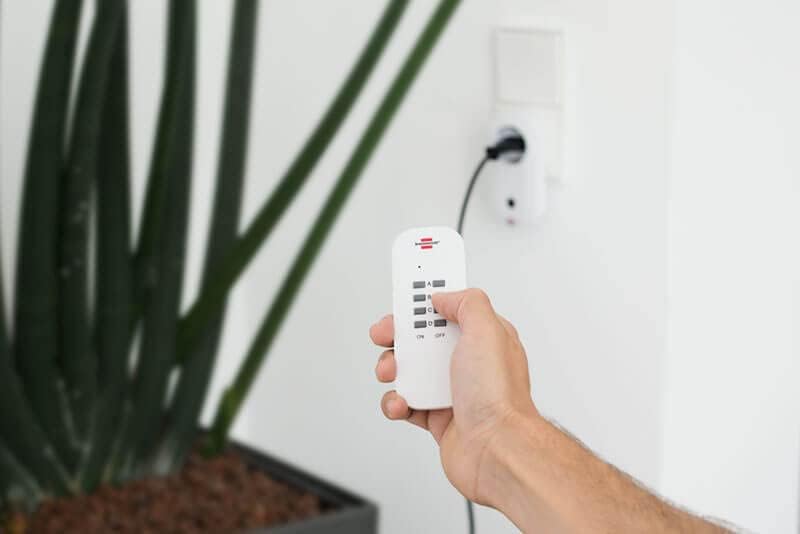
Figure 5: A hand holding the Brennenstuhl 4-channel remote control, ready to operate the wireless sockets.

Figure 6: A person comfortably using the Brennenstuhl remote control to operate a device while reading a book.
- Manual Operation: Each wireless socket has a manual on/off button. Press this button to toggle the power to the connected appliance directly at the socket.
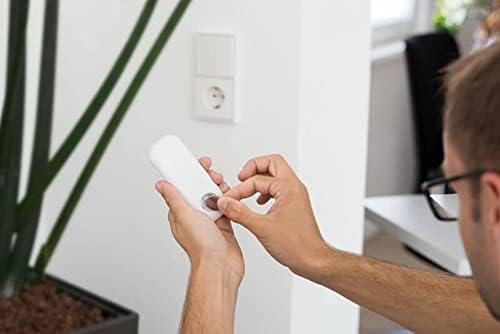
Figure 7: A hand pressing the manual on/off button located on the side of a Brennenstuhl wireless socket.
- Practical Application: Use the sockets to control various indoor appliances such as lamps, coffee makers, or entertainment systems.

Figure 8: Brennenstuhl wireless socket connected to a coffee machine in a kitchen setting, demonstrating practical use.
7. Maintenance
- Battery Replacement: When the remote control's range decreases or it stops responding, replace the CR2032 (3V) battery. Ensure correct polarity when inserting the new battery.
- Cleaning: Clean the devices with a dry, soft cloth. Do not use liquid cleaners or solvents. Ensure the devices are unplugged before cleaning.
- Storage: Store the devices in a dry, dust-free environment when not in use for extended periods.
8. Troubleshooting
If you encounter issues with your radio switch set, refer to the table below for common problems and solutions:
| Problem | Possible Cause | Solution |
|---|---|---|
| Appliance does not switch on/off via remote. | No power to the wireless socket. | Check if the wall outlet is functioning. |
| Remote control battery is empty. | Replace the CR2032 battery in the transmitter. | |
| Wireless socket is not paired with the remote. | Re-pair the socket with the remote control (refer to Setup section). | |
| Appliance connected exceeds 1000 W. | Do not use with high-power devices. Ensure load is below 1000 W. | |
| Remote control range is limited. | Physical obstructions (walls, furniture) or interference. | Reduce distance between remote and socket, remove obstacles, or move away from other wireless devices. |
| Wireless socket does not respond to a specific channel. | Incorrect channel button pressed on the remote. | Ensure you are pressing the correct A/B/C/D button for the desired socket. |
| Pairing information lost. | Re-pair the socket with the remote control. |
9. Specifications
Technical details for the Brennenstuhl RC CE1 4001 Radio Switch Set:
| Feature | Detail |
|---|---|
| Model Number | 1507050 |
| Power Supply | 230 V AC, 50 Hz |
| Max. Load per Socket | 1000 W |
| Radio Frequency | 433.92 MHz |
| Range | Up to 25 m (unobstructed) |
| Transmitter Battery | 1 x CR2032 (3V) |
| Material | Plastic |
| Protection | Increased contact protection |
| Indoor Use | Yes |
| Country of Origin | Germany |
10. Warranty and Support
For warranty information or technical support, please refer to the documentation provided with your purchase or visit the official Brennenstuhl website. Keep your proof of purchase for any warranty claims.


