
Introduction
Thank you for choosing the Dacom P10 IPX7 Waterproof Bluetooth Earbuds. This manual provides essential information for the safe and effective use of your new earbuds. Please read it thoroughly before operation and retain it for future reference.
Safety Information
- Do not expose the earbuds to extreme temperatures or direct sunlight for prolonged periods.
- Avoid dropping or subjecting the earbuds to strong impacts.
- Do not attempt to disassemble or modify the earbuds. This will void the warranty and may cause damage.
- Keep out of reach of children and pets.
- Clean the earbuds with a soft, dry cloth. Do not use harsh chemicals or abrasive materials.
- While the earbuds are IPX7 waterproof, they are not designed for prolonged submersion or diving. Ensure charging port cover is securely closed before exposure to water.
Package Contents
Please check the package for the following items:
- Dacom P10 Bluetooth Earbuds
- USB Charging Cable
- User Manual
- Additional Ear Tips (various sizes)

Image: Contents of the Dacom P10 package, including the earbuds, charging cable, and user manual.

Image: Another view of the Dacom P10 earbuds (blue version) with the charging cable and user manual.

Image: The retail packaging for the Dacom P10 earbuds, showing both red and blue color options.
Product Overview
The Dacom P10 earbuds feature an ergonomic design with ear hooks for secure fit during sports and activities. They are equipped with Bluetooth connectivity for wireless audio and an in-line microphone for calls.
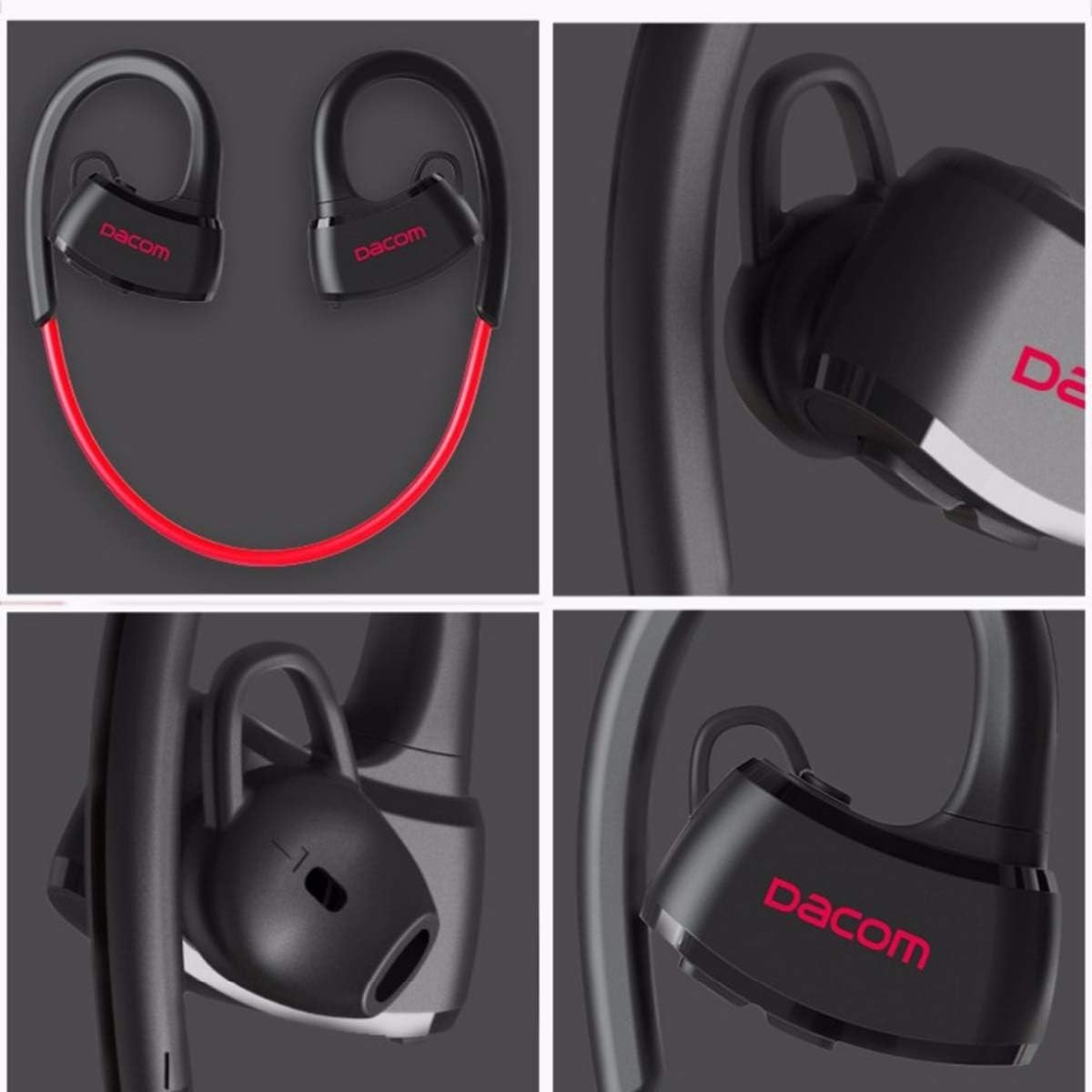
Image: Detailed views of the Dacom P10 earbuds, highlighting the ear hook design, Dacom branding, and ear tip structure.
Key Features:
- IPX7 Waterproof Rating: Suitable for use during intense workouts and in rainy conditions.
- Bluetooth Connectivity: For wireless audio streaming.
- Built-in Microphone: For hands-free calling.
- Noise Cancelling: Enhances audio clarity.
- Stereo Sound: Delivers rich audio experience.

Image: A person floating in water, demonstrating the IPX7 waterproof capability of the Dacom P10 earbuds.
Setup
1. Charging the Earbuds:
Before first use, fully charge the earbuds. Connect the USB charging cable to the charging port on the earbuds and the other end to a USB power source (e.g., computer USB port, wall adapter). The indicator light will show charging status and turn off when fully charged.
2. Pairing with a Bluetooth Device:
- Ensure the earbuds are turned off.
- Press and hold the multi-function button on the earbuds until the indicator light flashes red and blue alternately, indicating pairing mode.
- On your device (smartphone, tablet, PC), enable Bluetooth and search for available devices.
- Select "Dacom P10" from the list of found devices.
- Once paired, the indicator light on the earbuds will flash blue slowly or turn off, and you will hear a confirmation tone.

Image: Illustrates compatibility with various devices such as laptops, tablets, and smartphones, which can be paired with the earbuds.
Operating Instructions
Power On/Off:
- Power On: Press and hold the multi-function button until the blue indicator light flashes.
- Power Off: Press and hold the multi-function button until the red indicator light flashes and then turns off.
Music Playback:
- Play/Pause: Short press the multi-function button.
- Next Track: Long press the Volume + button.
- Previous Track: Long press the Volume - button.
- Volume Up: Short press the Volume + button.
- Volume Down: Short press the Volume - button.
Call Management:
- Answer/End Call: Short press the multi-function button.
- Reject Call: Long press the multi-function button.
- Redial Last Number: Double-press the multi-function button.
Maintenance
- Cleaning: Use a soft, lint-free cloth to wipe the earbuds. For ear tips, remove them and clean with mild soap and water, then dry thoroughly before reattaching.
- Storage: Store the earbuds in a cool, dry place away from direct sunlight and extreme temperatures.
- Battery Care: To prolong battery life, avoid fully discharging the earbuds frequently. Charge them regularly, even if not in use for extended periods.
Troubleshooting
| Problem | Possible Cause | Solution |
|---|---|---|
| Cannot power on | Low battery | Charge the earbuds fully. |
| Cannot pair with device | Earbuds not in pairing mode / Device Bluetooth off / Too far apart | Ensure earbuds are in pairing mode (flashing red/blue). Turn on Bluetooth on your device. Keep devices within 10 meters. |
| No sound | Volume too low / Not connected / Wrong audio output selected | Increase volume on earbuds and device. Re-pair the earbuds. Check audio output settings on your device. |
| Intermittent connection | Interference / Too far from device / Obstacles | Move closer to the device. Avoid strong electromagnetic interference. |
Specifications
| Feature | Detail |
|---|---|
| Brand | Dacom |
| Model Number | P10 (2724629220479) |
| Connectivity Technology | Wireless (Bluetooth) |
| Headphone Form Factor | In-Ear |
| Noise Control | Active Noise Cancellation |
| Microphone | Included |
| Waterproof Rating | IPX7 |
| Compatible Devices | PC, Mac |
| Product Dimensions | 4.6 x 16.2 x 11 cm |
| Item Weight | 160 grams |
| Color | Red |
| Included Components | Cable, User Manual |
Warranty and Support
For warranty information and technical support, please refer to the contact details provided on the product packaging or the official Dacom website. Keep your purchase receipt as proof of purchase for warranty claims.
This product is designed for adult use. Please ensure proper handling and storage.


