
Introduction
This manual provides essential information for the safe and efficient installation, operation, and maintenance of your Circutor eHOME T2C32 V25030. Wall Charging Box. Please read this manual thoroughly before using the product and retain it for future reference.
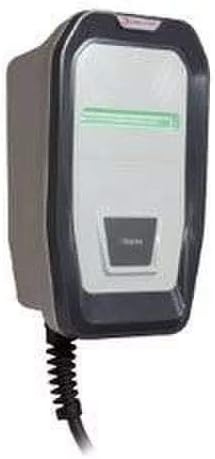
The Circutor eHOME T2C32 V25030. is designed for easy installation in private, indoor, and outdoor parking areas, providing a high-quality charging solution for electric vehicles. It supports Mode 3 charging with Type 1 or Type 2 connectors, compatible with various electric vehicle brands.
Safety Information
Important Safety Instructions:
- Installation must be performed by qualified personnel in accordance with local electrical codes and regulations.
- Do not attempt to open, disassemble, or modify the charging box.
- Ensure the charging box is properly grounded.
- Avoid contact with water or other liquids.
- Do not use the charging box if it is damaged or shows signs of malfunction.
- Keep children away from the charging area during operation.
- Always follow the vehicle manufacturer's instructions for charging.
Package Contents
Verify that all items are present in the package:
- Circutor eHOME T2C32 V25030. Wall Charging Box (1 unit)
- Instruction Manual (this document)
- Mounting hardware (if included, not explicitly stated but common)
Note: The primary component included is the charging box itself.
Specifications
| Feature | Detail |
|---|---|
| Manufacturer | Circutor, Sa |
| Item Model Number | V25030. |
| Package Dimensions | 48 x 40 x 17.8 cm |
| Item Weight | 4.8 kilograms |
| Quantity of Items | 1 |
| Included Components | Charging box |
| Battery(ies) Required | No |
| Spare Parts Availability | Information unavailable |
| ASIN | B073V4F4VQ |
| Date First Available | 20 April 2022 |
Setup
Professional Installation Required: The Circutor eHOME T2C32 V25030. Wall Charging Box requires professional installation by a certified electrician. Improper installation can lead to electric shock, fire, or damage to the unit and vehicle.
Installation Steps (for qualified personnel):
- Site Selection: Choose a suitable location in a private, indoor, or outdoor parking area, ensuring it is protected from direct impact and extreme weather conditions.
- Power Supply: Ensure a dedicated electrical circuit with appropriate voltage and current protection is available.
- Mounting: Securely mount the charging box to a solid wall or support structure using appropriate fasteners.
- Electrical Connection: Connect the charging box to the main electrical supply according to local wiring regulations and the product's wiring diagram.
- Grounding: Ensure the unit is properly grounded.
- Testing: After installation, perform thorough testing to verify correct operation and safety features.
Operating Instructions
The Circutor eHOME T2C32 V25030. is designed for straightforward operation. Always refer to your electric vehicle's owner's manual for specific charging procedures.
- Ensure Power: Verify that the charging box is powered on and ready for use (indicated by status lights, if present).
- Connect to Vehicle: Take the charging cable from the eHOME unit and securely plug the appropriate connector (Type 1 or Type 2) into your electric vehicle's charging port.
- Initiate Charging: The charging process should begin automatically. Some vehicles or units may require a manual start via a button or an app.
- Monitor Status: Observe the status indicators on the charging box and your vehicle to confirm charging is active.
- Terminate Charging: To stop charging, follow your vehicle's instructions, then safely disconnect the charging cable from the vehicle and return it to its storage position on the eHOME unit.
Note: The eHOME range is optimized for Mode 3 charging, which involves communication between the charging station and the vehicle for safe and efficient power delivery.
Maintenance
Regular maintenance ensures the longevity and safe operation of your Circutor eHOME T2C32 V25030. Wall Charging Box.
- Cleaning: Periodically clean the exterior of the charging box with a soft, damp cloth. Do not use abrasive cleaners or solvents. Ensure the unit is powered off before cleaning.
- Cable Inspection: Regularly inspect the charging cable and connector for any signs of wear, damage, or fraying. If any damage is observed, discontinue use and contact qualified service personnel.
- Ventilation: Ensure that the charging box's ventilation openings (if any) are not obstructed to prevent overheating.
- Professional Checks: It is recommended to have the unit inspected by a qualified electrician annually to ensure continued safe operation.
Troubleshooting
If you encounter issues with your Circutor eHOME T2C32 V25030., refer to the following common problems and solutions:
| Problem | Possible Cause | Solution |
|---|---|---|
| Charging box not powering on. | No power supply; circuit breaker tripped. | Check the main power supply and circuit breaker. If the issue persists, contact a qualified electrician. |
| Vehicle not charging. | Cable not securely connected; vehicle charging port issue; charging box fault. | Ensure the charging cable is firmly plugged into both the charging box and the vehicle. Check vehicle's charging status. If problem continues, consult your vehicle's manual or contact service. |
| Status indicator shows an error. | Internal fault; external electrical issue. | Note the error code or pattern of the indicator lights. Refer to specific error codes in the full product documentation (if available) or contact Circutor support. |
For issues not covered here, please contact Circutor customer support or a qualified service technician.
Warranty and Support
Specific warranty terms and conditions for the Circutor eHOME T2C32 V25030. Wall Charging Box are typically provided at the point of purchase or within separate warranty documentation. Please retain your proof of purchase for warranty claims.
For technical support, service, or warranty inquiries, please contact Circutor customer service or your authorized dealer. Contact information can usually be found on the manufacturer's official website or on the product packaging.
Manufacturer: Circutor, Sa
Model: V25030.