
Introduction
This instruction manual provides essential information for the safe and effective use of your Zeee 2S Lipo Battery 8000mAh 7.4V 100C Hard Case RC Battery. Please read this manual thoroughly before using the battery to ensure proper handling, charging, and maintenance, which will maximize its performance and lifespan.
Product Overview and Specifications
The Zeee 2S 8000mAh Lipo Battery is designed for high-performance RC models, offering reliable power and durability. Below are the key specifications and features of this battery.
Key Specifications:
- Battery Voltage: 7.4V
- Configuration: 2S2P
- Cell Voltage Range: 3.2V to 4.2V
- Capacity: 8000mAh
- Discharge Rate: 100C
- Plug Type: T Connector
- Balance Connector: JST-XH
- Dimensions (L*W*H): 138mm * 47mm * 25mm (5.43in * 1.85in * 0.98in)
- Approximate Weight: 320g (11.3oz)
- Battery Cell Composition: Lithium Polymer
- Wire Gauge: 12AWG
- Case Type: Hard Case
Product Dimensions

Image: Zeee 2S 8000mAh Lipo Battery with its physical dimensions clearly marked, showing a length of 138mm, width of 47mm, and height of 25mm.
Product Details
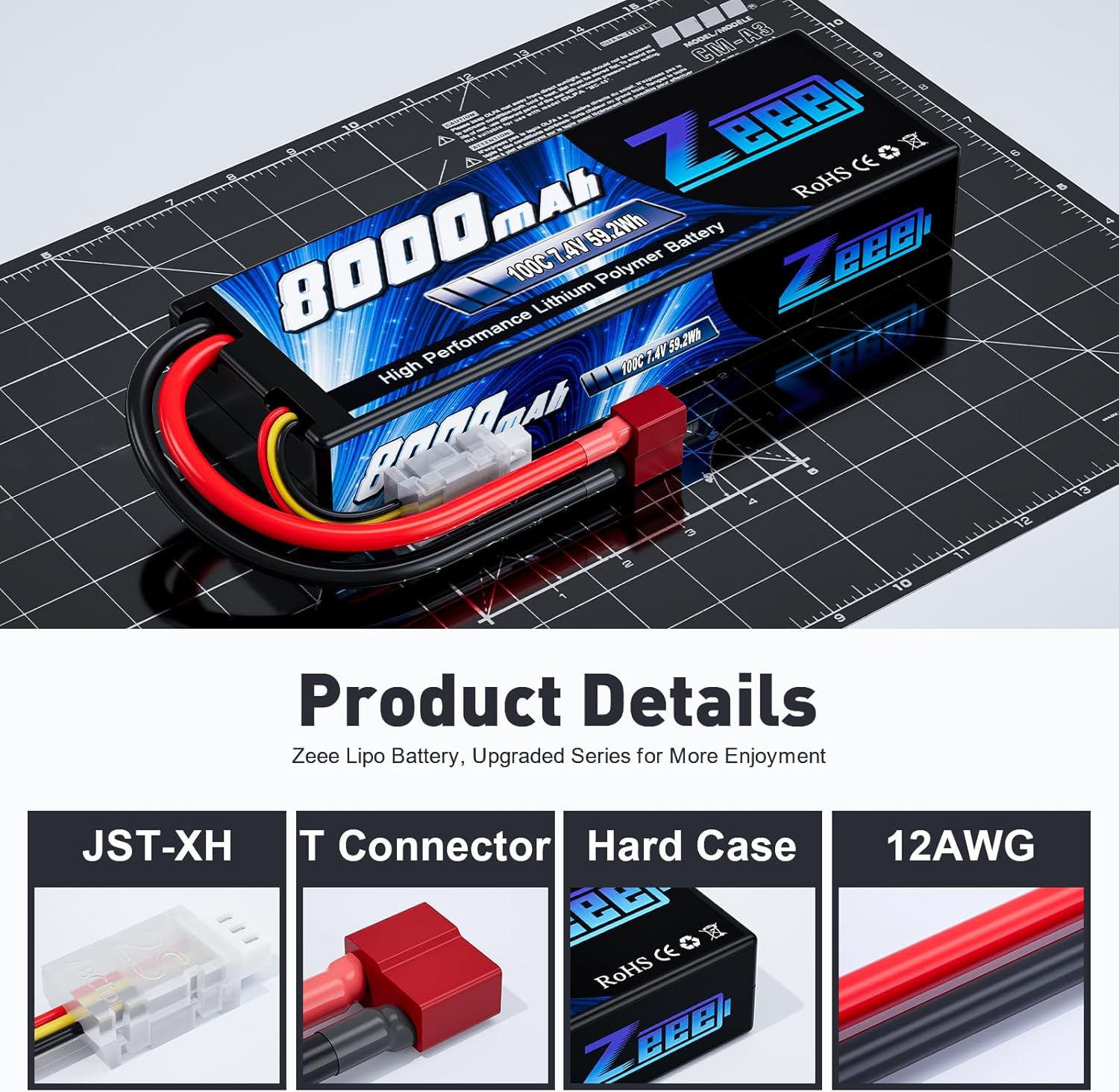
Image: Detailed view of the Zeee Lipo Battery highlighting its components: the JST-XH balance connector, the T-connector for power, the protective hard case, and the robust 12AWG wiring.
Discharge and Cycle Performance

Image: Graphs illustrating the discharge C-rate and capacity retention over multiple charge cycles for Zeee batteries compared to other brands, indicating consistent performance.
Application Compatibility
This Zeee 8000mAh 2S Lipo battery is suitable for professional 1/8 scale and 1/10 scale RC car hobby models, including popular brands like Slash, Bandit, Rustler version, Losi, and Team Associated. Compatibility is ensured if the voltage, dimensions, and plug type match your specific model's requirements.

Image: The Zeee Lipo Battery positioned alongside an RC monster truck, illustrating its intended use in various RC vehicles.
What's Included

Image: The package contents for the Zeee 2S 8000mAh Lipo Battery, showing one battery, a user manual, and the retail packaging.
Product Video
Video: An official product video from Zeee showcasing the Lipo Battery and its features.
Safety Warnings
Lithium Polymer (LiPo) batteries require careful handling. Failure to follow these safety guidelines can result in fire, personal injury, and property damage.
- Users must read the safety manual before using the battery.
- Use only Lithium Polymer (LiPo) specific balance chargers. Do not use NiMH, NiCd, or other battery chargers.
- The charge rate should not exceed 1C. For this 8000mAh battery, the maximum charge current is 8.0A (8000mAh / 1000 * 1C = 8A).
- Never charge the battery unattended. Always monitor the charging process.
- Do not overcharge or over-discharge the battery. Overcharging can lead to fire, and over-discharging can damage the battery.
- Store batteries in a fireproof container or LiPo safety bag.
- Keep batteries away from flammable materials, heat sources, and direct sunlight.
- Do not puncture, disassemble, short-circuit, or expose the battery to liquids.
- If the battery swells, smokes, or gets excessively hot, immediately disconnect it from the charger or device and move it to a safe, non-flammable area.
- Dispose of damaged or swollen batteries properly according to local regulations.
Setup Instructions
- Initial Inspection: Upon receiving your Zeee Lipo battery, inspect it for any visible damage, such as swelling, punctures, or damaged connectors. Do not use a damaged battery.
- First Charge:
- Connect the battery's T-connector to your LiPo balance charger's output port.
- Connect the JST-XH balance connector to the balance port on your charger.
- Set your charger to the LiPo balance charge mode.
- Set the charge current to 1C (8.0A for this 8000mAh battery).
- Begin charging and monitor the battery throughout the process. The battery is fully charged when each cell reaches 4.2V.

Image: A Zeee Lipo battery connected to a balance charger, illustrating the correct setup for charging.
- Installation in RC Model:
- Ensure your RC model's battery compartment can accommodate the battery dimensions (138x47x25mm).
- Secure the battery firmly within the compartment to prevent movement during operation.
- Connect the battery's T-connector to your RC model's ESC (Electronic Speed Controller) power input.
Operating Instructions
- Always ensure the battery is fully charged before use for optimal performance and runtime.
- Monitor the battery voltage during use. Most RC models have a Low Voltage Cutoff (LVC) feature to prevent over-discharging. Ensure your LVC is set correctly for 2S LiPo batteries (typically around 3.2V per cell).
- Avoid continuous high-current discharge that can cause excessive heat buildup. Allow the battery to cool down between runs.
- If the battery becomes hot during operation, stop using it immediately and allow it to cool before handling or recharging.
- After use, if you do not plan to recharge and use the battery immediately, discharge it to a storage voltage (typically 3.8V-3.85V per cell) using a LiPo charger's storage mode.
Maintenance
- Storage: Store LiPo batteries at room temperature (15-25°C or 59-77°F) in a dry, fireproof location, away from direct sunlight and heat sources. For long-term storage, ensure each cell is at its storage voltage (3.8V-3.85V).
- Cleaning: Keep the battery and connectors clean and free from dirt or debris. Use a soft, dry cloth for cleaning.
- Inspection: Regularly inspect the battery for any signs of damage, such as swelling, tears in the casing, or damaged wires/connectors. Discontinue use immediately if any damage is observed.
- Cycle Life: While Zeee batteries are designed for a long cycle life, proper charging and discharging practices (avoiding overcharge/discharge, maintaining storage voltage) are crucial for maximizing it.
Troubleshooting
| Issue | Possible Cause | Solution |
|---|---|---|
| Battery not charging | Incorrect charger settings; damaged charger or battery; poor connection. | Verify charger settings (LiPo mode, correct cell count, 1C charge rate). Check all connections. Inspect battery and charger for damage. |
| Short runtime | Battery not fully charged; over-discharged battery; high power draw from RC model; aging battery. | Ensure full charge. Avoid over-discharging. Check RC model's power consumption. Consider battery replacement if it's old. |
| Battery swells or gets hot | Overcharging; over-discharging; internal damage; short circuit. | Immediately disconnect and move to a safe, non-flammable area. Do not use. Dispose of properly. This indicates a serious safety risk. |
| Connectors are hot | Loose connection; high current draw; undersized connectors. | Ensure connections are secure. Reduce current draw if possible. Consider upgrading connectors if they are consistently hot. |
If you encounter issues not listed here or if the suggested solutions do not resolve the problem, please contact Zeee customer support for assistance.
Warranty Information
Zeee provides a 12-month warranty for this product. This warranty covers manufacturing defects and issues arising from normal use. It does not cover damage caused by misuse, improper charging, physical impact, unauthorized modifications, or failure to follow the safety guidelines outlined in this manual.
Please retain your proof of purchase for warranty claims.
Customer Support
For any product-related questions, technical assistance, or warranty claims, please contact Zeee customer support:
- Via Amazon: Go to "Your Orders", locate your purchase, and click the "Contact Seller" option.
- Directly: Visit the Zeee storefront on Amazon and click "Ask a question".
Our support team aims to respond within 24 hours.