
Introduction
Thank you for choosing the Lasko 2510 36-Inch 3-Speed Programmable Oscillation Tower Fan. This manual provides essential information for the safe assembly, operation, and maintenance of your new fan. Please read all instructions carefully before use and retain this manual for future reference.
Important Safety Instructions
When using electrical appliances, basic precautions should always be followed to reduce the risk of fire, electric shock, and injury to persons. These include:
- Read all instructions before using this fan.
- This fan has a polarized plug (one blade is wider than the other). To reduce the risk of electric shock, this plug is intended to fit in a polarized outlet only one way. If the plug does not fit fully in the outlet, reverse the plug. If it still does not fit, contact a qualified electrician. Do not attempt to defeat this safety feature.
- Do not operate any fan with a damaged cord or plug. Discard fan or return to an authorized service facility for examination and/or repair.
- Do not run cord under carpeting. Do not cover cord with throw rugs, runners, or similar coverings. Do not route cord under furniture or appliances. Arrange cord away from traffic area and where it will not be tripped over.
- Always unplug the fan when moving it, cleaning, or whenever the fan is not in use.
- Do not insert or allow fingers or foreign objects to enter any ventilation or exhaust opening as this may cause an electric shock or fire, or damage the fan.
- Do not block air intakes or exhaust in any manner. Do not use on soft surfaces, like a bed, where openings may become blocked.
- This fan is not intended for use in wet or damp locations.
- This fan is not suitable for use in agricultural facilities including areas where livestock, poultry or other animals are confined.
- This fan is not suitable for use in hazardous locations.
Setup
Your Lasko 2510 Tower Fan requires minimal assembly. Follow these steps to prepare your fan for use:
- Unpacking: Carefully remove the fan and all packaging materials from the box. Ensure all components are present: the fan body, the base (two halves), and the remote control.
- Base Assembly:

Image: The Lasko 2510 Tower Fan with its circular base fully assembled.
Align the two halves of the base and snap them together. Then, align the assembled base with the bottom of the fan body and secure it using the provided screws. Ensure the power cord passes through the designated channel in the base. - Placement: Place the fan on a firm, level surface. Ensure there is adequate space around the fan for proper air circulation and oscillation. Avoid placing the fan near curtains or other objects that could obstruct airflow or become entangled in the fan.
- Power Connection: Plug the fan's power cord into a 120V AC wall outlet.
Operating Instructions
Your Lasko 2510 Tower Fan can be operated using the control panel on top of the fan or the included remote control.
Control Panel

Image: A close-up view of the fan's top control panel, showing buttons for Power, Speed, Oscillation, and Timer, along with indicator lights for speed (1, 2, 3) and timer settings (1hr, 2hr, 4hr).
- Power Button (U): Press to turn the fan ON or OFF.
- Speed Button (Fan Icon): Press repeatedly to cycle through the three fan speeds: 1 (Low), 2 (Medium), 3 (High). The corresponding indicator light will illuminate.
- Oscillation Button (Circle Arrows): Press to activate or deactivate the oscillation function, which allows the fan to rotate from side to side.
- Timer Button (Clock Icon): Press repeatedly to set the fan to operate for a specific duration: 1 hour, 2 hours, or 4 hours. The fan will automatically turn off after the selected time.
Remote Control
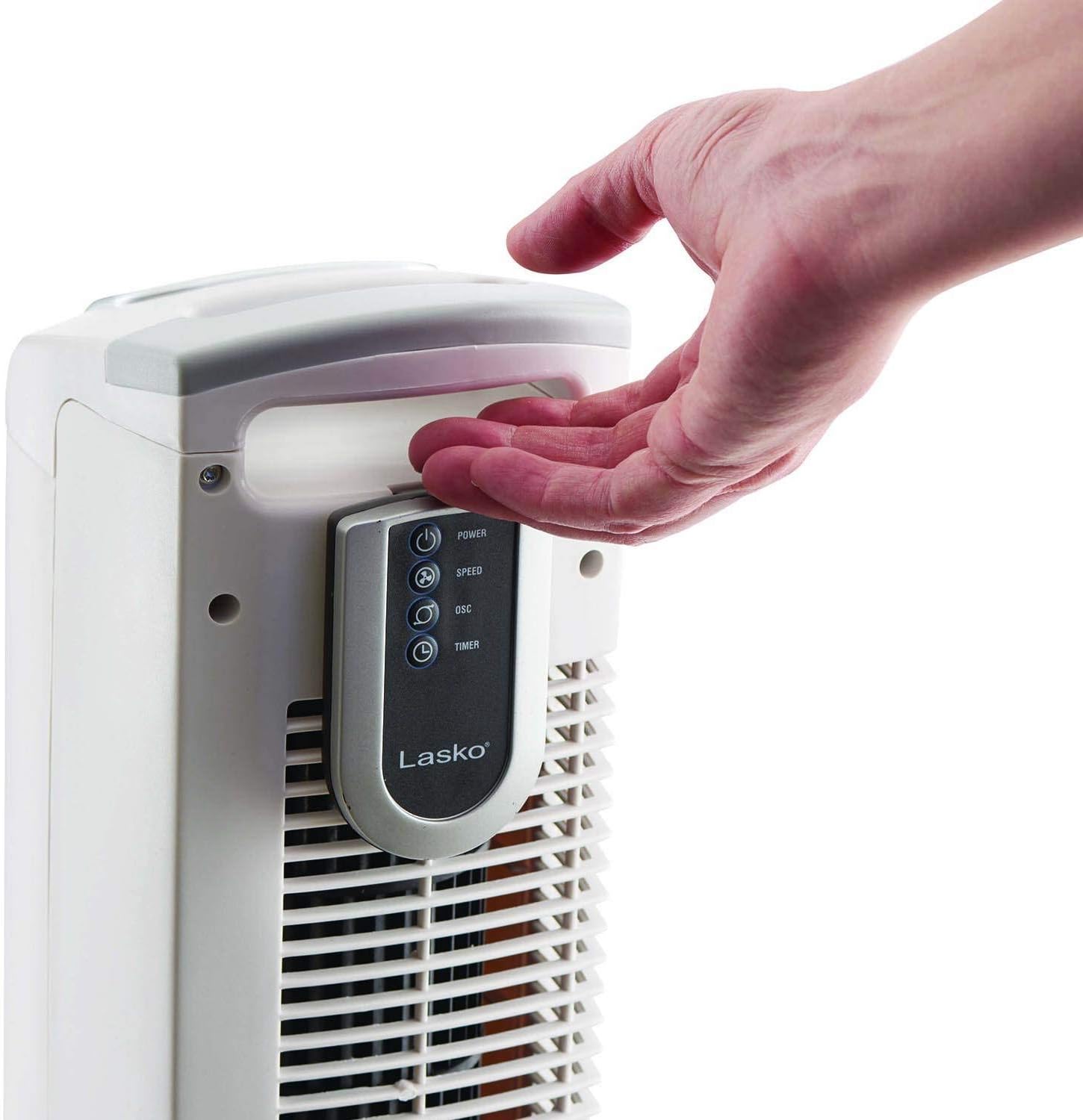
Image: A hand holding the Lasko remote control, with the fan's integrated remote storage slot visible on the back.
The remote control duplicates all functions of the control panel, allowing convenient operation from a distance. Ensure the remote has working batteries. The remote can be stored in the designated slot on the back of the fan when not in use.
Maintenance
Regular maintenance helps ensure the longevity and efficient operation of your fan.
Cleaning
- Always unplug the fan before cleaning.
- Use a soft cloth to gently wipe the exterior surfaces of the fan.
- To clean the grilles, use a vacuum cleaner with a brush attachment to remove dust and debris.
- Never immerse the fan in water or allow water to drip into the motor housing.
- Do not use gasoline, paint thinner, or other harsh chemicals to clean the fan.
Storage
When storing the fan, keep it in its original carton in a cool, dry place. Store the remote control in its designated slot on the fan to prevent loss.
Troubleshooting
If your fan fails to operate, please check the following:
- Ensure the power cord is securely plugged into a working electrical outlet.
- Check if the outlet is functioning by plugging in another appliance.
- Verify that the fan's power button is pressed to the ON position.
- If using the remote control, ensure the batteries are correctly installed and not depleted.
- If the fan still does not operate, it may require servicing. Do not attempt to repair the fan yourself.
Specifications
| Feature | Detail |
|---|---|
| Model Number | 2510 |
| Brand | Lasko |
| Height | 36 inches |
| Number of Speeds | 3 |
| Special Feature | Oscillating, Programmable Timer |
| Control Method | Button Control, Remote |
| Power Source | Corded Electric |
| Material | Plastic, Steel, Copper, Aluminum |
| Color | White |
| Indoor/Outdoor Usage | Indoor |
| Included Components | Remote |
Warranty and Customer Support
For warranty information or customer support, please refer to the warranty card included with your product or visit the official Lasko website. Do not return the product to the place of purchase without first contacting Lasko customer service.


