1. Introduction
This manual provides comprehensive instructions for the safe and effective operation of your Stagg SLI-ECOPAR186-1 Flat LED Spotlight. This professional lighting fixture is designed for various applications, offering versatile and powerful illumination for stages, events, and venues.
2. Product Features
- Beam Angle: 25 Degree beam angle for focused light projection.
- LED Configuration: Equipped with 186 x 0.1 Watt LED Bulbs.
- Power Consumption: Efficient 15 Watt power consumption.
- Control Protocol: Supports DMX-512 Protocol with selectable 4 or 8 channels.
- Operating Modes: Features DIMMER (0-100%), Strobe, Auto, Sound Control, and Master/Slave functions.
- Mounting: Includes 2 brackets for flexible hanging or floor placement.
- Usage: Designed for indoor use only.
- Connectivity: Utilizes 3-Pin DMX and IEC input and outputs.
3. Package Contents
Please check the package contents to ensure all items are present:
- 1 x Stagg SLI-ECOPAR186-1 Flat LED Spotlight
- 1 x Power Cable
- 2 x Mounting Brackets
- 1 x User Manual
4. Safety Instructions
To ensure safe operation and prevent damage, please observe the following safety precautions:
- Read all instructions thoroughly before operating the device.
- Keep the device away from water, moisture, and high humidity environments.
- Ensure adequate ventilation around the fixture to prevent overheating.
- Do not open the casing or attempt to repair the unit yourself. Refer all servicing to qualified personnel.
- This product is designed for indoor use only. Do not expose to rain or extreme temperatures.
- Always disconnect power before cleaning or performing maintenance.
5. Setup
5.1 Mounting
The SLI-ECOPAR186-1 is equipped with two adjustable brackets, allowing for flexible installation. The fixture can be securely hung from a truss system or placed stably on a flat surface. Always ensure the fixture is firmly secured to prevent accidental falls.
5.2 Connections
Connect the provided IEC power cable to the fixture's power input and then to a suitable electrical outlet. For DMX control, connect standard 3-pin DMX cables from your DMX controller to the fixture's DMX input. To daisy-chain multiple units, connect the DMX output of the first fixture to the DMX input of the next.
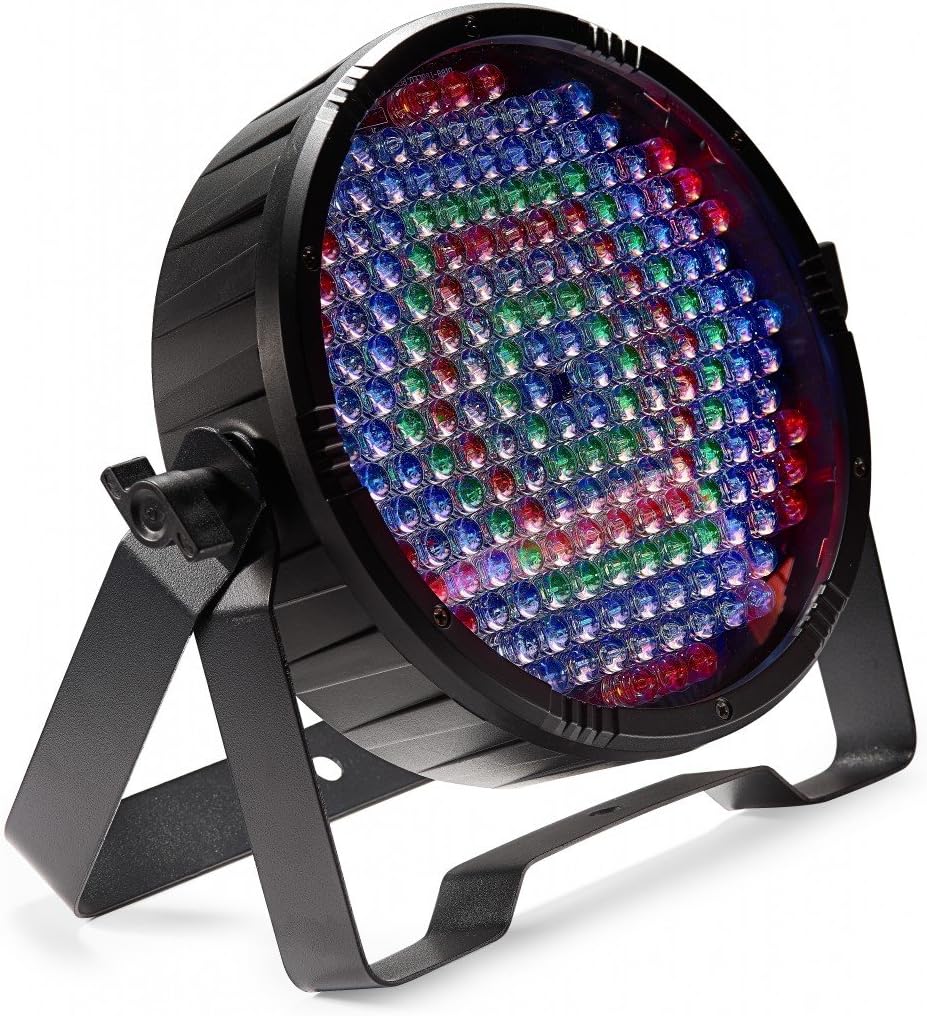
Image: The Stagg SLI-ECOPAR186-1 Flat LED Spotlight, featuring a circular array of numerous small, multi-colored LED bulbs. The fixture is black with two adjustable mounting brackets, designed for versatile positioning.
6. Operating Modes
The Stagg SLI-ECOPAR186-1 offers several operating modes to suit various lighting needs:
- DMX-512 Protocol: Allows for precise control over light functions using an external DMX controller. The fixture can be set to 4 or 8 DMX channels. Refer to the DMX chart (typically found in the full product manual) for specific channel assignments and values.
- Dimmer (0-100%): Adjusts the overall brightness of the light output from completely off to full intensity.
- Strobe: Activates a rapid flashing effect, with adjustable speed.
- Auto Mode: The fixture cycles through a series of pre-programmed light shows automatically, providing dynamic lighting without external control.
- Sound Control Mode: An integrated microphone allows the light to react to ambient sound or music, synchronizing light changes with audio beats.
- Master/Slave Function: Connect multiple SLI-ECOPAR186-1 units together for synchronized operation. Set one unit as the 'Master' and the others as 'Slave' units. The slave units will mimic the master's behavior.
7. Maintenance
Regular maintenance ensures the longevity and optimal performance of your LED spotlight:
- Cleaning: Periodically clean the lens and the exterior casing with a soft, dry, lint-free cloth. Do not use abrasive cleaners, solvents, or harsh chemicals, as they may damage the finish or optical components.
- Connections: Routinely check all power and DMX cable connections to ensure they are secure and free from damage.
- Storage: When not in use for extended periods, store the fixture in a cool, dry place, away from direct sunlight and extreme temperatures.
8. Troubleshooting
If you encounter issues with your Stagg SLI-ECOPAR186-1, refer to the following common problems and solutions:
- No Power:
- Ensure the power cable is securely connected to both the fixture and a working electrical outlet.
- Verify that the power switch on the fixture is in the 'ON' position.
- No Light Output:
- Check the selected operating mode (e.g., DMX, Auto, Sound).
- If in DMX mode, ensure a valid DMX signal is being received and the DMX address is correctly set.
- Confirm the dimmer setting is not at 0%.
- Incorrect Operation / Unresponsive:
- Temporarily disconnect and reconnect the power to reset the unit.
- If using DMX, double-check your DMX channel settings and ensure there are no conflicts with other devices.
9. Specifications
| Attribute | Value |
|---|---|
| Light Source Type | Light Emitting Diode |
| Brand | Stagg |
| Item Weight | 2.89 Pounds (1.31 kg) |
| Global Trade Identification Number | 00882030234835 |
| Manufacturer | Stagg |
| UPC | 882030234835 |
| Product Dimensions | 9.4 x 3.1 x 9.3 inches (23.9 x 7.9 x 23.6 cm) |
| Country of Origin | China |
| ASIN | B073PV6RNJ |
| Item Model Number | SLI-ECOPAR186-1 |
| Date First Available | July 5, 2017 |
10. Warranty and Support
For detailed warranty information, technical support, or service inquiries regarding your Stagg SLI-ECOPAR186-1 Flat LED Spotlight, please contact Stagg customer service directly or visit the official Stagg website. Keep your purchase receipt as proof of purchase for any warranty claims.


