
1. Important Safety Instructions
Please read all instructions carefully before using the XTERRA Fitness TRX3500 Treadmill. Retain this manual for future reference.
- Always consult with a physician before starting any exercise program.
- Keep children and pets away from the treadmill during operation.
- Place the treadmill on a solid, level surface with adequate clearance around it.
- Wear appropriate exercise attire and footwear.
- Do not operate the treadmill if it has a damaged cord or plug, or if it is not working properly.
- Use the safety key clip at all times. In case of emergency, the safety key will stop the treadmill.
- WARNING: This product can expose you to chemicals including Lead, which is known to the State of California to cause cancer and birth defects or other reproductive harm. For more information go to www.P65Warnings.ca.gov.
2. Product Overview
The XTERRA Fitness TRX3500 is a premium folding smart treadmill designed for home use, offering a smooth and powerful workout experience.
Key Features:
- Smooth and powerful 3.0 HP motor.
- Reader-friendly 6.5” bright blue backlit LCD display.
- Variety of motivating programs: 30 pre-set, 2 custom, 1 heart rate control, and manual options.
- Handlebar mounted speed and incline controls for quick adjustments.
- Built-in Bluetooth FTMS-enabled for connectivity to third-party apps like Zwift, Kinomap, Tacx, and more.
- Large XTRASoft Cushioned Running Deck (20" x 60") for maximum impact absorption.

Image: The powerful 3.0 HP motor of the TRX3500 treadmill.

Image: Close-up of the XTRASoft Cushioned Deck, designed for comfort and impact absorption during workouts.
3. Setup
Assembly:
The XTERRA TRX3500 Treadmill requires assembly. Refer to the included Owner's Manual for detailed step-by-step instructions. All necessary tools are typically provided.
Placement:
Ensure the treadmill is placed on a stable, flat surface. Recommended total space for operation is 11.5' x 6', with 3.5' clear space behind and 20" clear space in front and on sides.
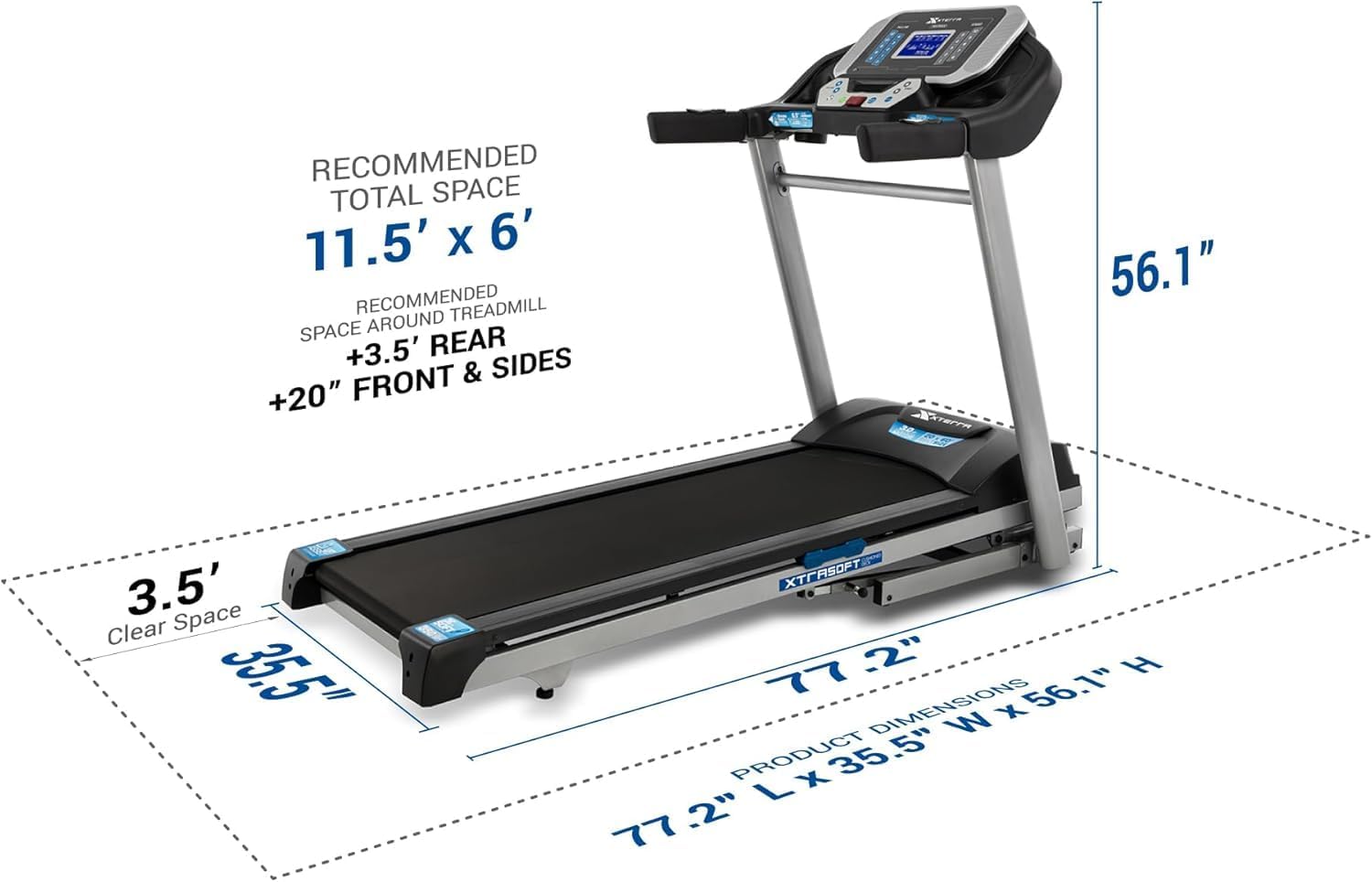
Image: Diagram illustrating the recommended total space and product dimensions for the TRX3500 treadmill.
Folding and Unfolding:
The treadmill features a folding deck design for convenient storage. To fold, lift the running deck until it locks into place. To unfold, gently release the deck, and it will slowly lower for added safety.

Image: A person demonstrating the folding mechanism of the TRX3500 treadmill, showing how the deck can be slowly lowered for safe setup.

Image: The TRX3500 treadmill in its folded position, highlighting its compact design for storage.
4. Operating Instructions
Console Functions:
The 6.5" blue backlit LCD display shows program profile, time, speed, pace, distance, calories, incline, and pulse. Use the quick keys for direct access to various speed and incline levels.

Image: Close-up of the TRX3500 treadmill console, showing the 6.5-inch blue backlit LCD display and direct access buttons for speed and incline.
Speed and Incline Controls:
Adjust speed from 0.5 to 12 MPH and incline from 0 to 12% using the console buttons or the convenient handlebar-mounted controls. The handlebar controls allow for quick and easy changes during your workout.

Image: Close-up of the handlebar-mounted speed and incline controls on the TRX3500 treadmill, allowing for convenient adjustments during exercise.
Workout Programs:
Choose from 30 pre-set programs, 2 custom programs, 1 heart rate control program, or manual mode to tailor your workout intensity and duration.
Bluetooth Connectivity:
The treadmill features built-in Bluetooth FTMS, enabling connection to third-party fitness apps such as Zwift, Kinomap, and Tacx. This allows for tracking workouts and accessing interactive training experiences.

Image: A smartphone displaying the XF Connect Fitness App interface, demonstrating the treadmill's Bluetooth connectivity for tracking and interactive workouts.
Official Product Video:
Video: Official product overview of the XTERRA Fitness TRX3500 Folding Treadmill, showcasing its features and operation.
5. Maintenance
General Care:
- Keep the treadmill clean by wiping it down after each use with a damp cloth.
- Regularly inspect all parts for wear and tear.
Belt Adjustment and Lubrication:
The running belt may require occasional adjustment for tension and alignment. Lubrication of the running deck is also necessary to ensure smooth operation and prolong belt life. Refer to the Owner's Manual for specific instructions on these procedures.
6. Troubleshooting
If you encounter any issues with your TRX3500 treadmill, refer to the troubleshooting section in your Owner's Manual. Common issues may include:
- Treadmill not starting: Check power connection, safety key, and main power switch.
- Belt slipping or uneven: Adjust belt tension and alignment as per manual instructions.
- Unusual noises: Inspect for loose parts or foreign objects.
For persistent problems, contact XTERRA customer support.
7. Specifications
| Feature | Detail |
|---|---|
| Brand | XTERRA |
| Model Number | TRX3500 |
| Motor | 3.0 Horsepower |
| Running Surface | 20 Inches (Width) x 60 Inches (Length) |
| Maximum Speed | 12 Miles per Hour |
| Maximum Incline | 12% |
| Display | 6.5 Inches LCD Screen |
| Connectivity | Bluetooth (FTMS-enabled) |
| Programs | 30 Pre-set, 2 Custom, 1 Heart Rate Control, Manual |
| Maximum Weight Recommendation | 350 Pounds |
| Item Weight | 213.9 Pounds |
| Product Dimensions (D x W x H) | 77.2" x 35.5" x 56.1" |
| Assembly Required | Yes |
8. Warranty and Support
Warranty Description:
- Lifetime: Frame and Motor
- 2 Years: Deck and Parts
- 1 Year: Labor
For customer support or warranty claims, please refer to the contact information provided in your Owner's Manual or visit the official XTERRA Fitness website.


