
1. Important Safety Information
Please read all instructions carefully before using the NOVA NF-4021SR Multi Super Fan. Retain this manual for future reference.
- Always ensure the fan is placed on a stable, flat surface to prevent tipping.
- Do not insert fingers or any objects through the fan grilles when the fan is operating.
- Keep the fan away from water or other liquids. Do not use in wet environments.
- Unplug the fan from the power outlet before cleaning, moving, or performing any maintenance.
- Do not operate the fan with a damaged cord or plug. If the cord or plug is damaged, contact qualified service personnel.
- This appliance is for indoor use only. Do not use outdoors.
- Keep out of reach of children and pets.
- Do not cover the fan or obstruct its airflow during operation.
2. Product Overview
The NOVA NF-4021SR Multi Super Fan is a versatile floor fan designed for indoor cooling. It features multiple fan units for enhanced airflow and comes with a remote control for convenient operation.
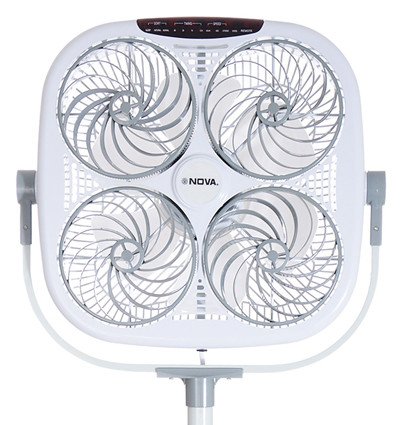
Figure 1: Front view of the NOVA NF-4021SR Multi Super Fan. This image displays the square-shaped fan unit with four individual fan blades visible behind a protective grille. The NOVA brand logo is centered on the unit, and control buttons are located on the top edge. The fan is mounted on a stand.
Key Features:
- Multi-fan design for powerful and widespread airflow.
- Remote-controlled operation for convenience.
- Floor fan design suitable for various indoor spaces.
- Energy-efficient 5 Watt power consumption.
3. Package Contents
Please check the package carefully to ensure all items are present:
- 1 x NOVA NF-4021SR Multi Super Fan Unit
- 1 x Remote Control (batteries not included)
- 1 x User Manual (this document)
4. Setup Instructions
Follow these steps to set up your NOVA NF-4021SR Multi Super Fan:
- Unpack the Fan: Carefully remove all components from the packaging. Retain packaging materials for future storage or transport.
- Assemble the Stand (if required): If the fan unit and stand are separate, attach the fan unit securely to the stand according to the diagrams in the separate assembly guide (if provided). Ensure all screws are tightened.
- Position the Fan: Place the fan on a firm, level surface in the desired location, ensuring there is adequate space around it for proper airflow. Avoid placing it near curtains or other objects that could obstruct the grilles.
- Insert Remote Batteries: Open the battery compartment on the remote control and insert the required batteries (e.g., 2 x AAA, not included), observing the correct polarity (+/-).
- Connect to Power: Plug the fan's power cord into a standard electrical outlet.
5. Operating Instructions
The NOVA NF-4021SR Multi Super Fan can be operated using the control panel on the unit or the included remote control.
5.1 Control Panel
The control panel is located on the top of the fan unit. It typically includes buttons for Power, Speed, Mode, and Timer.
- Power Button: Press to turn the fan ON or OFF.
- Speed Button: Press repeatedly to cycle through fan speeds (e.g., Low, Medium, High).
- Mode Button: Press to select different operating modes (e.g., Normal, Natural, Sleep).
- Timer Button: Press to set an auto-off timer (e.g., 1 hour, 2 hours, up to X hours).
5.2 Remote Control
The remote control duplicates the functions of the control panel, allowing for convenient operation from a distance.
- Point the remote control towards the fan's receiver.
- Press the corresponding buttons for Power, Speed, Mode, and Timer as desired.
- Ensure there are no obstructions between the remote and the fan.
6. Maintenance
Regular cleaning and maintenance will help ensure the longevity and optimal performance of your fan.
- Cleaning the Exterior:
- Always unplug the fan before cleaning.
- Wipe the exterior surfaces with a soft, damp cloth. Do not use abrasive cleaners or solvents.
- Ensure no water enters the internal components.
- Cleaning the Grilles and Blades:
- Dust can accumulate on the grilles and blades, reducing airflow.
- Use a vacuum cleaner with a brush attachment or a soft brush to remove dust from the grilles.
- If deeper cleaning is required, consult the manufacturer's instructions for grille removal (if applicable and safe to do so).
- Storage:
- When not in use for extended periods, unplug the fan and store it in a cool, dry place.
- Cover the fan to protect it from dust.
7. Troubleshooting
If you encounter issues with your NOVA NF-4021SR Multi Super Fan, refer to the table below for common problems and solutions.
| Problem | Possible Cause | Solution |
|---|---|---|
| Fan does not turn on. | No power supply. Power button not pressed. | Ensure the power cord is securely plugged into a working outlet. Press the Power button on the unit or remote. |
| Remote control not working. | Dead batteries. Obstruction between remote and fan. Remote not pointed correctly. | Replace batteries in the remote control. Remove any objects blocking the signal path. Point the remote directly at the fan's receiver. |
| Weak airflow. | Fan speed set too low. Grilles are dusty or obstructed. | Increase the fan speed setting. Clean the fan grilles and blades as described in the Maintenance section. |
| Unusual noise during operation. | Fan not on a level surface. Loose parts or foreign object. | Place the fan on a stable, level surface. Unplug the fan and carefully inspect for any loose components or foreign objects. If the noise persists, discontinue use and contact customer support. |
8. Specifications
| Feature | Detail |
|---|---|
| Brand | NOVA |
| Model Name | NF-4021SR |
| Electric Fan Design | Floor Fan |
| Power Source | Electric |
| Special Feature | Remote Controlled |
| Wattage | 5 Watts |
| Control Method | Remote |
| Indoor/Outdoor Usage | Indoor |
| Colour | Greyish White |
| Item Weight | 1 kg 500 g |
| Included Components | 1 PC NOVA Household appliance (Fan Unit) |
9. Warranty and Support
NOVA products are manufactured to high-quality standards. This product is covered by a warranty policy. For detailed information regarding warranty terms, conditions, and duration, please refer to the warranty card included with your purchase or visit the official NOVA website.
For technical support, service, or inquiries, please contact NOVA customer service through the contact information provided on the product packaging or the official NOVA website.
