
Introduction
The Antec 2 Port 3.5mm Stereo Manual Switch Box is designed to manage audio connections between multiple devices. This passive device requires no external power or software, offering a straightforward solution for audio routing in home or office environments. It features two manual switch buttons for easy selection between audio sources or destinations.
This switch box facilitates two primary configurations:
- Connecting one audio source to two different audio output devices (e.g., speakers and headphones).
- Connecting two different audio sources (e.g., computer and mobile device) to a single audio output device (e.g., a speaker system).

Figure 1: Front view of the Antec 2 Port 3.5mm Stereo Manual Switch Box.
Package Contents
- 1 x Antec 2 Port 3.5mm Stereo Manual Switch Box (Model 4330142721)
- Note: 3.5mm audio cables are not included and must be purchased separately.
Setup and Connection
The switch box is designed for simple plug-and-play operation. Ensure all audio devices are powered off before making connections.
- Identify Ports: The switch box features three 3.5mm stereo audio ports: two labeled '1' and '2' (inputs/outputs), and one labeled 'IN/OUT' (common port).
- Connection Type A: One Audio Source to Two Audio Outputs
- Connect your audio source (e.g., computer, mobile device) to the 'IN/OUT' port using a 3.5mm stereo audio cable.
- Connect your first audio output device (e.g., Speaker 1) to port '1' using a 3.5mm stereo audio cable.
- Connect your second audio output device (e.g., Speaker 2 or headphones) to port '2' using a 3.5mm stereo audio cable.
- Connection Type B: Two Audio Sources to One Audio Output
- Connect your first audio source (e.g., PC) to port '1' using a 3.5mm stereo audio cable.
- Connect your second audio source (e.g., PS5, Tablet) to port '2' using a 3.5mm stereo audio cable.
- Connect your audio output device (e.g., a single speaker system) to the 'IN/OUT' port using a 3.5mm stereo audio cable.
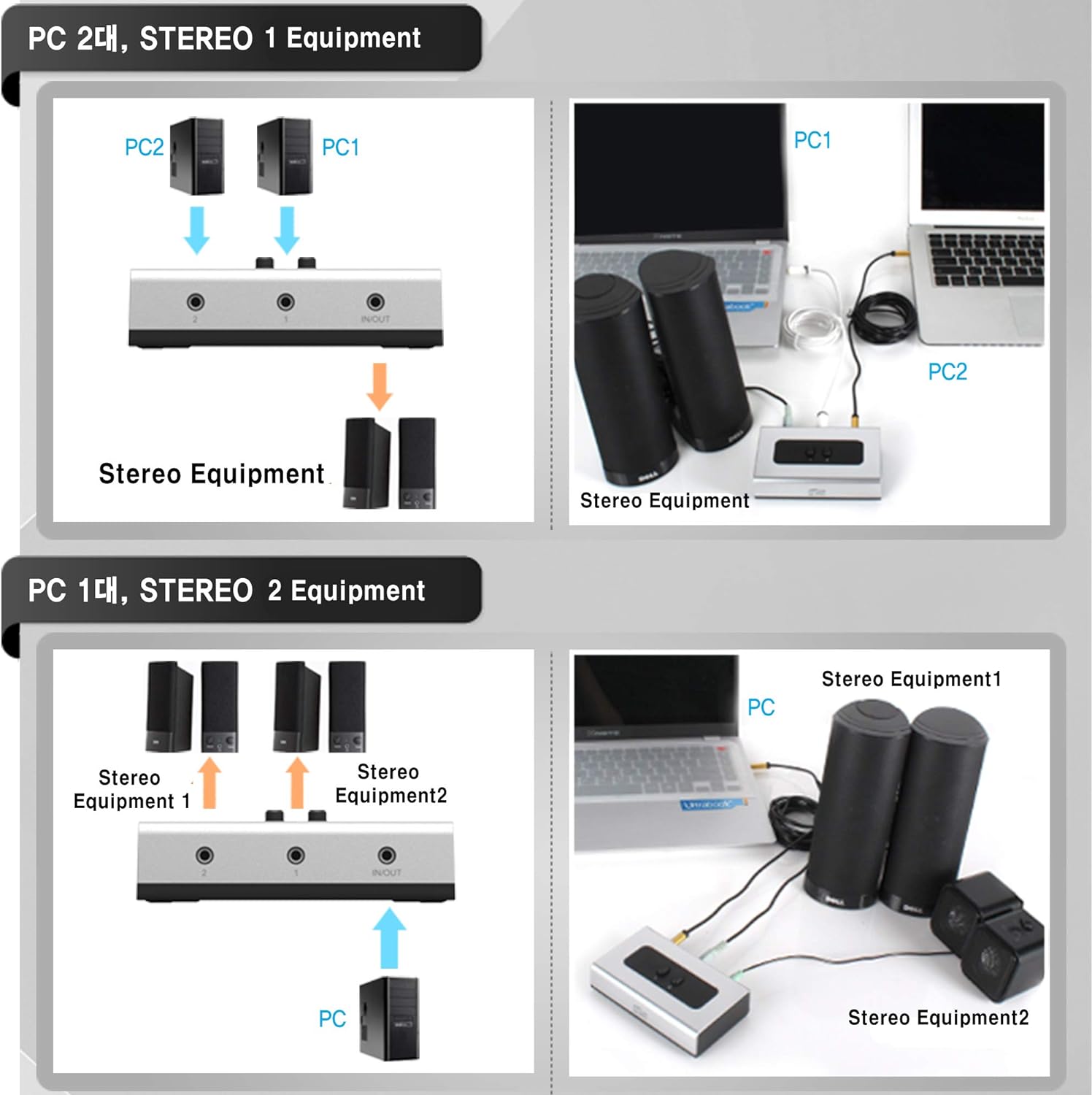
Figure 2: Connection diagrams illustrating two common setup configurations.
The switch box can be placed on a table or mounted to a wall using the built-in wall mount holes. Rubber feet are included for stable desktop placement.

Figure 3: The switch box features a wall-mounted design option.
Operating Instructions
Once connected, operate the switch box using the two manual buttons on the top panel.
- Press button 1 to select the audio path connected to port 1.
- Press button 2 to select the audio path connected to port 2.
Only one button can be engaged at a time. The selection is mechanical and immediate, requiring no power or software intervention. This allows for hot-swapping between audio paths without needing to reboot connected devices.
Maintenance
The Antec 2 Port 3.5mm Stereo Manual Switch Box requires minimal maintenance.
- Keep the device clean by wiping it with a soft, dry cloth.
- Avoid exposing the device to moisture, extreme temperatures, or direct sunlight.
- Do not attempt to disassemble the unit, as this may void any potential warranty and could cause damage.
Troubleshooting
If you encounter issues with your switch box, refer to the following common problems and solutions:
| Problem | Possible Cause | Solution |
|---|---|---|
| No audio output |
|
|
| Static, buzzing, or poor audio quality |
|
|
| Buttons not switching properly |
|
|
Specifications
| Feature | Detail |
|---|---|
| Brand | Antec |
| Model Number | 4330142721 |
| Product Dimensions | 6 x 3.8 x 1.7 inches |
| Item Weight | 5.3 ounces |
| Connector Type | 3.5mm Jack |
| Cable Type | Auxiliary |
| Compatible Devices | Gaming Console, Laptop, Personal Computer, Tablet, Television |
| Power Requirement | None (Passive Device) |

Figure 4: Detailed dimensions of the switch box.
Warranty and Support
For warranty information and technical support, please refer to the official Antec website or contact their customer service directly. Keep your purchase receipt for warranty claims.