
Unknown Yu- TLXgo-2201
Wireless Bluetooth Headset User Manual
Model: Yu- TLXgo-2201 | Brand: Unknown
Introduction
Thank you for purchasing the Wireless Bluetooth Headset. This manual provides essential information for the proper use, setup, and maintenance of your new headset. Please read it thoroughly before use to ensure optimal performance and longevity of the product.
Package Contents
Please verify that all items listed below are included in your package:
- Wireless Bluetooth Headset (2 units)
- USB Charging Cable (2 units)
- User Manual

Image: Contents of the headset package, showing one black headset and a white USB charging cable.
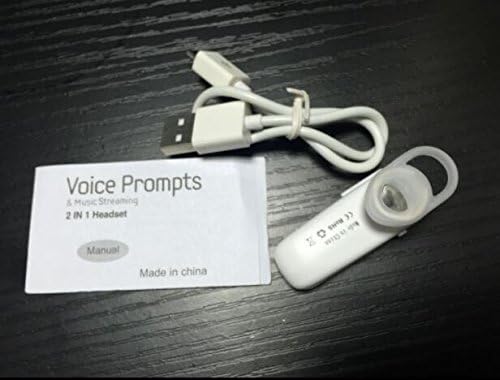
Image: Contents of the headset package, showing one white headset, a white USB charging cable, and the printed user manual.
Product Overview
The Wireless Bluetooth Headset is designed for convenience and portability, ideal for sports, driving, and daily use. It features a super mini design and supports voice prompts and music streaming.

Image: Front view of the product packaging, displaying the black wireless Bluetooth headset inside its clear plastic casing.
Specifications
| Feature | Description |
|---|---|
| Bluetooth Version | V3.0 + EDR |
| Support Profiles | Headset, Handsfree, A2DP |
| Talk Time/Playing Time | Up to 5 hours |
| Standby Time | Up to 80 hours |
| Power Source | Built-in Rechargeable Li-ion Battery |
| Connectivity Technology | Wireless |
| Form Factor | In Ear |
| Item Weight | 15.8 ounces (for 2 units) |
| Package Dimensions | 1.97 x 1.57 x 1.18 inches |
| Model Number | Yu- TLXgo-2201 |

Image: Back of the product packaging, displaying a list of product specifications including Bluetooth version, talk time, and power source.
Setup
Charging the Headset
- Connect the small end of the USB charging cable to the charging port on the headset.
- Connect the larger end of the USB charging cable to a USB power source (e.g., computer USB port, USB wall adapter).
- The indicator light on the headset will illuminate during charging. It will change color or turn off once fully charged.
- A full charge typically takes approximately 1-2 hours.
Pairing with a Bluetooth Device
- Ensure the headset is fully charged before initial pairing.
- With the headset turned off, press and hold the Multi-function Button (MFB) for approximately 5-7 seconds until the indicator light flashes red and blue alternately. This indicates the headset is in pairing mode.
- On your Bluetooth-enabled device (smartphone, tablet, etc.), go to the Bluetooth settings and ensure Bluetooth is enabled.
- Search for available devices. The headset should appear in the list, typically named "MBT2013" or similar.
- Select the headset from the list to connect. If prompted for a password, enter "0000" (four zeros).
- Once successfully paired, the indicator light will stop flashing and may show a steady blue light, and you may hear a voice prompt confirming the connection.
- The headset will automatically connect to the last paired device when turned on, if the device's Bluetooth is active and within range.
Operating Instructions
Power On/Off
- Power On: Press and hold the Multi-function Button (MFB) for about 3 seconds until the blue indicator light flashes and you hear a voice prompt.
- Power Off: Press and hold the MFB for about 3-4 seconds until the red indicator light flashes and you hear a voice prompt.
Call Management
- Answer Call: Press the MFB once.
- End Call: Press the MFB once during a call.
- Reject Call: Press and hold the MFB for about 2 seconds during an incoming call.
- Redial Last Number: Double-press the MFB when not on a call.
Music Playback
- Play/Pause: Press the MFB once during music playback.
Note: Volume control may be managed directly from your connected device.
Maintenance
- Cleaning: Use a soft, dry cloth to clean the headset. Do not use harsh chemicals or abrasive materials.
- Storage: Store the headset in a cool, dry place away from direct sunlight and extreme temperatures.
- Battery Care: To prolong battery life, charge the headset regularly, even if not in frequent use. Avoid fully discharging the battery for extended periods.
- Water Resistance: This headset is not waterproof. Avoid exposure to water or excessive moisture.
Troubleshooting
- Headset does not power on:
- Ensure the headset is fully charged. Connect it to a power source and try again.
- Cannot pair with device:
- Ensure the headset is in pairing mode (red and blue lights flashing alternately). Make sure Bluetooth is enabled on your device and it is within range (typically 10 meters). Try restarting both the headset and your device.
- No sound or poor sound quality:
- Check the volume levels on both the headset and your connected device. Ensure the headset is properly connected to your device. Move closer to your device to avoid interference.
- Headset disconnects frequently:
- Ensure the headset is within range of your device. Check for potential interference from other wireless devices. Try re-pairing the headset.
Safety Information
- Do not disassemble, repair, or modify the headset. This may cause fire, electronic breakdown, or complete damage to the product.
- Keep the headset away from extreme temperatures, humidity, and corrosive substances.
- Avoid dropping or subjecting the headset to strong impacts.
- Do not expose the headset to open flames or dispose of it in fire.
- Dispose of the product and its battery responsibly according to local regulations.
Warranty and Support
For warranty information or technical support, please refer to the contact details provided by your retailer or the manufacturer's official website. Please retain your proof of purchase for warranty claims.
Related documentsYu- TLXgo-2201


Ask a question about this manual
Ask about setup, troubleshooting, compatibility, parts, safety, or missing instructions. Manuals+ will review the question and use this page’s manual context to help answer it.