
Cambridge Soundworks SWOA3UWHT
Cambridge Soundworks OontZ Ultra Portable Bluetooth Speaker 5.0 Instruction Manual
Model: SWOA3UWHT
Introduction
Welcome to the instruction manual for your Cambridge Soundworks OontZ Ultra Portable Bluetooth Speaker 5.0. This speaker is designed to deliver clear audio with enhanced bass, featuring a durable, waterproof design and extended battery life. Please read this manual carefully to ensure proper use and to maximize your listening experience.

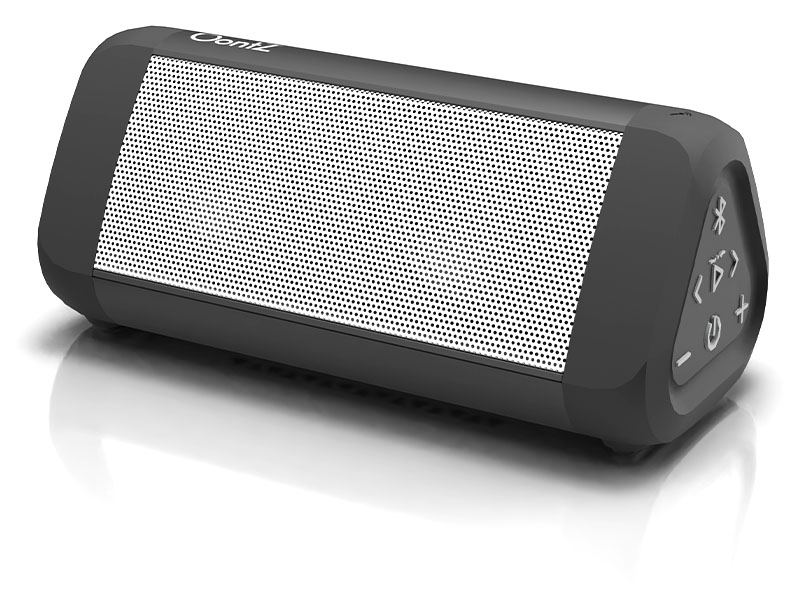
Front view of the OontZ Ultra Portable Bluetooth Speaker 5.0, black with a white grille.
What's in the Box
Verify that all items are present in your package:
- OontZ Ultra Portable Bluetooth Speaker 5.0
- USB-C Charging Cable
- 3.5mm Audio Cable
- User Manual (this document)
The OontZ Ultra speaker alongside its USB-C charging cable, 3.5mm audio cable, and user manual. The image also indicates the speaker's dimensions: 6.4 inches long and 2.8 inches high.
Product Overview
Familiarize yourself with the speaker's controls and components.

An exploded diagram illustrating the internal components of the OontZ Ultra speaker, including its precision dual drivers, passive bass radiator, battery, and control panel, highlighting its design for clear audio and enhanced bass.
Controls and Indicators:
- Power Button (⏻): Press and hold to power on/off.
- Volume Down Button (-): Press to decrease volume.
- Volume Up Button (+): Press to increase volume.
- Play/Pause Button (⏸): Press to play or pause audio.
- Previous Track Button (⏮): Press to go to the previous track.
- Next Track Button (⏭): Press to go to the next track.
- Bluetooth Button (Ⓘ): Press to enter Bluetooth pairing mode.
- Charging Port: USB-C port for charging.
- AUX IN Port: 3.5mm input for wired audio connection.
- LED Indicator: Displays power, charging, and Bluetooth status.
Setup
1. Charging the Speaker
- Connect the supplied USB-C charging cable to the charging port on the speaker.
- Connect the other end of the USB-C cable to a USB wall adapter (not included) or a computer USB port.
- The LED indicator will show charging status. A full charge provides up to 20 hours of playtime.
2. Powering On/Off
- To Power On: Press and hold the Power Button (⏻) for 2 seconds. The LED indicator will illuminate.
- To Power Off: Press and hold the Power Button (⏻) for 2 seconds. The LED indicator will turn off.
3. Bluetooth Pairing
- Ensure the speaker is powered on and within 100 feet of your Bluetooth device.
- The LED indicator will flash blue, indicating it is in pairing mode.
- On your Bluetooth device, go to the Bluetooth settings and search for "OontZ Ultra".
- Select "OontZ Ultra" from the list of available devices to connect.
- Once paired, the LED indicator will turn solid blue, and you will hear an audible confirmation.

The OontZ Ultra speaker positioned outdoors during a gathering, emphasizing its extended 20-hour battery life for prolonged music playback.
Operating
1. Playing Audio
- After successful Bluetooth pairing, open your music application on your device and begin playback.
- Use the Volume Up (+) and Volume Down (-) buttons on the speaker or your device to adjust the volume.
- Use the Play/Pause (⏸), Previous Track (⏮), and Next Track (⏭) buttons to control playback.
2. Stereo Pairing (Dual Speaker Mode)
You can pair up to four OontZ Ultra speakers for a stereo sound experience using the OontZ app. Note that Dual Mode is only compatible with 4th Generation Angle 3 speakers.
- Ensure both speakers are charged and powered on.
- Download and open the OontZ app on your smartphone or tablet.
- Follow the in-app instructions to connect and pair your OontZ Ultra speakers for stereo playback.

Two OontZ Ultra speakers shown together, illustrating their ability to connect for stereo sound and highlighting the 100-foot wireless Bluetooth range.
3. Using the Auxiliary Input
- Connect one end of the supplied 3.5mm audio cable to the AUX IN port on the speaker.
- Connect the other end of the audio cable to the headphone jack or audio output of your device.
- The speaker will automatically switch to AUX mode. Adjust volume from your device and the speaker.
4. Answering Calls
- When a call comes in while connected via Bluetooth, the music will pause.
- Press the Play/Pause button (⏸) once to answer the call.
- Press the Play/Pause button (⏸) again to end the call.
Maintenance
1. Cleaning
- Wipe the speaker with a soft, damp cloth.
- Do not use abrasive cleaners or solvents.
- Ensure the charging port cover is securely closed when cleaning or using near water.
2. Storage
- Store the speaker in a cool, dry place away from direct sunlight and extreme temperatures.
- If storing for an extended period, charge the battery periodically to maintain its lifespan.

The OontZ Ultra speaker shown partially submerged in water, illustrating its IPX7 waterproof capability, suitable for use near pools or in the shower.
Troubleshooting
| Issue | Possible Solution |
|---|---|
| Speaker does not power on. | Ensure the battery is charged. Connect the speaker to a power source using the USB-C cable. |
| Cannot pair via Bluetooth. |
|
| No sound or low volume. |
|
| Audio cuts out or is distorted. |
|
Specifications
| Model Name | OontZ Ultra Portable Bluetooth Speaker 5.0 |
| Model Number | SWOA3UWHT |
| Brand | Cambridge Soundworks |
| Connectivity | Bluetooth 5.0, Auxiliary (3.5mm) |
| Wireless Range | Up to 100 feet (unobstructed) |
| Output Power | 14 Watts |
| Water Resistance | IPX7 (submersible up to 3 feet for 30 minutes) |
| Battery Life | Up to 20 hours (at 2/3 volume) |
| Power Source | Battery Powered (1 Lithium Ion battery included) |
| Charging Port | USB-C |
| Dimensions (L x W x H) | 6.5" x 2.8" x 2.8" (16.5 cm x 7.1 cm x 7.1 cm) |
| Weight | 0.48 kg (1.06 lbs) |
| Material | Plastic |
Warranty and Support
Limited Warranty
The OontZ Ultra Portable Bluetooth Speaker 5.0 comes with a limited warranty. For specific terms and conditions, please refer to the warranty card included with your product or visit the official Cambridge Soundworks website.
Customer Support
For further assistance, troubleshooting, or product inquiries, please visit the Cambridge Soundworks support page on their official website. You may find FAQs, additional resources, and contact information there.
Related documentsSWOA3UWHT


Ask a question about this manual
Ask about setup, troubleshooting, compatibility, parts, safety, or missing instructions. Manuals+ will review the question and use this page’s manual context to help answer it.