
Introduction
This manual provides comprehensive instructions for the ETT Eco Tech Time Solar Chronograph Watch, model EGS-11328-81M. This sophisticated timepiece combines solar power with radio-controlled accuracy, ensuring reliable timekeeping without the need for frequent battery changes. Designed for durability and functionality, it features a robust stainless steel case and strap, a dark dial, and a range of advanced functions including a chronograph, world time, and perpetual calendar. Please read this manual thoroughly to understand the full capabilities and proper operation of your watch.
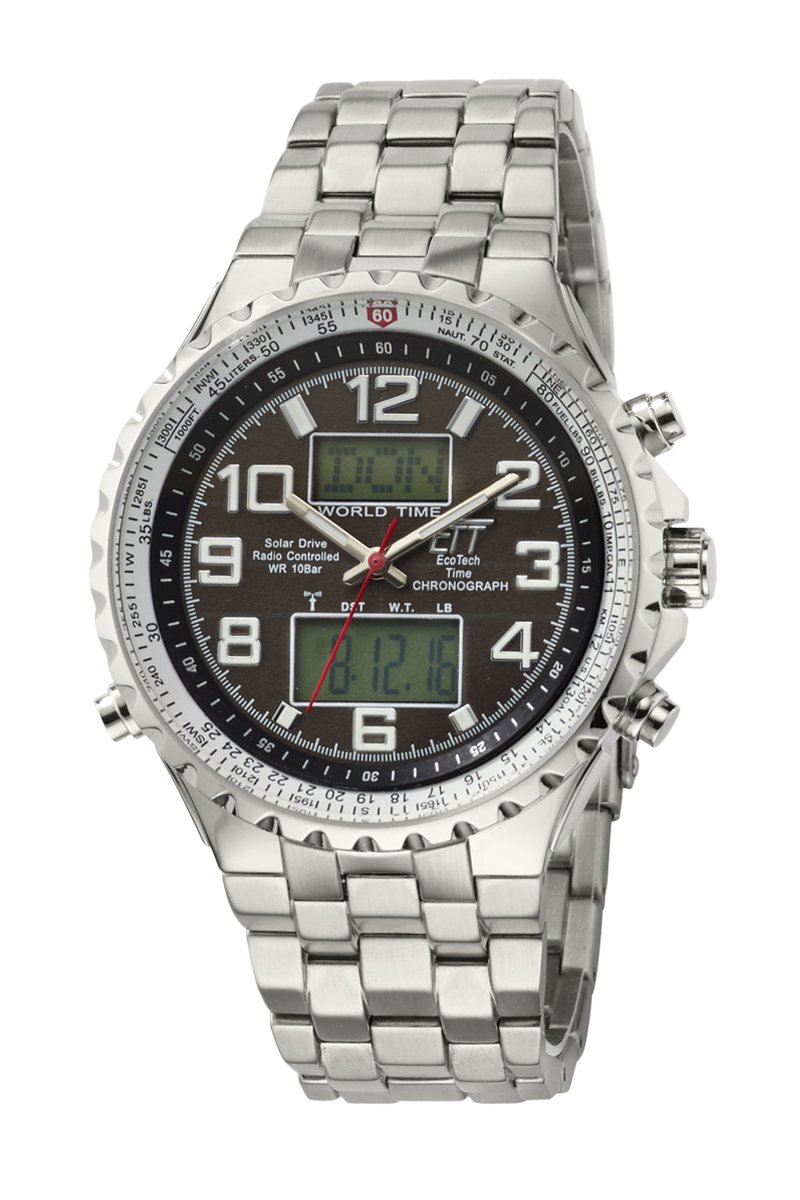
Image: Front view of the ETT Eco Tech Time Solar Chronograph Watch EGS-11328-81M, showcasing its dark dial, analog and digital displays, and stainless steel bracelet.
Key Features
- Solar Drive Movement: Powered by light, eliminating the need for battery replacement.
- Radio-Controlled Time: Automatically receives the DCF 77 signal (Mainflingen, Germany) for precise time synchronization, ensuring accuracy of +/- 1 second per million years.
- Chronograph Function: Integrated stopwatch for measuring elapsed time.
- World Time: Displays time for 38 cities worldwide, with a dedicated world timer function.
- Perpetual Calendar: Automatically adjusts for different month lengths and leap years.
- Automatic Summer/Winter Time Adjustment: Seamless transition between daylight saving and standard time.
- Date Display: Clearly shows the current date.
- Charging Status Indicator: Monitors the watch's power reserve.
- Luminous Hands and Numbers: Provides visibility in low-light conditions.
- Water Resistance: Rated up to 10 bar (100 meters), suitable for swimming and showering.
- Durable Construction: Features mineral glass and a stainless steel case and bracelet with a safety clasp.
Setup
Upon first use or after extended storage in darkness, expose the watch to light to initiate charging. The watch is designed for easy setup, primarily through its radio-controlled function.
- Initial Charge: Place the watch under a strong light source (natural sunlight is ideal) for several hours to ensure a sufficient initial charge. The charging status indicator will show the current power level.
- City Selection: The watch requires you to set your current city or the closest major city within its 38-city world time database. Refer to the detailed instruction manual (usually provided in the watch packaging) for specific button operations to navigate and select your city. Once selected, the watch will attempt to configure itself automatically.
- Automatic Time Synchronization: After setting your city, the watch will automatically attempt to receive the DCF 77 atomic time signal, typically overnight. Ensure the watch is placed in an area with good signal reception, away from electronic interference. The watch will then synchronize its time and date for your selected region.
- Manual Time Adjustment (If Needed): In areas outside the DCF 77 signal range or if automatic synchronization fails, manual time and date adjustment is possible. Consult the full instruction manual for detailed steps on manual setting.

Image: Map illustrating the reception range of the DCF 77 radio signal, covering a significant portion of Europe, including major cities like London, Paris, Berlin, and Rome, with a 1,000 km radius from the signal source.
Operating Instructions
Your ETT Eco Tech Time watch offers various functions accessible via its pushers and crown.
- Time Display: The watch displays time both analogically (hands) and digitally. The digital display can often be configured independently or to show additional information.
- Chronograph (Stopwatch):
- Press the upper right pusher to start the stopwatch.
- Press the upper right pusher again to pause/resume.
- Press the lower right pusher to reset the stopwatch to zero.
- World Time Function:
Access the world time mode to view the current time in any of the 38 pre-programmed cities. Use the designated pushers (refer to your detailed manual) to cycle through cities. The digital display will show the selected city's time.
- Charging Status Indicator: This indicator (often a segment on the digital display or a specific hand movement) shows the current charge level of the solar battery. Keep the watch exposed to light to maintain an optimal charge.
- Automatic Time Synchronization: The watch will attempt to receive the radio signal and synchronize its time automatically every night. Ensure it is placed in an open area for best reception.
- Luminous Display: The hands and some hour markers are coated with a luminous material. For optimal glow in darkness, expose the watch to bright light for a few minutes before entering a dark environment. Note that the luminosity duration is limited.
Maintenance
Proper care will ensure the longevity and optimal performance of your ETT Eco Tech Time watch.
- Charging: Regularly expose the watch to light (natural or artificial) to keep the solar battery fully charged. Avoid prolonged storage in darkness, which can deplete the power reserve.
- Cleaning: Wipe the watch case and bracelet with a soft, dry cloth. For stubborn dirt, a slightly damp cloth can be used, followed by drying. For the stainless steel bracelet, a soft brush and mild soapy water can be used, ensuring to rinse thoroughly and dry completely.
- Water Resistance: The watch is water-resistant up to 10 bar (100 meters). This means it is suitable for swimming and showering. Do not operate the pushers or crown while the watch is wet or submerged, as this can compromise the water resistance. After exposure to saltwater, rinse the watch with fresh water and dry it thoroughly.
- Temperature Extremes: Avoid exposing the watch to extreme temperatures (hot or cold) for extended periods, as this can affect its accuracy and battery life.
- Impact: While robust, avoid dropping the watch or subjecting it to strong impacts, which can damage the internal movement or external components.

Image: Detailed view of the watch's stainless steel bracelet and safety clasp mechanism, designed for secure wearing.
Troubleshooting
If you encounter issues with your watch, refer to the following common troubleshooting steps.
- Watch Not Functioning / Hands Not Moving:
This often indicates a low power reserve. Place the watch under strong light (e.g., direct sunlight) for several hours to fully charge it. Check the charging status indicator to confirm power accumulation.
- Incorrect Time / Date:
Ensure the watch is receiving the radio signal. Place it near a window, away from electronic devices, especially overnight. Verify that the correct city is selected for your time zone. If automatic synchronization consistently fails, manual adjustment may be necessary (refer to the detailed manual).
- Luminous Hands Not Glowing:
The luminous material requires exposure to light to charge. If the hands are not glowing, expose the watch to a bright light source for a few minutes. Note that the glow duration is limited and will fade over time in darkness.
- Digital Display Contrast Too Weak:
A weak display contrast can sometimes be related to low power. Ensure the watch is fully charged. If the issue persists, it may indicate a service requirement.
- Water Inside the Watch:
If moisture appears inside the watch, stop using it immediately and contact customer support. This indicates a breach in water resistance, which requires professional repair.
Specifications
| Model Number | EGS-11328-81M |
| Movement | Solar Drive (W345), Radio-Controlled (DCF 77 signal) |
| Accuracy | +/- 1 second per 1 million years (via radio signal) |
| Case Material | Stainless Steel |
| Case Dimensions | Ø 45 mm x H 14 mm |
| Glass Type | Mineral Glass |
| Band Material | Stainless Steel |
| Band Width | 20 mm |
| Max. Wrist Circumference | 20 cm |
| Weight | 161 g |
| Water Resistance | 10 bar (100 meters) |
| Power Source | Solar Drive (with internal backup battery, not user-replaceable) |
| Manufacturer | ETT Eco Tech Time |
Warranty and Support
For warranty information, please refer to the warranty card included with your purchase or visit the official ETT Eco Tech Time website. If you require technical assistance, repairs, or have questions not covered in this manual, please contact ETT Eco Tech Time customer support directly. Keep your proof of purchase for warranty claims.

Image: The packaging box for the ETT Eco Tech Time watch, typically containing the watch, manual, and warranty information.

Image: The Eco Tech Time Solar Drive Initiative logo, featuring a frog, symbolizing environmental consciousness and solar power.

