
1. Introduction
The BONECO U350 Ultrasonic Humidifier is designed to improve indoor air quality by adding moisture to the air. This unit features an innovative top-fill design for easy refilling, touch-sensitive controls, and an LED display. It can operate in both warm and cool mist modes and includes an AUTO mode for self-regulating humidification. The integrated demineralization cartridge helps prevent limescale residue.
This manual provides essential information for the safe and efficient operation, maintenance, and troubleshooting of your BONECO U350 humidifier. Please read all instructions carefully before use.
2. Safety Instructions
Always observe the following safety precautions to reduce the risk of injury, electric shock, or damage to the appliance:
- Read all instructions before operating the appliance.
- Place the humidifier on a firm, level, water-resistant surface at least 6 inches (15 cm) away from walls and appliances.
- Do not immerse the appliance in water or other liquids.
- Unplug the humidifier before filling, cleaning, or performing any maintenance.
- Do not use attachments not recommended by the manufacturer.
- Keep out of reach of children and pets.
- Use only clean, cool tap water or distilled water.
- Do not add essential oils directly into the water tank; use the designated fragrance tray.
3. Package Contents
Verify that all items are present in the packaging:
- BONECO U350 Humidifier Unit
- A250 AQUA PRO Water Filter
- Cleaning Brush
- Packet of EZCal Cleaning Solution
- Instruction Manual (this document)
4. Setup
Follow these steps to set up your BONECO U350 humidifier for first use:
- Unpack the Unit: Carefully remove all packaging materials and place the humidifier on a stable, level surface.
- Install Water Filter: The A250 AQUA PRO water filter is typically pre-installed. Ensure it is securely in place in the water tank. This filter helps demineralize water and prevent limescale.
- Fill the Water Tank:

Image: A hand pouring water from a pitcher into the open top of the BONECO U350 humidifier. A small yellow cleaning brush is visible attached to the lid.
Lift the top lid of the humidifier. Pour clean, cool tap water or distilled water directly into the water tank until it reaches the 'MAX' fill line. Close the lid securely.
- Connect Power: Plug the power cord into a suitable electrical outlet.
5. Operating Instructions
The BONECO U350 features a multifunctional digital display with touch-sensitive controls for easy operation.
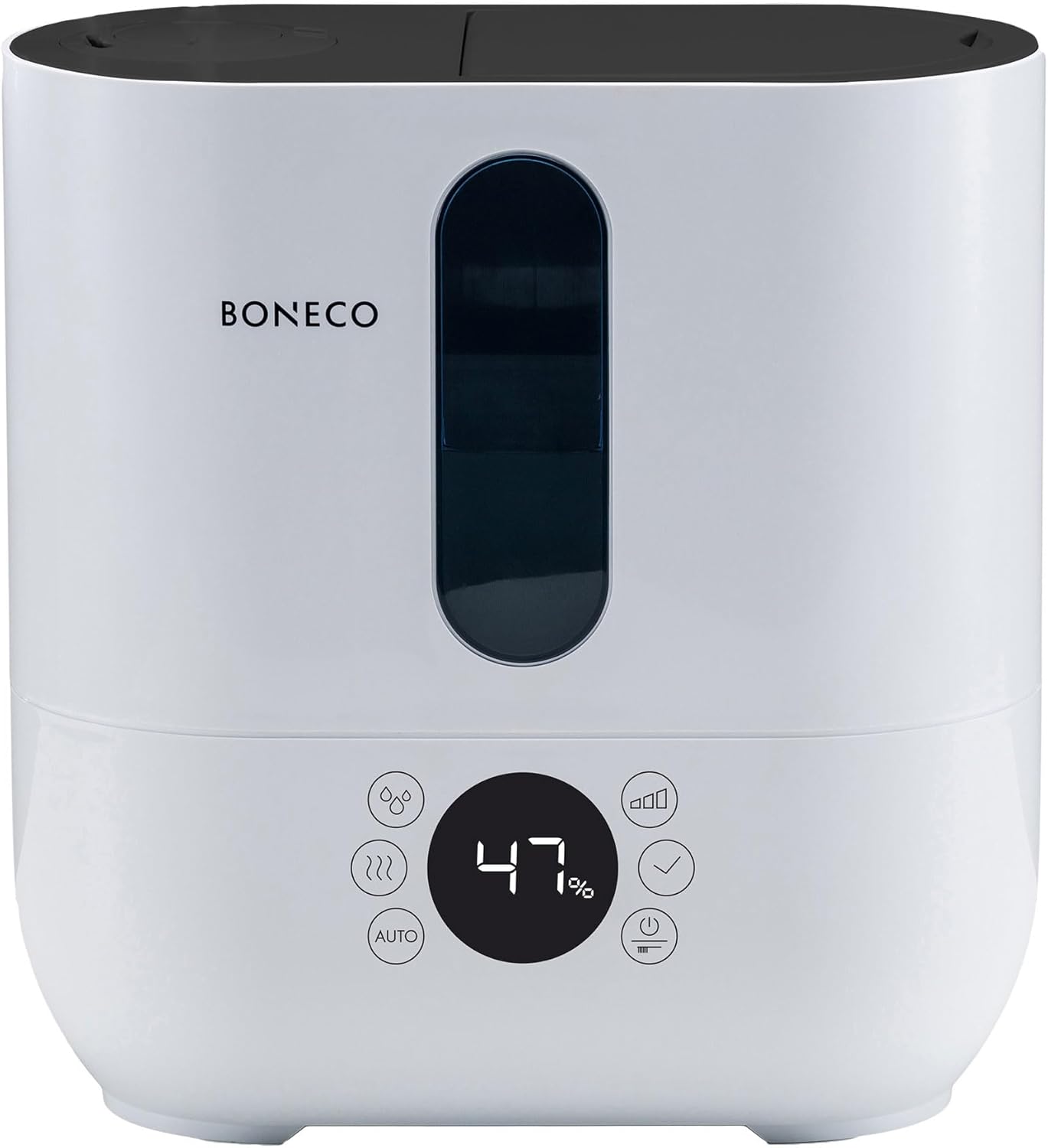
Image: Front view of the BONECO U350 humidifier, highlighting its digital display and touch controls. The display shows '47%' humidity.
5.1. Basic Operation
- Power On/Off: Press the power button on the control panel to turn the unit on or off.
- Adjust Mist Output: The humidifier offers 3 performance levels (Low, Medium, High). Use the mist output button to cycle through these levels.
- Warm or Cool Mist: Select between warm or cool mist output using the dedicated button. Warm mist provides faster humidification during colder months.
- Double Jet Nozzle: The mist can be directed in two directions using the double jet nozzle. Adjust the nozzles as desired to distribute mist effectively in the room.
5.2. AUTO Mode
The AUTO mode simplifies humidification by automatically maintaining an optimal relative humidity level.
- Activate AUTO Mode: Press the 'AUTO' button on the control panel.
- Automatic Humidification: In AUTO mode, the humidifier will automatically adjust its output to achieve and maintain a relative humidity of 50%. This is measured by the built-in humidistat.
- Customizing AUTO Mode: The target humidity can be adjusted from the default 50% if desired.
5.3. Fragrance Tray
The BONECO U350 includes a fragrance tray for using essential oils to scent your room.

Image: A hand holding a small bottle, adding drops of essential oil into the pull-out fragrance tray located at the back of the BONECO U350 humidifier.
- Access Tray: Locate the small pull-out tray on the side or back of the unit.
- Add Essential Oil: Place a few drops of your preferred essential oil onto the felt pad in the tray.
- Do Not Add to Water Tank: Never add essential oils directly into the water tank, as this can damage the unit.
5.4. Digital Display Reminders
The digital display provides helpful reminders:
- Refill Water: Indicates when the water tank needs refilling.
- Replace Water Filter: Reminds you when it's time to replace the A250 AQUA PRO filter.
- Humidity Indicator: Shows the current relative humidity level in the room.
5.5. Product Overview Video
Video: An official product video from BONECO North America Corp. demonstrating the features and operation of the BONECO U350 humidifier, including its top-fill design, mist output, and overall aesthetic.
6. Maintenance
Regular cleaning and maintenance are crucial for the optimal performance and longevity of your humidifier.
6.1. Daily Maintenance
- Refill Water: Always use fresh water when refilling the tank.
- Wipe Down: Wipe any condensation or water droplets from the exterior of the unit.
6.2. Weekly Cleaning
- Unplug: Always unplug the humidifier before cleaning.
- Empty Water: Empty any remaining water from the tank and base.
- Clean Water Tank: Use the provided cleaning brush to gently scrub the inside of the water tank and remove any mineral deposits or film. Rinse thoroughly.
- Demineralization Cartridge: The integrated demineralization cartridge helps prevent limescale. Replace the A250 AQUA PRO filter as indicated by the display or approximately every 2-3 months, depending on water hardness and usage.
- Descaling: Periodically descale the unit using the EZCal cleaning solution or a vinegar solution as per the instructions provided with the cleaning solution. This helps remove stubborn mineral buildup.
- Wipe Dry: Dry all parts thoroughly before reassembling.
7. Troubleshooting
If you encounter issues with your BONECO U350, refer to the following common problems and solutions:
| Problem | Possible Cause | Solution |
|---|---|---|
| No mist output | Low water level Mineral buildup on transducer Unit not properly assembled | Refill water tank Clean the transducer with the cleaning brush and descale Ensure all parts are correctly seated and lid is closed |
| Unpleasant odor | Stagnant water Dirty water tank | Empty and refill with fresh water daily Clean the water tank thoroughly |
| White dust around unit | Hard water Worn demineralization cartridge | Use distilled water Replace the A250 AQUA PRO water filter |
| Unit is noisy | Unit not on a level surface Internal component vibration | Ensure unit is on a flat, stable surface Contact customer support if noise persists after checking water levels and placement |
If the problem persists after attempting these solutions, please contact BONECO customer support.
8. Specifications
Detailed technical specifications for the BONECO U350 Humidifier:
| Feature | Detail |
|---|---|
| Brand | BONECO |
| Model Name | U350 |
| Special Feature | Humidistat, Quiet Operation |
| Color | White |
| Recommended Room Area | Up to 860 sq. ft. |
| Operation Mode | Automatic |
| Product Dimensions (D x W x H) | 6.5" x 12.1" x 12.7" |
| Item Weight | 7.7 Pounds |
| Humidity Output | Up to 3 gallons/day |
| Included Components | Aqua Pro Filter, cleaning brush, EZCal cleaning solution |
| UPC | 834546000978 |
| Manufacturer | BONECO North America Corp. |
| First Available Date | August 17, 2017 |
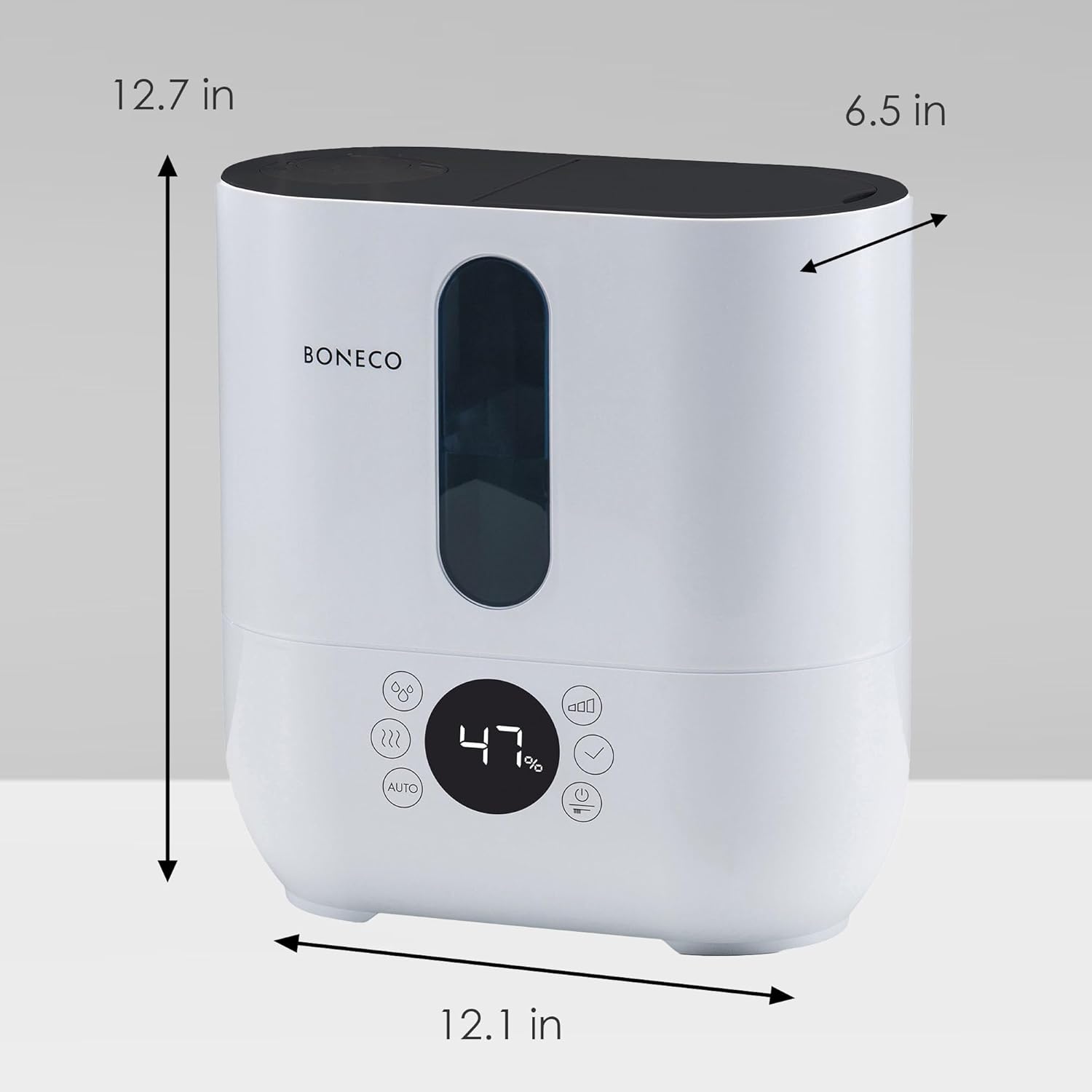
Image: A diagram showing the dimensions of the BONECO U350 humidifier: 12.7 inches high, 12.1 inches wide, and 6.5 inches deep.
9. Warranty & Support
For warranty information and customer support, please refer to the official BONECO website or contact BONECO North America Corp. directly. Keep your proof of purchase for any warranty claims.
- Online Support: Visit the official BONECO website for FAQs, product registration, and support resources.
- Contact Manufacturer: Refer to the contact information provided in your product packaging or on the BONECO website for direct assistance.


