
1. Introduction
The iSpring WSP-100 Reusable Whole House Spin Down Sediment Water Filter is designed to protect your entire plumbing system and appliances from sediment, rust, dirt, sand, and large particles. This pre-filter acts as the first line of defense, extending the life of finer filters and water-using appliances such as water heaters, washing machines, and dishwashers.

Image 1: Diagram illustrating the iSpring WSP-100 filter's role in protecting various household appliances by filtering water before it enters the main plumbing system.
2. Product Features
- 100 Micron Filtration: Effectively removes sediment, rust, dirt, sand, and large particles.
- Flushable and Reusable: The filter screen can be easily flushed and reused, reducing the need for frequent cartridge replacements.
- Durable Materials: Constructed with solid lead-free brass machine head and a stainless steel mesh filter screen for reliability and longevity.
- User-Friendly Design: Features double threads (1-inch MNPT and 3/4 inch FNPT) for versatile installation and a see-through housing for easy visual monitoring of sediment buildup.
- Indoor Use: Suitable for indoor environments with water temperatures between 40-100°F and pressure between 15-115 psi.

Image 2: This image compares the smooth, consistent water flow and durability of the Dutch Weave Stainless Steel Pre-Filter (WSP-SL Series) with the inconsistent flow and deformation prone nature of other non-Dutch Weave filters, highlighting the superior design of iSpring filters.

Image 3: A visual representation of the iSpring WSP-100 filter's multiple installation options, flushable and reusable design, and high-quality filter, emphasizing its ease of maintenance and adaptability.
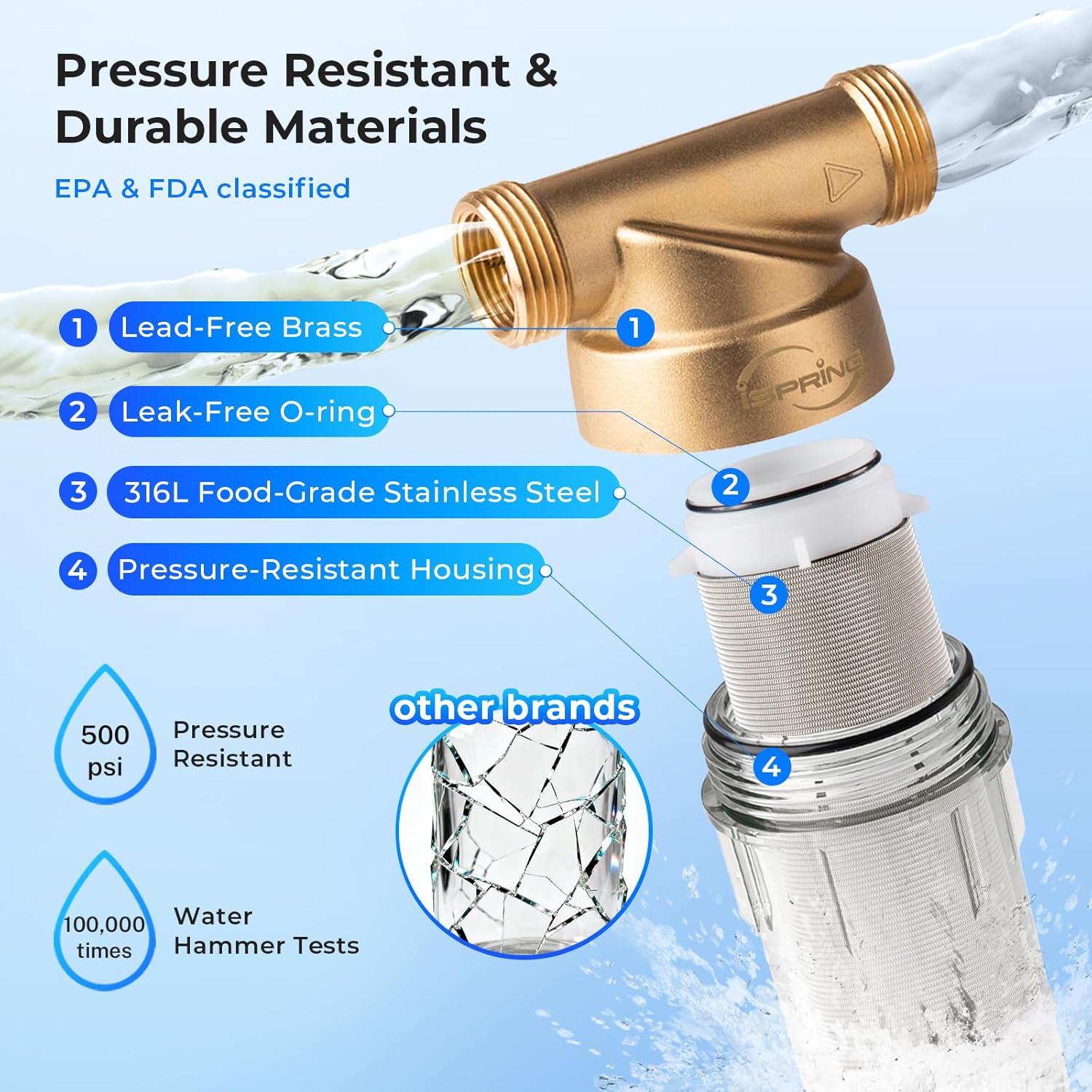
Image 4: An exploded diagram showcasing the durable and pressure-resistant materials used in the iSpring WSP-100 filter, including lead-free brass, leak-free O-rings, 316L food-grade stainless steel, and pressure-resistant housing, capable of withstanding up to 500 psi and 100,000 water hammer tests.

Image 5: A chart demonstrating the precision filtration capabilities of iSpring WSP Series filters across various micron sizes (1000, 500, 200, 100, 50 microns), showing what types of particles each size can filter, from glass wool to silt and asbestos, and advising users to choose the most suitable micron for their home.
3. What's Included
Your iSpring WSP-100 package includes the following components:
- Filter Unit (Head Machine, Housing, Filter)
- Wrench
- Manual
- Mounting Bracket
- Mounting Screws
- Plumber's Tape
- Housing O-ring (Spare)

Image 6: The iSpring WSP-100 filter unit, showcasing its brass head and clear housing, alongside the included wrench for maintenance.
4. Safety Precautions
- This system must be installed in a dry indoor environment, away from heat sources.
- This system is only suitable for municipal tap water and well water within the temperature range of 40°F - 100°F.
- Do not allow wastewater or corrosive liquids to pass through the filter.
- The filter must be installed upright.
- Be sure the water flow direction marked on the valve body is the same as the direction of water flow within the pipeline.
- The installation location must provide reliable drainage.
- The unit comes with two types of threads on both ends: 1" Male NPT and 3/4" Female NPT to ensure proper fit for different plumbing sizes.
5. Installation Guide
Follow these steps to install your iSpring WSP-100 filter:
Step 1: Prepare for Installation
- Shut off the main water supply to your home.
- Open the nearest faucet to drain water from the pipes and release any pressure.
Step 2: Select Location and Cut Pipe
- Find a suitable location for the filter, ensuring it is in a dry indoor environment with reliable drainage.
- Measure and cut the cold water inlet pipe where the filter will be installed. Use a bucket to catch any remaining water.
Step 3: Connect Fittings
- Apply plumber's tape evenly on the machine head threads.
- Screw the appropriate connectors (1" MNPT or 3/4" FNPT) to the threaded ends of the filter head. Tighten with a wrench.
Step 4: Mount Filter
- Mount the provided bracket securely on the wall.
- Install the filter unit to the pipeline, ensuring the water flow direction arrow on the machine head matches the direction of water flow in your plumbing.
Step 5: Drain Line Connection
- Connect a drain hose (not included) to the drain connector at the bottom of the filter. Ensure the drain hose leads to a reliable drainage point.
Step 6: Final Check
- Slowly turn on the main water supply.
- Check for any leaks and ensure the filter is operating correctly.
Installation Video Guide
Video 1: Official iSpring installation guide for WSP, WSP-SL, and WSP-GR series filters. This video provides a visual walkthrough of the installation process, including preparation, connecting fittings, mounting, and drain line assembly.
6. Operation
Once installed, the iSpring WSP-100 filter operates continuously, filtering sediment from your water supply. The transparent housing allows for easy visual inspection of the filter screen to monitor sediment buildup.
7. Maintenance
Regular maintenance ensures optimal performance and longevity of your iSpring WSP-100 filter.
Manual Flushing
To flush the filter:
- Ensure the drain pipe or drain is clear and can drain freely.
- Switch the drain valve at the bottom of the filter to the vertical (open) position to flush. Water will drain, carrying away accumulated sediment.
- Let the water drain for a few seconds until it runs clear.
- Switch the drain valve back to the horizontal (closed) position when finished.
The frequency of flushing depends on the quality of your source water. It may be necessary to flush the filter screen at least once every week for optimal performance.
Filter Screen Cleaning/Replacement
If manual flushing is insufficient or the screen appears heavily clogged, a deeper clean or replacement may be necessary:
- Shut off the main water supply and open a nearby faucet to relieve pressure.
- Drain any remaining water from the filter by opening the drain valve.
- Unscrew the filter housing counter-clockwise using the included housing wrench. Use a bucket to catch any drips.
- Remove the stainless steel mesh filter screen from the housing.
- Clean the filter screen thoroughly with a brush under running water. For stubborn deposits, soak the screen in vinegar for a few hours before scrubbing.
- Inspect the O-ring for any damage. Replace if necessary (a spare O-ring is included).
- Reinstall the clean filter screen into the housing.
- Carefully align the filter housing with the machine head and screw it on clockwise. Tighten with the housing wrench.
- Reinstall the drain hose.
- Slowly turn on the main water supply and check for leaks.
8. Troubleshooting
Here are some common issues and their potential solutions:
- Low Water Pressure: This often indicates a clogged filter screen. Perform a manual flush or a thorough cleaning of the filter screen.
- Leaks from Housing: Ensure the filter housing is tightened correctly with the wrench. Check the O-ring for proper seating or damage; replace if necessary.
- Water Not Draining During Flush: Check if the drain hose is kinked or clogged. Ensure the drain valve is fully open.
- Filter Not Catching Sediment: Verify that the filter screen is correctly installed and not damaged. Ensure the water flow direction is correct.
If you encounter issues not listed here or require further assistance, please contact iSpring customer support.
9. Specifications
| Feature | Detail |
|---|---|
| Model Number | WSP-100 |
| Filtration Rating | 100 Micron |
| Material | Brass (Head), Stainless Steel (Mesh Filter), Pressure-Resistant Housing |
| Product Dimensions | 3.5"D x 3.5"W x 9"H |
| Item Weight | 1 Pounds |
| Inlet/Outlet Connections | 1" MNPT + 3/4" FNPT |
| Operating Temperature | 40°F - 100°F |
| Operating Pressure | 15 - 115 psi |
| External Testing Certification | FDA |
| Included Components | Unit, Wrench, Manual |
10. Warranty & Support
iSpring is committed to providing quality, reliable products and services. For any questions, concerns, or warranty information regarding your WSP-100 filter, please refer to the user manual included in your package or contact iSpring customer support directly.
You can typically find contact information on the iSpring website or within your product's documentation.


