
DOBE TI-465
DOBE TI-465 Wireless Gamepad Controller Instruction Manual
Model: TI-465
1. Introduction
This manual provides comprehensive instructions for the DOBE TI-465 Wireless Gamepad Controller. This device is designed to enhance your gaming experience on various platforms, including Android smartphones, tablets, and PCs. It features wireless Bluetooth connectivity, a built-in rechargeable battery, and a telescopic holder for mobile devices. Please read this manual thoroughly before use to ensure proper operation and maintenance.
2. Safety Information
- Do not expose the device to extreme temperatures, direct sunlight, or high humidity.
- Avoid dropping or subjecting the device to strong impacts.
- Keep the device away from water and other liquids.
- Do not attempt to disassemble or modify the device. This will void the warranty and may cause damage.
- Use only the specified charging voltage (DC 5V) to prevent damage to the battery and device.
- Keep out of reach of children.
3. Package Contents
Please check the package contents upon opening. If any items are missing or damaged, contact your retailer.
- DOBE TI-465 Wireless Gamepad Controller
- USB Charging Cable
- User Manual (this document)
4. Product Overview
The DOBE TI-465 is a versatile wireless gamepad designed for comfortable and precise control across various gaming platforms. It features a standard controller layout with dual analog sticks, a D-pad, action buttons, and shoulder buttons. A built-in telescopic holder allows for direct attachment of smartphones.

Image 4.1: Front view of the DOBE TI-465 Wireless Gamepad Controller with all buttons labeled. This image illustrates the layout of the Cross function button (D-pad), Left Analog Stick, Right Analog Stick, HOME button, SELECT button, START button, L1/L2 Shoulder Buttons, R1/R2 Shoulder Buttons, X emission button, Y emission button, B emission button, and A emission button.
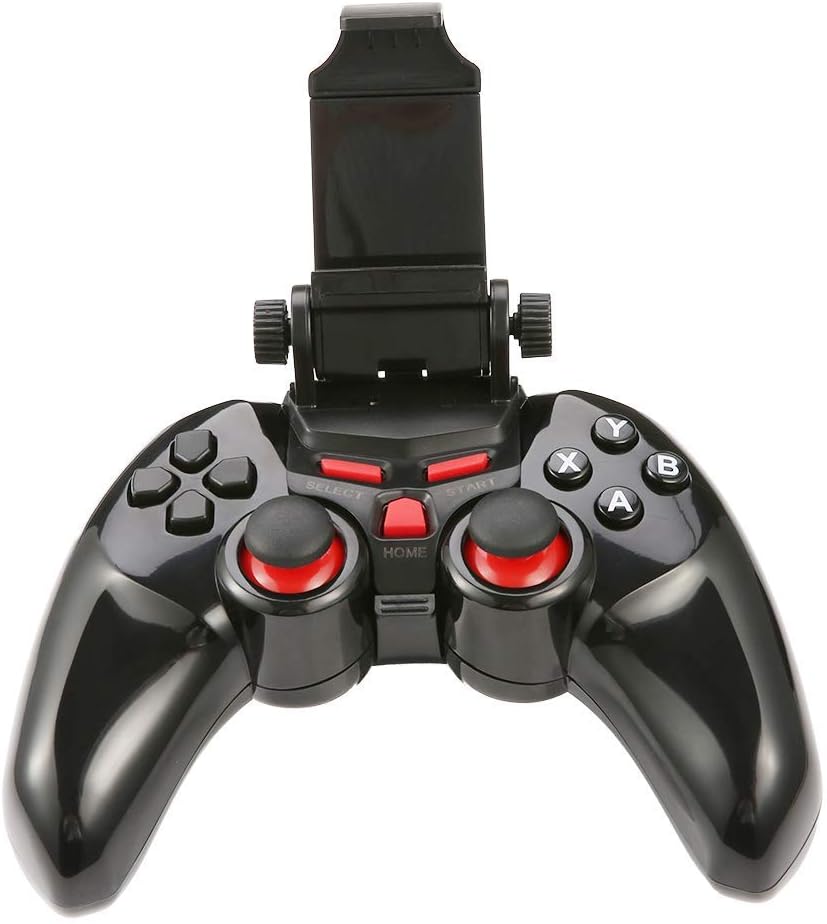
Image 4.2: The DOBE TI-465 Gamepad Controller with its integrated telescopic smartphone holder extended upwards, ready to securely hold a mobile device.
4.1 Button Layout
- Cross Function Button (D-pad): Directional input.
- Left/Right Analog Sticks: 360-degree movement control.
- A/B/X/Y Buttons: Action buttons.
- L1/L2/R1/R2 Shoulder Buttons: Additional action inputs.
- SELECT Button: Game-specific function.
- START Button: Game-specific function, often for pausing or menu access.
- HOME Button: Returns to the main menu or exits the game.
5. Setup
5.1 Charging the Controller
Before initial use, fully charge the controller.
- Connect the small end of the USB charging cable to the charging port on the controller.
- Connect the large end of the USB charging cable to a USB power source (e.g., computer USB port, USB wall adapter).
- The charging indicator light will illuminate. Once fully charged (approximately 2 hours), the light will change or turn off.
- A full charge provides approximately 20 hours of continuous use.
5.2 Bluetooth Pairing
The DOBE TI-465 uses Bluetooth 3.0 for wireless connection. Ensure your device's Bluetooth is enabled.
5.2.1 Pairing with Android Devices (Smartphones/Tablets/Android TV)
- Ensure the controller is powered off.
- Press and hold the HOME button until the indicator light starts flashing rapidly, indicating pairing mode.
- On your Android device, go to Settings > Bluetooth.
- Scan for available devices. The controller should appear as "TI-465" or similar.
- Select "TI-465" to pair. The indicator light on the controller will become solid once connected.
5.2.2 Pairing with PC (Windows XP/7/8)
- Ensure the controller is powered off.
- Press and hold the HOME button until the indicator light starts flashing rapidly.
- On your PC, go to Bluetooth & other devices settings.
- Click Add Bluetooth or other device > Bluetooth.
- Select "TI-465" from the list of available devices.
- Follow any on-screen prompts to complete the pairing. The indicator light on the controller will become solid once connected.
5.3 Installing a Smartphone
The integrated telescopic holder supports smartphones up to 6 inches in size.
- Gently pull the top part of the holder upwards to extend it.
- Carefully place your smartphone into the holder, ensuring it is securely gripped by both the top and bottom clamps.
- Adjust the angle for optimal viewing.

Image 5.1: The DOBE TI-465 Gamepad Controller with a smartphone securely mounted in its telescopic holder, demonstrating its use for mobile gaming.
5.4 Game Hall Application
For optimal compatibility and access to a wide range of games, it is recommended to download a compatible game hall application.
- Scan the QR code provided in the original product manual (not included here) to download the recommended game hall APP (e.g., Chicken Simulator, Grape Game Hall).
- Install the application on your Android device.
- Launch the game hall APP and download games compatible with external controllers.
- Ensure your controller is connected via Bluetooth before launching games from the application.
6. Operating the Controller
6.1 Power On/Off
- Power On: Press the HOME button. The indicator light will flash and then become solid if connected to a previously paired device.
- Power Off: Press and hold the HOME button for approximately 5 seconds until the indicator light turns off. The controller will also automatically enter power-saving mode if idle for an extended period without a connection.
6.2 Game Compatibility
The DOBE TI-465 is compatible with Android 3.2 and above systems, including various Android smartphones (e.g., Samsung Galaxy S9/S9+, S10/S10+, HUAWEI Mate 20/P30, OPPO R17, VIVO NEX X23 X27pro), Android TV BOX, Android TV, and PC (Win XP/7/8). It supports simulator games and iTunes compatible controller games.

Image 6.1: A user operating the DOBE TI-465 Gamepad Controller while connected to a television, demonstrating its use for TV gaming.
6.3 Power Saving Mode
The controller is designed with user-friendly software to enter a power-saving mode automatically when not connected or idle for a period. To reactivate, press the HOME button.
7. Maintenance
7.1 Cleaning
- Wipe the controller with a soft, dry cloth.
- Do not use abrasive cleaners, solvents, or strong chemicals, as these may damage the surface.
- Avoid getting moisture into any openings.
7.2 Battery Care
- To prolong battery life, avoid fully discharging the battery frequently.
- Charge the controller regularly, even if not in use for extended periods (e.g., once every 3 months).
- Store the controller in a cool, dry place.
8. Troubleshooting
| Problem | Possible Cause | Solution |
|---|---|---|
| Controller does not power on. | Battery is depleted. | Charge the controller fully. |
| Cannot connect via Bluetooth. | Controller not in pairing mode. Bluetooth on device is off. Interference. | Ensure controller is in pairing mode (flashing light). Enable Bluetooth on your device. Move closer to the device; avoid other wireless devices. |
| Controller connects but does not respond in game. | Game not compatible. Game hall app not used. | Verify game compatibility. Use the recommended game hall app for supported titles. |
| Short battery life. | Battery not fully charged. Aging battery. | Ensure controller is fully charged before use. If battery life significantly degrades, consider contacting support. |
9. Specifications
| Feature | Detail |
|---|---|
| Model | TI-465 |
| Connectivity | Bluetooth 3.0 |
| Wireless Range | 6-8 meters (19.68-26.24 ft) |
| Working Voltage | DC 3.7V |
| Working Current | 38 mA |
| Quiescent Current | <2uA |
| Charging Input Voltage | DC 5V |
| Charging Current | <500 mA |
| Battery Capacity | 400 mAh |
| Working Time | Approx. 20 hours |
| Charging Time | Approx. 2 hours |
| Telescopic Holder Support | Up to 6-inch mobile phone |
| Compatible OS | Android 3.2+, Windows XP/7/8 |
| Dimensions (approx.) | 155mm (6.1 inch) x 105mm (4.1 inch) x 70mm (2.7 inch) (folded) |
| Item Model Number | 611864732190 |

Image 9.1: The DOBE TI-465 Gamepad Controller with its telescopic holder extended, showing approximate dimensions: 155mm (6.1 inches) width, 105mm (4.1 inches) height (controller body), and 70mm (2.7 inches) height (extended holder).
10. Warranty and Support
For warranty information and technical support, please refer to the documentation provided at the time of purchase or contact your retailer. Keep your proof of purchase for warranty claims.
Related documentsTI-465


Ask a question about this manual
Ask about setup, troubleshooting, compatibility, parts, safety, or missing instructions. Manuals+ will review the question and use this page’s manual context to help answer it.