1. Important Safety Information
Read all instructions thoroughly before operating the Hobart 84186-2 Food Cutter. Failure to follow these instructions may result in serious injury or damage to the equipment. Keep this manual for future reference.
- Always ensure the unit is unplugged before cleaning, maintenance, or when not in use.
- Keep hands and utensils away from moving parts, especially the knives, during operation.
- Do not operate the food cutter without the bowl cover properly in place and secured. The safety interlock prevents operation if the cover is not correctly positioned.
- Ensure the food cutter is placed on a stable, level surface to prevent tipping.
- This appliance is designed for commercial food preparation. Do not use it for any other purpose.
- Only qualified personnel should perform repairs.
2. Setup and Installation
Carefully unpack the Hobart 84186-2 Food Cutter and inspect for any shipping damage. Report any damage immediately to the carrier and your supplier.
2.1 Placement
Place the food cutter on a sturdy, level countertop or table capable of supporting its weight (approximately 195 pounds). Ensure adequate clearance around the unit for ventilation and safe operation. The unit is equipped with 3-inch legs for stability.
2.2 Electrical Connection
The Hobart 84186-2 Food Cutter requires a 115/60/1 electrical supply. It is equipped with a 6-foot cord and plug. Connect the unit to a properly grounded electrical outlet. Do not use extension cords or adapters.
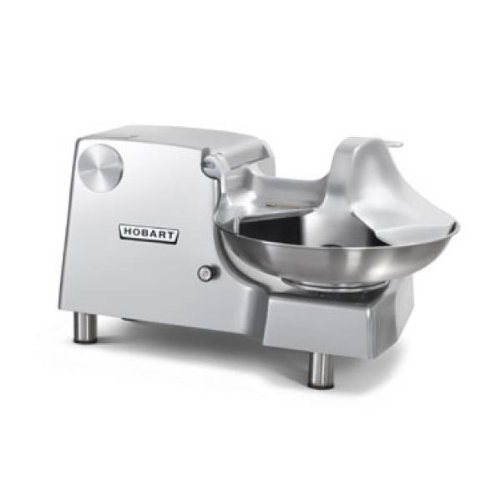
Figure 1: The Hobart 84186-2 Food Cutter, showcasing its one-piece burnished aluminum housing, 18-inch stainless steel bowl, and double stainless steel knives.
3. Operating Instructions
Follow these steps for safe and efficient operation of your food cutter.
- Preparation: Ensure the unit is clean and properly assembled. Verify the 18-inch diameter stainless steel bowl is securely in place.
- Loading Food: Place the food items to be processed into the stainless steel bowl. Do not overfill the bowl; ensure the bowl cover can be securely closed.
- Secure Bowl Cover: Carefully lower and secure the bowl cover. The unit features a safety interlock that prevents operation if the cover is not correctly seated.
- Power On: Locate the push/pull on/off switch. To start the unit, pull the switch outwards. The double stainless steel knives will begin rotating at 1725 RPM, and the bowl will rotate at 20 RPM.
- Processing: Allow the food cutter to process the ingredients until the desired consistency is achieved. Monitor the process through the bowl cover.
- Power Off: To stop the unit, push the on/off switch inwards. Wait for all moving parts to come to a complete stop before attempting to remove the bowl cover or food.
- Unloading Food: Once the unit is completely stopped, remove the bowl cover and carefully extract the processed food.
4. Maintenance and Cleaning
Regular cleaning and maintenance are crucial for the longevity and hygienic operation of your Hobart 84186-2 Food Cutter.
- Daily Cleaning: After each use, unplug the unit. Remove the bowl cover and the stainless steel bowl. These components, along with the double stainless steel knives, should be hand washed with warm, soapy water. Rinse thoroughly and dry completely.
- Housing Cleaning: The one-piece burnished aluminum housing should be wiped down with a damp cloth and mild detergent. Do not use abrasive cleaners or immerse the housing in water.
- Inspection: Periodically inspect the power cord for damage and ensure all components are securely fastened.
- Lubrication: Refer to the service manual for specific lubrication requirements, if any.
Product Care Instructions: Hand Wash all removable parts. Do not use a dishwasher.
5. Troubleshooting
This section addresses common issues you might encounter with your food cutter.
| Problem | Possible Cause | Solution |
|---|---|---|
| Unit does not start | Not plugged in; power switch off; bowl cover not secured; circuit breaker tripped. | Check power cord connection; ensure push/pull switch is pulled out; verify bowl cover is correctly seated; check building's circuit breaker. |
| Food not processing efficiently | Overloaded bowl; dull knives; incorrect food consistency for processing. | Reduce batch size; inspect knives for sharpness (contact service if dull); pre-cut larger items if necessary. |
| Excessive noise or vibration | Unstable surface; loose components; motor issue. | Ensure unit is on a stable, level surface; check for loose parts (after unplugging); if problem persists, contact authorized service. |
6. Specifications
- Model: Hobart 84186-2
- Brand: Hobart
- Item Weight: 195 pounds
- Dimensions: (Refer to product diagram for exact measurements)
- Material: One-piece burnished aluminum housing, stainless steel bowl and knives
- Bowl Diameter: 18 inches
- Bowl Speed: 20 RPM
- Knife Speed: 1725 RPM
- Motor: 1 HP
- Electrical Rating: 115/60/1
- Wattage: 900 watts
- Cord Length: 6 feet (with plug)
- Legs: 3 inches
- Safety Features: Bowl cover with safety interlock
- Manufacturer: Hobart
- ASIN: B072SWH717
- Date First Available: March 29, 2013
7. Warranty and Support
Hobart products are manufactured to high standards and are backed by a limited warranty. For specific warranty details, please refer to the warranty card included with your purchase or visit the official Hobart website.
For technical assistance, parts, or service inquiries, please contact Hobart Customer Support. Have your model number (84186-2) and serial number ready when contacting support to expedite service.
- Hobart Official Website: www.hobartcorp.com
- Customer Service: Refer to the website for regional contact information.


