
Introduction
This manual provides instructions for the safe and effective use of your Proster Coaxial Crimping and Stripping Tool (Model PST067). Please read this manual thoroughly before operating the tool and retain it for future reference.
Safety Information
- Always wear appropriate personal protective equipment, such as safety glasses, when using this tool.
- Keep hands and fingers away from cutting blades and crimping jaws during operation.
- Ensure the tool is clean and free from debris before and after each use.
- Do not use the tool for purposes other than its intended use (crimping and stripping cables).
- Store the tool in a dry, secure place, out of reach of children.
Package Contents
Verify that all items are present in your package:
- 1 x Proster Coaxial Crimping Tool
- 1 x Proster Multi-function Wire Stripper
- 15 x F-Type Compression Connectors
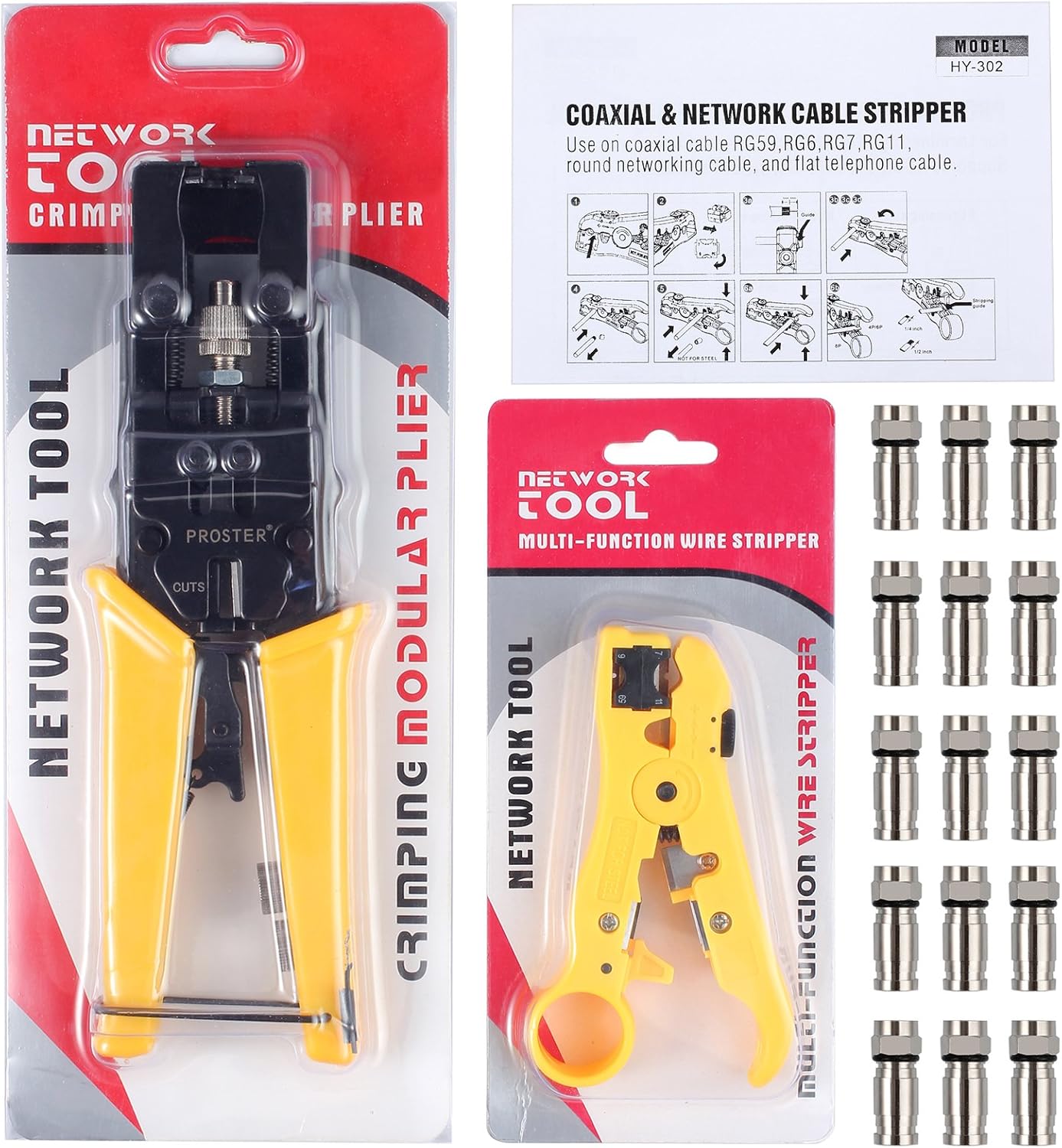
Image: Complete kit including the crimping tool, stripping tool, and F-type connectors.
Product Components
Coaxial Crimping Tool
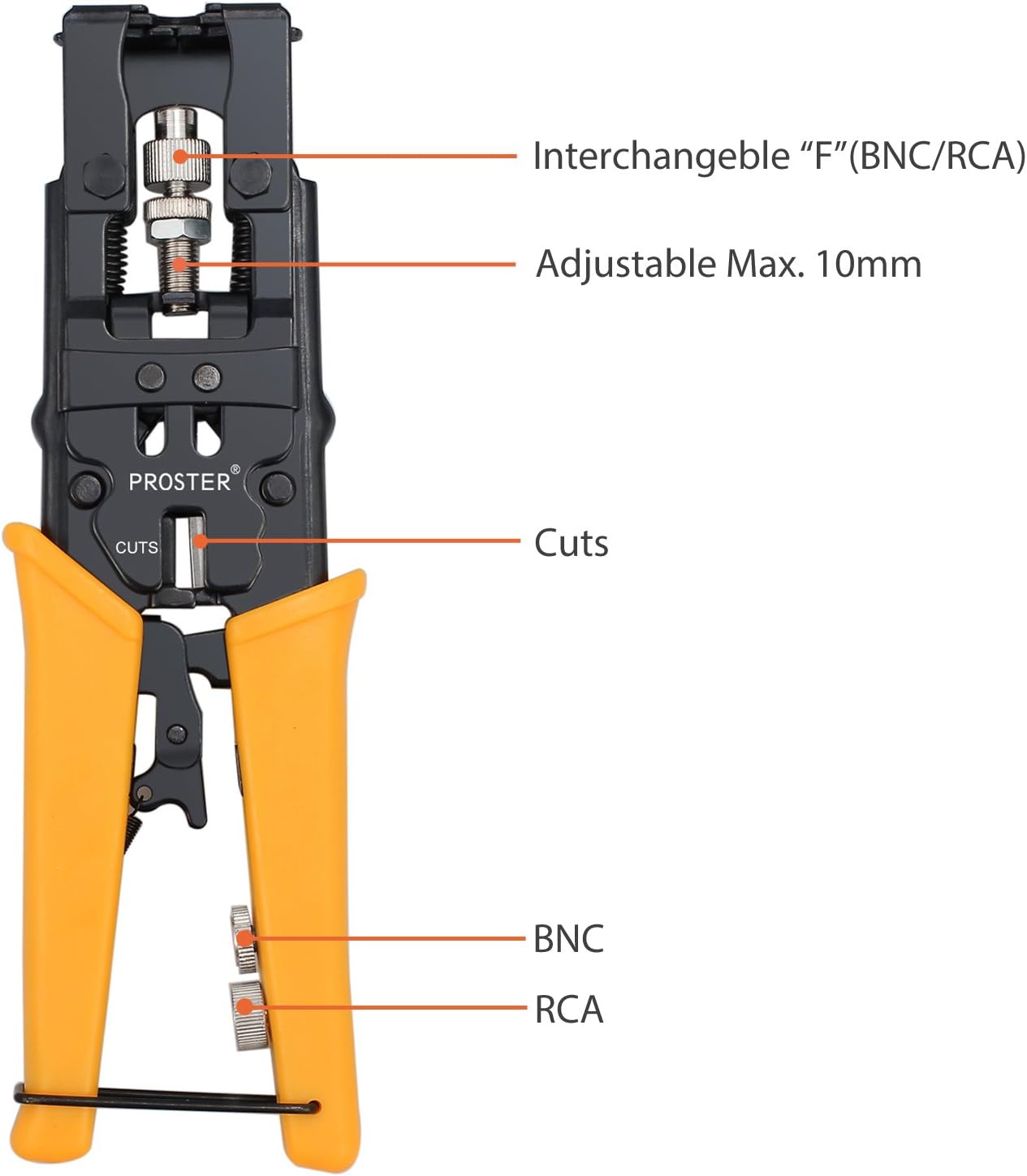
Image: The coaxial crimping tool, highlighting the interchangeable F/BNC/RCA head, adjustable 10mm crimp depth, and cutting function.
- Interchangeable Head: Supports F-Type, BNC, and RCA connectors.
- Adjustable Max. 10mm: Allows for precise crimp depth adjustment.
- Cuts: Integrated cable cutting function.
- BNC/RCA Adapters: Located on the handle for storage and use.
Multi-function Wire Stripper
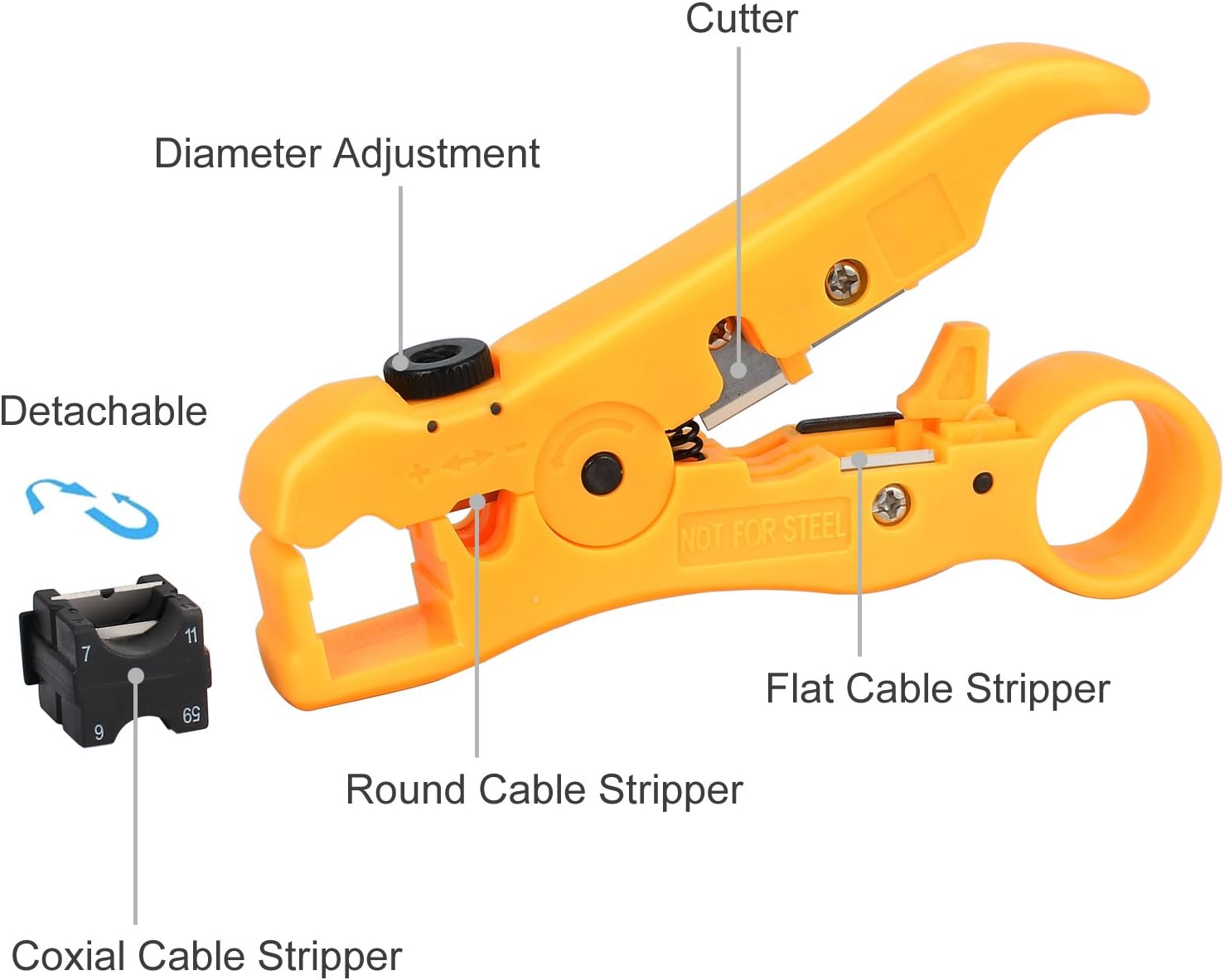
Image: The multi-function wire stripper, showing the diameter adjustment, cutter, round cable stripper, flat cable stripper, and detachable coaxial cable stripper block.
- Diameter Adjustment: Knob to adjust blade depth for various cable thicknesses.
- Cutter: Integrated blade for cutting cables.
- Round Cable Stripper: For stripping round cables like coaxial.
- Flat Cable Stripper: For stripping flat cables.
- Detachable Coaxial Cable Stripper Block: Specific block for RG59/6, RG7/11 coaxial cables.
Setup
No specific setup is required for the tools themselves. Ensure you have the correct cable type and connectors for your application.
Crimping Tool Adapter Selection
- Identify the type of connector you are using (F-Type, BNC, or RCA).
- Select the corresponding adapter from the tool's handle.
- Insert the chosen adapter into the crimping tool's head. Ensure it is securely seated.
Operating Instructions
1. Cable Stripping (Coaxial Cable)
- Open the multi-function wire stripper.
- Insert the coaxial cable into the appropriate stripping hole on the detachable block (e.g., RG59/6 or RG7/11).
- Adjust the blade depth using the diameter adjustment knob if necessary, ensuring it cuts through the outer jacket without damaging the inner conductor or shield.
- Rotate the stripper tool around the cable 2-3 times.
- Remove the tool and pull off the stripped insulation to expose the conductor and shield.
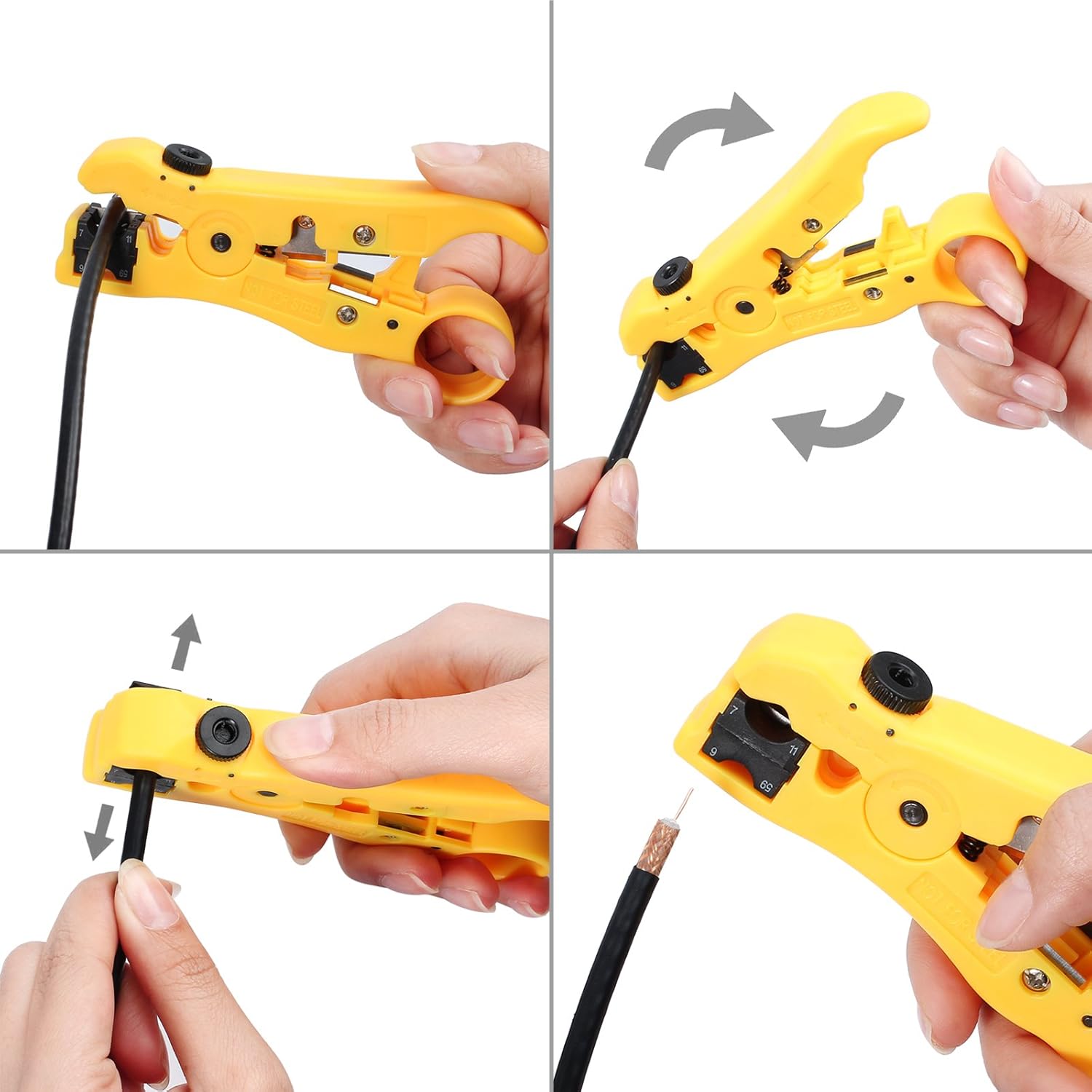
Image: Step-by-step guide demonstrating how to strip a coaxial cable using the multi-function wire stripper.
2. Cable Stripping (Network/UTP/STP Cable)
- For round network cables, use the round cable stripper slot. For flat cables, use the flat cable stripper slot.
- Insert the cable into the chosen slot.
- Adjust the blade depth if needed.
- Rotate the tool or pull the cable through to strip the outer jacket.

Image: Demonstration of stripping both round and flat network cables using the multi-function wire stripper.
3. Cable Crimping (F-Type, BNC, RCA Connectors)
- After stripping the cable, prepare the connector by sliding it onto the cable according to the connector's specific instructions.
- Open the crimping tool and ensure the correct adapter for your connector type is installed.
- Place the connector with the cable into the crimping jaw. Ensure the connector is fully seated and aligned.
- Squeeze the handles of the crimping tool firmly and completely until the crimping mechanism releases or reaches its full travel. This ensures a secure compression.
- Release the handles and remove the crimped cable and connector.
- Inspect the crimp for proper seating and connection.

Image: A four-panel image illustrating the process of inserting a cable into the crimper, compressing the connector, and removing the finished crimped cable.
Maintenance
- Cleaning: After each use, wipe the tools with a clean, dry cloth to remove any cable debris or residue.
- Lubrication: Periodically apply a light machine oil to the moving parts and pivot points of the crimping tool to ensure smooth operation.
- Blade Inspection: Regularly check the stripper blades for sharpness and damage. Dull or damaged blades can lead to poor stripping results. Replacement blades are not specified in the product information, but general care is advised.
- Storage: Store the tools in a dry environment to prevent rust and corrosion.
Troubleshooting
| Problem | Possible Cause | Solution |
|---|---|---|
| Poor cable stripping (cuts too deep or not deep enough) | Incorrect blade depth adjustment; dull blades. | Adjust the diameter adjustment knob on the stripper. Ensure the correct stripping slot is used for the cable type. Inspect blades for wear. |
| Connector not crimping securely | Incorrect adapter used; insufficient pressure applied; incompatible connector. | Verify the correct F/BNC/RCA adapter is installed. Squeeze the crimper handles completely. Ensure the connector is compatible with the tool and cable. |
| Tool feels stiff or difficult to operate | Lack of lubrication; debris in mechanism. | Clean the tool and apply a light machine oil to pivot points. |
Specifications
| Feature | Detail |
|---|---|
| Model Number | PST067 |
| Brand | Proster |
| Crimper Compatibility | F-Type, BNC, RCA connectors for RG-58/59/62/6 (3C/4C/5C) cables |
| Stripper Compatibility | Coaxial cable (RG 59/6, RG 7/11), Network cable (UTP, STP) |
| Material | Rugged Steel and ABS |
| Item Weight | 1.8 pounds (approx. 0.82 kg) |
| Package Dimensions | 12.64 x 7.56 x 1.14 inches (approx. 32.1 x 19.2 x 2.9 cm) |
| Handle Material | ABS |
| Grip Type | Ergonomic |
Warranty and Support
For warranty information or technical support, please refer to the contact details provided with your purchase or visit the official Proster website. Keep your purchase receipt as proof of purchase.
Manufacturer: Proster Trading Limited