
Introduction
This manual provides essential instructions for the safe operation, maintenance, and troubleshooting of your BLACK+DECKER 450W Variable Speed Jigsaw, model KS501. Please read this manual thoroughly before using the tool to ensure proper and safe usage.
Safety Instructions
Always follow basic safety precautions to reduce the risk of fire, electric shock, and personal injury. Keep your work area clean and well-lit. Do not operate power tools in explosive atmospheres, such as in the presence of flammable liquids, gases, or dust. Keep children and bystanders away while operating a power tool. Wear appropriate personal protective equipment, including eye protection, hearing protection, and dust masks when necessary. Disconnect the plug from the power source before making any adjustments, changing accessories, or storing power tools.
Product Overview
The BLACK+DECKER KS501 is a 450W variable speed jigsaw designed for cutting various materials, primarily wood. It features a robust motor and a comfortable grip for controlled operation.
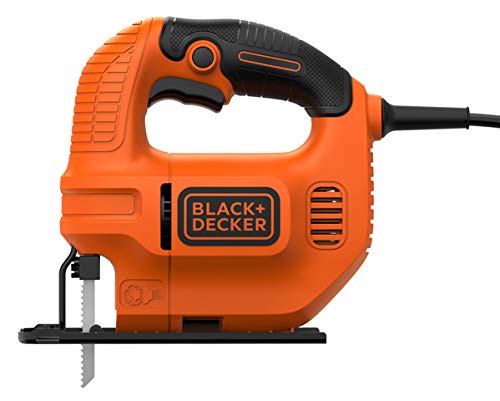
This image displays the BLACK+DECKER 450W Variable Speed Jigsaw KS501. The tool features an orange body with black accents on the handle and trigger area. A saw blade is visible at the front, extending from the base plate. The BLACK+DECKER logo is prominently displayed on the side.
Setup
1. Blade Installation
- Ensure the jigsaw is unplugged from the power source.
- Locate the blade clamp mechanism, typically at the front of the tool.
- Loosen the blade clamp screw using the provided hex key or lever.
- Insert the shank of the jigsaw blade into the blade clamp, ensuring the teeth face forward.
- Tighten the blade clamp screw securely. Gently pull on the blade to confirm it is firmly seated.
2. Base Plate Adjustment (Bevel Cut)
- Unplug the tool.
- Loosen the screws that secure the base plate to the main body of the jigsaw.
- Adjust the base plate to the desired bevel angle (0° or 45°). The tool supports bevel cuts at these angles.
- Once the desired angle is set, securely tighten the base plate screws.
Operating
1. Power Connection
- Connect the jigsaw's power cord to a suitable power outlet.
2. Starting and Stopping
- To start the jigsaw, press the trigger switch.
- To stop the jigsaw, release the trigger switch.
3. Variable Speed Control
- The jigsaw features variable speed control, allowing you to adjust the cutting speed based on the material and desired finish.
- Adjust the speed dial or pressure on the trigger to achieve the optimal RPM for your task. Lower speeds are suitable for harder materials or intricate cuts, while higher speeds are for softer materials and faster cuts.
4. Cutting Techniques
- Straight Cuts: Guide the jigsaw along a marked line, keeping the base plate flat against the workpiece.
- Curved Cuts: Apply gentle pressure and guide the blade along the curve. Do not force the tool.
- Plunge Cuts: For internal cuts, tilt the jigsaw forward so the front edge of the base plate rests on the workpiece. Start the tool, then slowly lower the blade into the material.
- Ensure the workpiece is securely clamped before cutting.
Maintenance
1. Cleaning
- Always unplug the tool before cleaning.
- Use a soft brush or compressed air to remove dust and debris from the ventilation openings and blade area.
- Do not use water or chemical cleaners.
2. Blade Care
- Replace dull or damaged blades promptly to ensure efficient and safe cutting.
- Store blades in a dry place to prevent rust.
Troubleshooting
| Problem | Possible Cause | Solution |
|---|---|---|
| Tool does not start | No power supply; Faulty switch | Check power connection; Contact service center |
| Blade not cutting efficiently | Dull or incorrect blade; Incorrect speed setting | Replace blade; Adjust variable speed control |
| Excessive vibration | Loose blade; Damaged blade; Loose base plate | Secure blade; Replace blade; Tighten base plate screws |
Specifications
| Feature | Detail |
|---|---|
| Power | 450W |
| Speed | 3,000 RPM (Variable) |
| Bevel Cut Capability | 0° or 45° |
| Power Source | Corded Electric |
| Weight | 1.3 Kilograms |
| Handle Material | Plastic |
| Model Number | KS501-XD |
Warranty and Support
This BLACK+DECKER Jigsaw KS501 comes with a 1 Year Local (Singapore) Manufacturer Warranty. For warranty claims, technical support, or service inquiries, please contact your local BLACK+DECKER service center or authorized dealer. Keep your purchase receipt as proof of purchase.
For further assistance, you may visit the official BLACK+DECKER website or contact their customer service.


