
1. Introduction
The HP EliteOne 800 G3 All-in-One PC is designed to provide a powerful and integrated computing experience. This manual will guide you through the setup, operation, and maintenance of your new device, ensuring optimal performance and longevity.
Key features include a 23.8-inch display, robust processors, advanced security features, and enhanced collaboration tools. The sleek design integrates all components into a single unit, minimizing cable clutter and maximizing workspace efficiency.
2. What's in the Box
Verify that all components are present in the packaging:
- Personal computer (HP EliteOne 800 G3 All-in-One)
- Recline stand
- Mouse
- Keyboard
- Power adapter and cable
- Documentation (this manual, warranty information)
3. Setup
Follow these steps to set up your HP EliteOne 800 G3 All-in-One PC:
- Unpack the PC: Carefully remove the All-in-One PC and its components from the packaging. Place the PC on a stable, flat surface.
- Attach the Stand: Securely attach the recline stand to the back of the All-in-One PC according to the instructions provided in the quick setup guide (if applicable). Ensure it clicks into place or is fastened with screws as directed.
- Connect Peripherals:
- Connect the USB keyboard to an available USB port on the PC.
- Connect the USB mouse to another available USB port on the PC.
- If using wired network, connect an Ethernet cable to the RJ-45 port.
- Connect Power: Connect the power cable to the power adapter, then plug the adapter into the PC's power input port. Plug the other end of the power cable into a grounded electrical outlet.
- Power On: Press the power button, usually located on the side or bottom bezel of the display. The PC will boot up, and the Windows 10 Pro operating system will begin its initial setup process. Follow the on-screen prompts to complete the setup, including language selection, network connection, and user account creation.
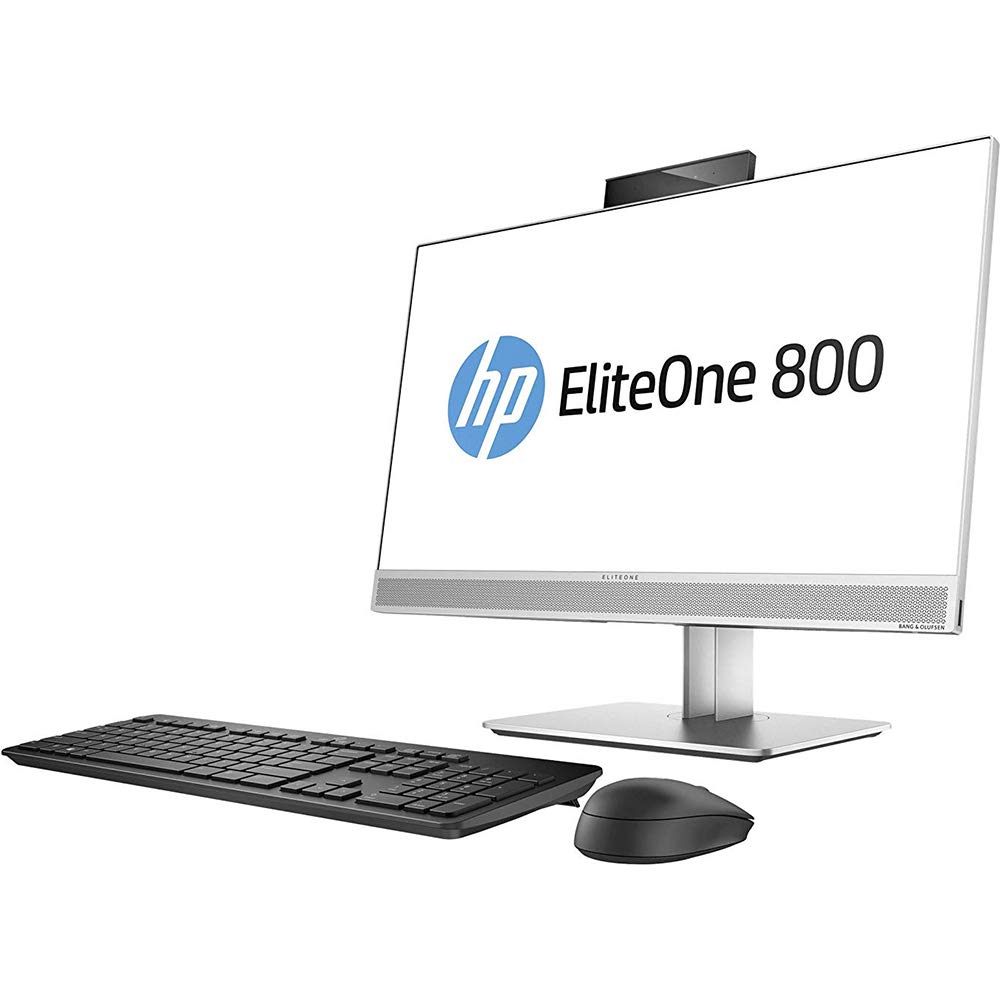
Figure 3.1: HP EliteOne 800 G3 All-in-One PC with connected peripherals. This image illustrates the general appearance of the computer and its basic setup components.
4. Operating the PC
Your HP EliteOne 800 G3 is pre-installed with Windows 10 Pro, offering a familiar and productive computing environment. Here are some operational highlights:
- Display: The 23.8-inch Full HD (1920x1080) display provides clear visuals for work and entertainment. Some models may feature an optional non-glare touchscreen for interactive use.
- Audio: Experience enhanced audio with Audio by Bang & Olufsen. The PC also includes HP Noise Cancellation software and HP Audio Boost for clear communication during calls and meetings.
- Webcams: Utilize the integrated front and optional rear-facing webcams for video conferencing and capturing images.
- Performance: Equipped with powerful Intel processors, 8 GB DDR4 RAM, and a 256 GB SSD, the system delivers responsive performance. Intel HD Graphics 630 handles visual tasks efficiently.
- Connectivity: Connect to networks via 802.11abg wireless or Gigabit Ethernet. Multiple USB ports are available for connecting external devices.
- Security: Benefit from HP's integrated security features designed to protect your data and system.
5. Maintenance
Proper maintenance ensures the longevity and optimal performance of your All-in-One PC:
- Cleaning the Display: Use a soft, lint-free cloth specifically designed for electronics. Lightly dampen the cloth with water or a non-abrasive screen cleaner. Avoid spraying liquid directly onto the screen.
- Cleaning the Chassis: Wipe the exterior surfaces with a soft, damp cloth. Do not use harsh chemicals or abrasive cleaners.
- Software Updates: Regularly check for and install operating system updates (Windows Update) and driver updates (HP Support Assistant) to ensure system stability and security.
- Ventilation: Ensure that the ventilation openings on the PC are not blocked to prevent overheating. Keep the PC in a well-ventilated area.
- Data Backup: Periodically back up important data to an external drive or cloud storage to prevent data loss.
6. Troubleshooting
This section addresses common issues you might encounter:
- No Power / PC Does Not Turn On:
- Ensure the power cable is securely connected to both the PC and the electrical outlet. Try a different outlet. Verify the power adapter is functioning correctly.
- No Display / Blank Screen:
- Check if the PC is powered on. If the PC is on but the screen is blank, try restarting the computer. Ensure no external display cables are connected that might be redirecting the output.
- No Audio:
- Check the volume settings in Windows. Ensure speakers are connected and powered on (if external). Verify audio drivers are installed and up to date in Device Manager.
- Network Connectivity Issues:
- For Wi-Fi, ensure the wireless adapter is enabled and you are connected to the correct network. For wired connection, check the Ethernet cable and router status. Restart your router/modem.
- System Slowdown / Unresponsive:
- Close unnecessary applications. Check Task Manager for processes consuming high CPU or RAM. Run a virus scan. Ensure sufficient free space on the SSD.
If problems persist, consult the HP support website or contact customer service.
7. Specifications
Detailed technical specifications for the HP EliteOne 800 G3 All-in-One PC:
| Feature | Specification |
|---|---|
| Model Number | 1JF75UT#ABA |
| Display Size | 23.8 Inches |
| Max Screen Resolution | 1920 x 1080 Pixels (Full HD) |
| Processor | Intel Core (3.4 GHz Cortex) |
| RAM | 8 GB DDR4 |
| Storage | 256 GB SSD |
| Graphics Coprocessor | Intel HD Graphics 630 |
| Operating System | Windows 10 Pro |
| Wireless Type | 802.11abg |
| Optical Drive Type | DVD-R |
| Item Weight | 13.29 pounds (approx. 6.03 kg) |
| Product Dimensions (LxWxH) | 21.2 x 2.1 x 13.5 inches (approx. 53.8 x 5.3 x 34.3 cm) |
| Color | Black/Silver |
8. Warranty and Support
Your HP EliteOne 800 G3 All-in-One PC comes with a standard manufacturer's warranty. Please refer to the warranty documentation included with your product for specific terms and conditions, including coverage duration and service procedures.
For technical support, driver downloads, and additional resources, please visit the official HP support website. You may also consider optional protection plans for extended coverage and support, such as the 3-Year Protection Plan or Complete Protect monthly plan, which can be purchased separately.
When contacting support, have your product model number (1JF75UT#ABA) and serial number ready.


