
astrum ET200
Astrum ET200 Stereo Wireless Headset User Manual
Model: ET200
Introduction
The Astrum ET200 Stereo Wireless Headset is an in-ear Bluetooth headset designed for hands-free communication and audio playback. Featuring Bluetooth V4.0 connectivity, it supports music and call functions with an in-built microphone and audio caller ID. This manual provides detailed instructions to help you set up, operate, and maintain your headset.
What's in the Box
- 1 x Astrum ET200 Wireless Headset Earphone
- 1 x Charging Cable
- 2 x Ear-hooks (various sizes)
- 1 x User Manual
Product Overview
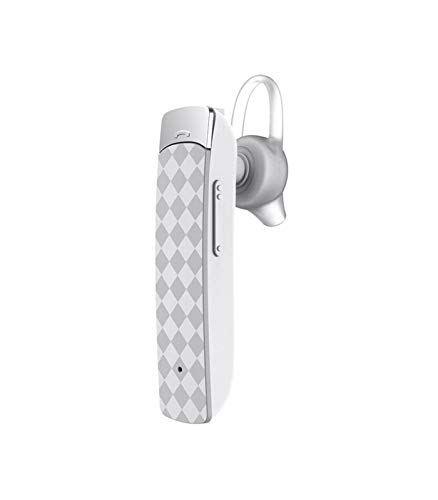

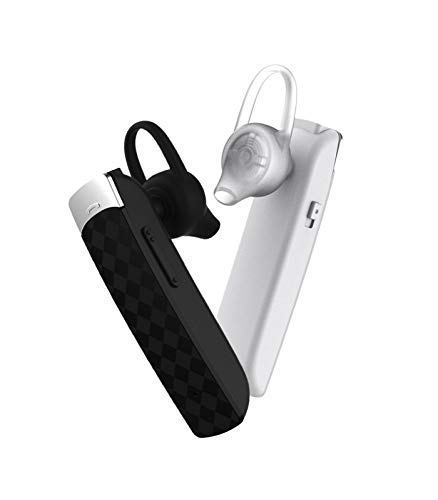
Setup
1. Charging the Headset
Before first use, fully charge the headset. Connect the provided charging cable to the headset's charging port and the other end to a USB power source (e.g., computer USB port, wall adapter). The charging indicator light will illuminate during charging and turn off or change color when fully charged. Charging time is approximately 2 hours.
2. Pairing with a Bluetooth Device
- Ensure the headset is turned off.
- Press and hold the multi-function button on the headset until the indicator light flashes red and blue alternately, indicating pairing mode.
- On your Bluetooth-enabled device (smartphone, tablet, etc.), go to the Bluetooth settings and enable Bluetooth.
- Search for available devices. The headset will appear as "ET200" or similar.
- Select "ET200" to connect. If prompted for a password, enter "0000".
- Once successfully paired, the indicator light will flash blue slowly, and you may hear a confirmation tone.
The headset supports Bluetooth V4.0 and has a range of up to 10 meters (33 feet) in an open environment.
Operating Instructions
Power On/Off
- Power On: Press and hold the multi-function button for approximately 3 seconds until the blue indicator light flashes.
- Power Off: Press and hold the multi-function button for approximately 3 seconds until the red indicator light flashes and then turns off.
Call Control
- Answer Call: Briefly press the multi-function button.
- End Call: Briefly press the multi-function button during a call.
- Reject Call: Press and hold the multi-function button for 2 seconds when an incoming call rings.
- Redial Last Number: Double-press the multi-function button.
Music Playback
- Play/Pause: Briefly press the multi-function button.
- Next Track: Press and hold the Volume + button.
- Previous Track: Press and hold the Volume - button.
Volume Adjustment
- Increase Volume: Briefly press the Volume + button.
- Decrease Volume: Briefly press the Volume - button.
Maintenance
- Clean the headset regularly with a soft, dry cloth. Do not use abrasive cleaners or solvents.
- Avoid exposing the headset to extreme temperatures, humidity, or direct sunlight.
- Store the headset in a cool, dry place when not in use.
- Do not attempt to disassemble or modify the headset, as this will void the warranty.
Troubleshooting
| Problem | Possible Cause | Solution |
|---|---|---|
| Headset does not power on. | Low battery. | Charge the headset fully. |
| Cannot pair the headset. | Headset not in pairing mode; Bluetooth disabled on device; device out of range. | Ensure headset is in pairing mode (flashing red/blue). Enable Bluetooth on your device. Move device closer to headset (within 10m). |
| No sound or poor sound quality. | Volume too low; headset not connected; interference. | Increase volume on headset and device. Re-pair the headset. Move away from other wireless devices. |
| Call quality issues. | Weak signal; microphone obstructed. | Move to an area with better signal. Ensure microphone is not covered. |
Specifications
- Model: ET200
- Connectivity Technology: Bluetooth V4.0
- Bluetooth Profiles: HFP / HSP / A2DP / AVRCP
- Wireless Range: Up to 10 meters (33 feet)
- Call Time: Up to 5 hours
- Playing Time: Up to 4.5 hours
- Charging Time: Up to 2 hours
- Stand-by Time: Up to 200 hours
- Control Type: Call Control, Touch
- Item Weight: 10 Grams
- Product Dimensions: 3.5 x 3.5 x 12.8 cm
- Material: Plastic
Warranty and Support
The Astrum ET200 Stereo Wireless Headset comes with a 1-year manufacturer's warranty from the date of purchase. This warranty covers manufacturing defects and workmanship under normal use. It does not cover damage caused by misuse, accidents, unauthorized modifications, or normal wear and tear.
For warranty claims, technical support, or any inquiries, please contact Astrum customer service. You can find more information and contact details on the official Astrum website or through your point of purchase.
Visit the official Astrum store for more products and support: Astrum Store on Amazon
Ask a question about this manual
Ask about setup, troubleshooting, compatibility, parts, safety, or missing instructions. Manuals+ will review the question and use this page’s manual context to help answer it.