
1. Introduction
The TechCare Massager BD20458 is a versatile TENS (Transcutaneous Electrical Nerve Stimulation) and EMS (Electrical Muscle Stimulation) device designed for drug-free pain relief and muscle stimulation. It delivers low-voltage electrical pulses to stimulate nerve fibers, which can help block pain signals and promote muscle recovery. This manual provides essential information for the safe and effective use of your device.
2. Safety Information
WARNING: Please read all safety instructions and precautions in the User Manual and Video Guide thoroughly before using this device.
- Do not use if you have a pacemaker, defibrillator, or any implanted metallic or electronic device.
- Consult a physician before use if you have any medical conditions, including but not limited to heart disease, epilepsy, cancer, or are pregnant.
- Do not apply pads over open wounds, rashes, swollen, red, infected, or inflamed skin areas.
- Keep out of reach of children.
- Discontinue use immediately if you experience any discomfort or adverse reactions.
3. Package Contents
Your TechCare Massager BD20458 package includes the following items:
- 1 Main Device (TENS/EMS Unit)
- 1 Pair (2) Large Electrode Pads
- 3 Pairs (6) Medium Electrode Pads
- 1 Pair (2) Small Electrode Pads
- 1 Charger Cable
- 1 Wall AC Adaptor
- 1 Belt Clip
- 1 Pad & Wire Holder
- 2 Electrode Leads
- 1 User Manual
- 1 Pad Placement Guide
- 1 Travel Case
- 1 Pair of Reflexology Slippers

Figure 3.1: Complete package contents of the TechCare Massager BD20458.
4. Product Overview
The TechCare Massager BD20458 features a user-friendly interface with a large display and intuitive controls. It offers dual channels, allowing for independent intensity control for two separate sets of pads or muscle groups.

Figure 4.1: Front and side views of the TENS EMS unit with key features labeled.
The device is equipped with a built-in rechargeable lithium battery, providing up to 12 hours of continuous use on a single charge. It can be conveniently charged via the included wall adapter or a computer USB port.
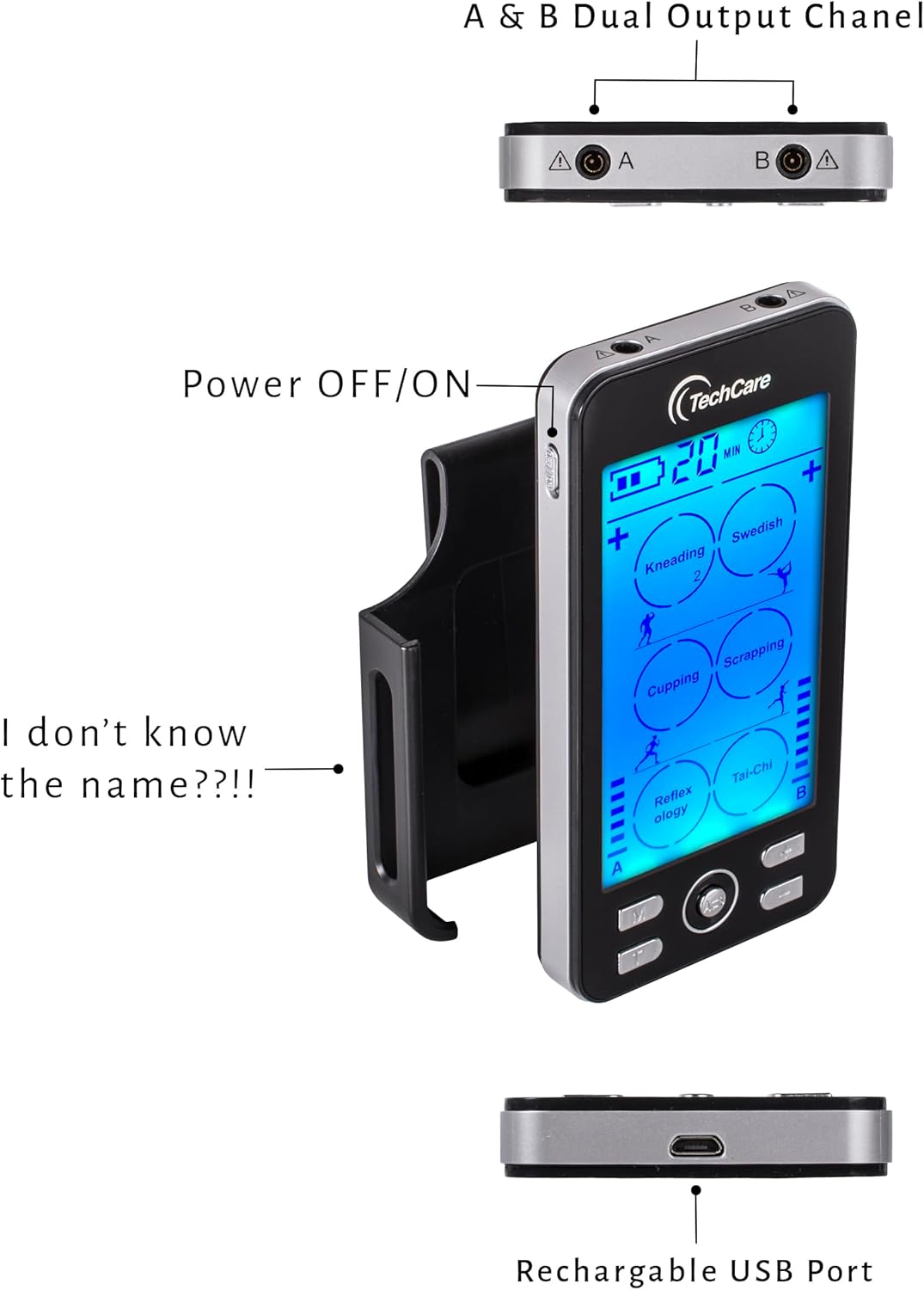
Figure 4.2: Side view highlighting the power button, belt clip, and charging port.
The included reflexology slippers can be connected to the device for foot stimulation, offering a unique application for pain relief and relaxation.

Figure 4.3: Reflexology slippers included with the unit.
5. Setup
- Charge the Device: Before first use, fully charge the device using the provided charger cable and wall AC adaptor. The battery indicator on the screen will show charging status.
- Connect Electrode Leads: Insert the electrode leads into the A and/or B output ports located at the top of the main device.
- Attach Electrode Pads: Connect the electrode pads to the ends of the electrode leads. Ensure a secure connection.
- Attach Reflexology Slippers (Optional): If using the reflexology slippers, connect the electrode leads to the metal studs on the slippers.

Figure 5.1: Connecting electrode leads to reflexology slippers.
6. Operating Instructions
- Power On: Press and hold the power button on the side of the device to turn it on.
- Place Pads: Ensure the electrode pads are placed firmly on clean, dry skin in the desired treatment area. The device has a safety feature and will not deliver intensity if pads are not properly placed on the skin.
- Select Mode: Press the 'M' button to cycle through the 24 available massage modes. Each mode offers a different pulse duration and sensation (e.g., Kneading, Swedish, Cupping, Scrapping, Reflexology, Tai-Chi).
- Adjust Intensity: Use the '+' and '-' buttons for each channel (A and B) to adjust the intensity level. There are 20 intensity levels. Start with a low intensity and gradually increase until you feel a comfortable, yet effective, sensation.
- Set Timer: The device features an adjustable timer from 10 to 60 minutes. Use the timer button to select your desired treatment duration.
- Dual Channel Operation: The device supports dual channels (A and B), allowing you to use two sets of pads simultaneously with independent mode and intensity settings. This is ideal for treating different areas or applying varied sensations.
- Power Off: Press and hold the power button to turn off the device after your session.
7. Pad Placement Guide
Proper electrode pad placement is crucial for effective and safe treatment. Refer to the included Pad Placement Guide for detailed diagrams and recommendations for various body areas. Generally, place pads on either side of the area of pain or muscle you wish to stimulate. For a single muscle group, place one pad at the beginning and one at the end of the muscle.

Figure 7.1: Example pad placement guide for common treatment areas.
8. Maintenance
- Cleaning Pads: Gently wipe the adhesive side of the pads with a damp cloth after each use to remove any residue. Allow them to air dry. Do not use harsh chemicals.
- Storage: Store the device and pads in the provided EVA travel case in a cool, dry place away from direct sunlight. Ensure pads are re-attached to their protective film.
- Battery Care: To prolong battery life, avoid fully discharging the device frequently. Charge it regularly, even if not in constant use.

Figure 8.1: Device and accessories stored in the travel case.
9. Troubleshooting
- No Sensation or Weak Sensation:
- Ensure pads are firmly attached to the skin. The device will not activate without proper skin contact.
- Check that electrode leads are securely plugged into the device and pads.
- Increase the intensity level using the '+' button for the active channel.
- Ensure the device is adequately charged.
- Pads Not Sticking:
- Clean the adhesive side of the pads with a damp cloth.
- Ensure skin is clean and dry before application.
- Replace pads if they have lost their adhesiveness after extended use.
- Device Not Turning On:
- Ensure the device is fully charged.
- Press and hold the power button for a few seconds.
10. Specifications
| Model Number | BD20458 |
| Power Source | Battery Powered (1 Lithium Ion battery required) |
| Item Weight | 5 Ounces |
| Material | Plastic |
| Package Dimensions | 12.13 x 6.81 x 6.46 inches |
| Manufacturer | TechCare Massagers |
11. Warranty and Support
The TechCare Massager BD20458 comes with a LIFETIME WARRANTY. For any product inquiries, technical support, or warranty claims, please contact TechCare Massager customer service through their official website or the retailer where the product was purchased.
12. Legal Disclaimer
Statements regarding dietary supplements have not been evaluated by the FDA and are not intended to diagnose, treat, cure, or prevent any disease or health condition. This device is intended for personal use and should not replace professional medical advice or treatment.