
Introduction
Thank you for purchasing the Blackweb BWA16AA003 1000W HiFi Bluetooth Stereo System. This powerful audio system is designed to provide a rich and immersive sound experience with its front speakers and subwoofer. It features wireless Bluetooth connectivity, a digital FM radio, and a top-loading CD player, allowing you to enjoy your favorite music from various sources. This manual provides detailed instructions for setup, operation, maintenance, and troubleshooting to ensure optimal performance and longevity of your device.
Important Safety Information
Please read all safety and operating instructions carefully before using this product. Keep these instructions for future reference.
- Do not expose this appliance to rain or moisture.
- Do not block any ventilation openings. Install in accordance with the manufacturer's instructions.
- Do not install near any heat sources such as radiators, heat registers, stoves, or other apparatus (including amplifiers) that produce heat.
- Protect the power cord from being walked on or pinched, particularly at plugs, convenience receptacles, and the point where they exit from the appliance.
- Only use attachments/accessories specified by the manufacturer.
- Unplug this appliance during lightning storms or when unused for long periods of time.
- Refer all servicing to qualified service personnel. Servicing is required when the apparatus has been damaged in any way, such as power-supply cord or plug is damaged, liquid has been spilled or objects have fallen into the apparatus, the apparatus has been exposed to rain or moisture, does not operate normally, or has been dropped.
Package Contents
Carefully unpack your stereo system and ensure all items are present. If any items are missing or damaged, please contact your retailer.
- Blackweb BWA16AA003 Main Unit
- Left Speaker
- Right Speaker
- Subwoofer
- Power Cord
- User Manual
Product Overview
Familiarize yourself with the main unit's controls and features.
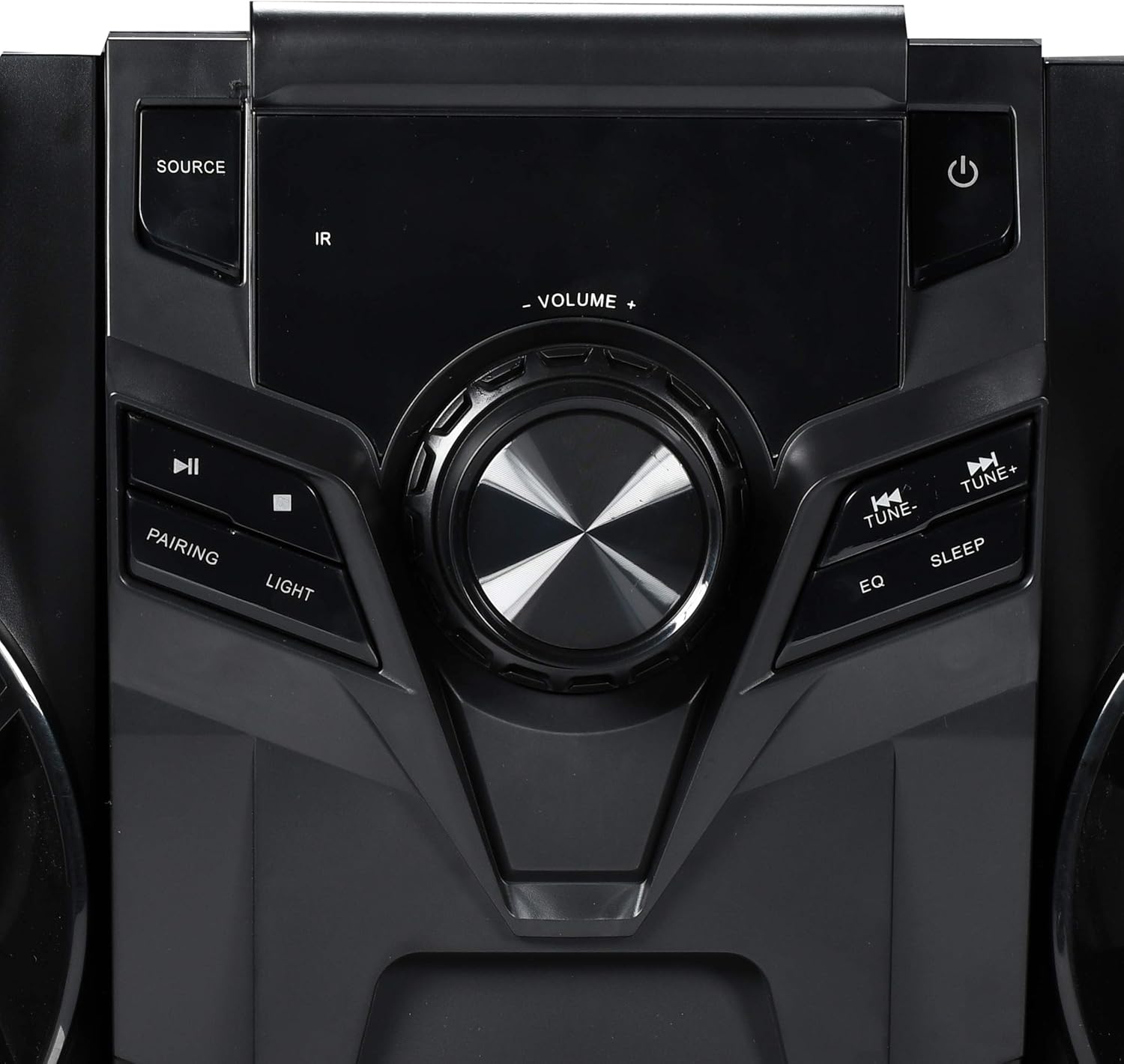
Figure 1: Front Panel Controls
This image displays the central control panel of the Blackweb BWA16AA003 stereo system. Key controls visible include the large central volume knob, a "SOURCE" button on the upper left for input selection, and a power button (represented by the universal power symbol) on the upper right. Below the source button are playback controls: a play/pause button and a pairing button for Bluetooth. Below the power button are "TUNE-" and "TUNE+" buttons for radio tuning, along with "EQ" and "SLEEP" buttons. An "IR" sensor for remote control input is also visible.
Control Panel Functions:
- Power Button (⏻): Turns the system on or off.
- SOURCE Button: Selects the input source (e.g., CD, Bluetooth, FM Radio).
- VOLUME Knob: Adjusts the master volume level.
- Play/Pause Button (⏸): Plays or pauses audio playback (CD/Bluetooth).
- PAIRING Button: Initiates Bluetooth pairing mode.
- LIGHT Button: Controls the multi-color LED lighting effects on the speakers.
- TUNE- / TUNE+ Buttons: Tunes FM radio frequencies or navigates tracks/chapters.
- EQ Button: Cycles through equalizer presets.
- SLEEP Button: Sets the sleep timer.
- IR Sensor: Receives signals from a compatible remote control (note: remote control not included as per specifications).
- USB Port: Located on the front or rear panel, used for charging compatible devices (charging cable sold separately).
- CD Tray: Top-loading tray for inserting audio CDs.
Setup
1. Placement
Place the main unit and speakers on a stable, flat surface. Ensure adequate ventilation around the unit to prevent overheating. For optimal sound, position the left and right speakers equidistant from the main unit and facing the listening area.
2. Speaker Connection
Connect the speaker wires from the left and right speakers and the subwoofer to the corresponding speaker terminals on the rear of the main unit. Ensure correct polarity (positive to positive, negative to negative) for optimal sound quality.
3. Power Connection
Plug the power cord into the AC IN socket on the rear of the main unit, then plug the other end into a standard wall outlet (AC 120V~60Hz).
Operating Instructions
Power On/Off
Press the Power Button (⏻) on the front panel to turn the system on or off.
Source Selection
Press the SOURCE Button repeatedly to cycle through available input modes: CD, Bluetooth, FM Radio.
Bluetooth Operation
- Switch the system to Bluetooth mode using the SOURCE Button. The display will indicate "BT" or "Bluetooth".
- The system will automatically enter pairing mode. If not, press the PAIRING Button. The Bluetooth indicator will flash.
- On your Bluetooth-enabled device (smartphone, tablet, laptop), enable Bluetooth and search for available devices.
- Select "Blackweb BWA16AA003" (or similar name) from the list of devices.
- Once paired, the Bluetooth indicator will stop flashing and remain solid. You can now play audio wirelessly from your device.
CD Playback
- Switch the system to CD mode using the SOURCE Button.
- Gently place an audio CD (CD or CD-R/RW) into the top-loading CD tray with the label side facing up.
- The system will automatically begin playing the CD. If not, press the Play/Pause Button (⏸).
- Use the TUNE- / TUNE+ Buttons to skip tracks.
FM Radio Operation
- Switch the system to FM Radio mode using the SOURCE Button.
- Extend the FM antenna fully for better reception.
- Press the TUNE- / TUNE+ Buttons to manually tune to a desired frequency.
- To auto-scan and save presets (if available), refer to the on-screen display or specific instructions for your model's auto-scan function.
USB Charging
Connect your compatible device's USB charging cable (sold separately) to the USB port on the stereo system to charge your device.
LED Light Control
Press the LIGHT Button to cycle through different multi-color LED lighting effects on the speakers or to turn them off.
Volume Adjustment
Rotate the VOLUME Knob clockwise to increase volume and counter-clockwise to decrease volume.
Equalizer (EQ)
Press the EQ Button to cycle through various preset equalizer modes (e.g., Rock, Pop, Jazz, Classic, Flat) to optimize sound for different music genres.
Sleep Timer
Press the SLEEP Button repeatedly to set a sleep timer (e.g., 15, 30, 60, 90 minutes). The system will automatically turn off after the selected time.
Maintenance
Cleaning
Wipe the unit with a soft, dry cloth. Do not use abrasive cleaners, waxes, or solvents as they may damage the finish. Ensure the unit is unplugged before cleaning.
Storage
If the unit is to be stored for an extended period, unplug it from the power outlet and store it in a cool, dry place, away from direct sunlight and extreme temperatures.
Troubleshooting
Before contacting customer support, please refer to the following table for common issues and their solutions.
| Problem | Possible Cause | Solution |
|---|---|---|
| No Power | Power cord not securely connected. Power outlet not functioning. | Ensure the power cord is firmly plugged into the unit and the wall outlet. Test the outlet with another device. |
| No Sound | Volume is too low or muted. Incorrect source selected. Speaker wires not connected properly. | Increase the volume. Press the SOURCE button to select the correct input. Check speaker wire connections at both the unit and speakers. |
| Bluetooth Pairing Fails | Bluetooth device is too far away. Bluetooth not enabled on your device. System is not in pairing mode. | Move your Bluetooth device closer to the stereo system. Ensure Bluetooth is enabled on your device. Press the PAIRING button on the stereo system. |
| CD Not Playing | CD is dirty or scratched. CD is inserted incorrectly. Incorrect source selected. | Clean the CD with a soft cloth. Re-insert the CD with the label side facing up. Press the SOURCE button to select CD mode. |
| Poor FM Reception | FM antenna not extended. Interference from other electronic devices. | Fully extend the FM antenna. Move the unit away from other electronic devices. |
Specifications
| Brand | Blackweb |
| Model | BWA16AA003 |
| Output Wattage | 1000 Watts |
| Compatible Devices | Smartphone, Tablet, Laptop |
| Connectivity Technology | Bluetooth, USB |
| Speaker Type | Stereo (with Subwoofer) |
| CD Player | Yes (CD and CD-R/RW compatible) |
| FM Radio | Yes (Digital FM with presets) |
| USB Port | Yes (for device charging) |
| LED Lighting | Multi-color LED speaker illumination |
| Dimensions (L x W x H) | 72.64 x 36.83 x 32.77 cm (approx. 28.6 x 14.5 x 12.9 inches) |
| Weight | 14.17 kg (approx. 31.24 lbs) |
Warranty and Support
For warranty information or technical support, please refer to the documentation included with your purchase or contact Blackweb customer service. Keep your proof of purchase for warranty claims.

