
Introduction
The LUCKY FF718LiCD-T is a portable fish finder designed to assist anglers in locating fish and determining water depth and bottom contour. Featuring a 2.8-inch color LCD display and dual sonar frequencies (200KHz/83KHz), this device provides essential underwater information for an improved fishing experience. This manual provides detailed instructions for the proper setup, operation, and maintenance of your fish finder.
Package Contents
Please verify that all items listed below are included in your package:
- Fish Finder Display Unit
- Cable Transducer
- Removable Transducer Float with Rubber Stopper
- Transducer Side-Scan Adapter
- Stainless Bolt and Wing Nut
- User Manual (this document)

Image: Overview of the LUCKY FF718LiCD-T Fish Finder components, showing the main display unit, the cable transducer, and the float.
Specifications
| Feature | Detail |
|---|---|
| Display | 2.8 inch Color LCD (240Vx960H pixels) |
| Backlighting | On/Off White LED |
| Depth Capability | 328 feet (100 meters) |
| Sonar Coverage | 60 degrees beam angle in 83KHz / 20 degrees beam angle in 200KHz |
| Power Source | 3.7V rechargeable lithium battery |
| Waterproof Design | Level-4 (spray-water-proof) |
| Operational Temperature | 14°F to 122°F (-10°C to 50°C) |
| Item Weight | 0.19 Kilograms (190 g) |
| Dimensions (LxWxH) | 12.5 x 7 x 3 Centimeters |

Image: Physical dimensions of the LUCKY FF718LiCD-T Fish Finder display unit.
Setup Guide
1. Charging the Battery
Before initial use, fully charge the internal 3.7V rechargeable lithium battery. Connect the fish finder to a compatible USB power source using a USB charging cable (not included). The battery indicator on the display will show charging status.
2. Transducer Installation
The transducer is the component that sends and receives sonar signals. Proper placement is crucial for accurate readings.
- Mounting Options: The transducer can be mounted in various ways depending on your fishing environment. Common methods include:
- Boat Hull Mounting: Use the provided transducer side-scan adapter, stainless bolt, and wing nut to secure the transducer to the boat hull. Ensure it is submerged and has a clear view of the water below.
- Float Mounting: Attach the removable transducer float to the transducer cable. This allows the transducer to float on the water surface, ideal for casting or stationary fishing from shore or a non-motorized vessel.
- Connecting the Transducer: Plug the transducer cable securely into the designated port on the fish finder display unit.
- Ensure Water Contact: For proper operation, the transducer must be in direct contact with the water. Air pockets between the transducer and water will prevent accurate readings.

Image: Detailed view of the transducer, showing the cable, float, and the main transducer unit.
Important Setup Notes:
- Do not test the fish finder in confined water bodies like swimming pools, bathtubs, buckets, or fish tanks. These environments can cause inaccurate readings or damage the unit.
- For ice fishing, if attempting to detect fish through ice without drilling a hole, ensure there is absolutely no air between the sensor and the ice layer. Clean any floating ice around the transducer for optimal performance.
Operating Instructions
1. Powering On/Off
Press and hold the power button (usually labeled with a power icon) located on the front panel to turn the device on or off.
2. Display Overview
The 2.8-inch color LCD provides a clear view of underwater conditions. Key information displayed includes:
- Sensitivity: Indicates the sonar's ability to detect objects.
- Water Depth: Current depth of the water.
- Water Temperature: Current water temperature.
- Battery Indicator: Shows remaining battery life.
- Fish Icons: Represents detected fish. Small fish icons indicate fish detected by the 83KHz wide beam, while large fish icons indicate fish detected by the 200KHz wide beam.
- Bottom Contour: Graphical representation of the seabed structure.
- Zoom Range: Upper and lower limits of the currently displayed depth range.
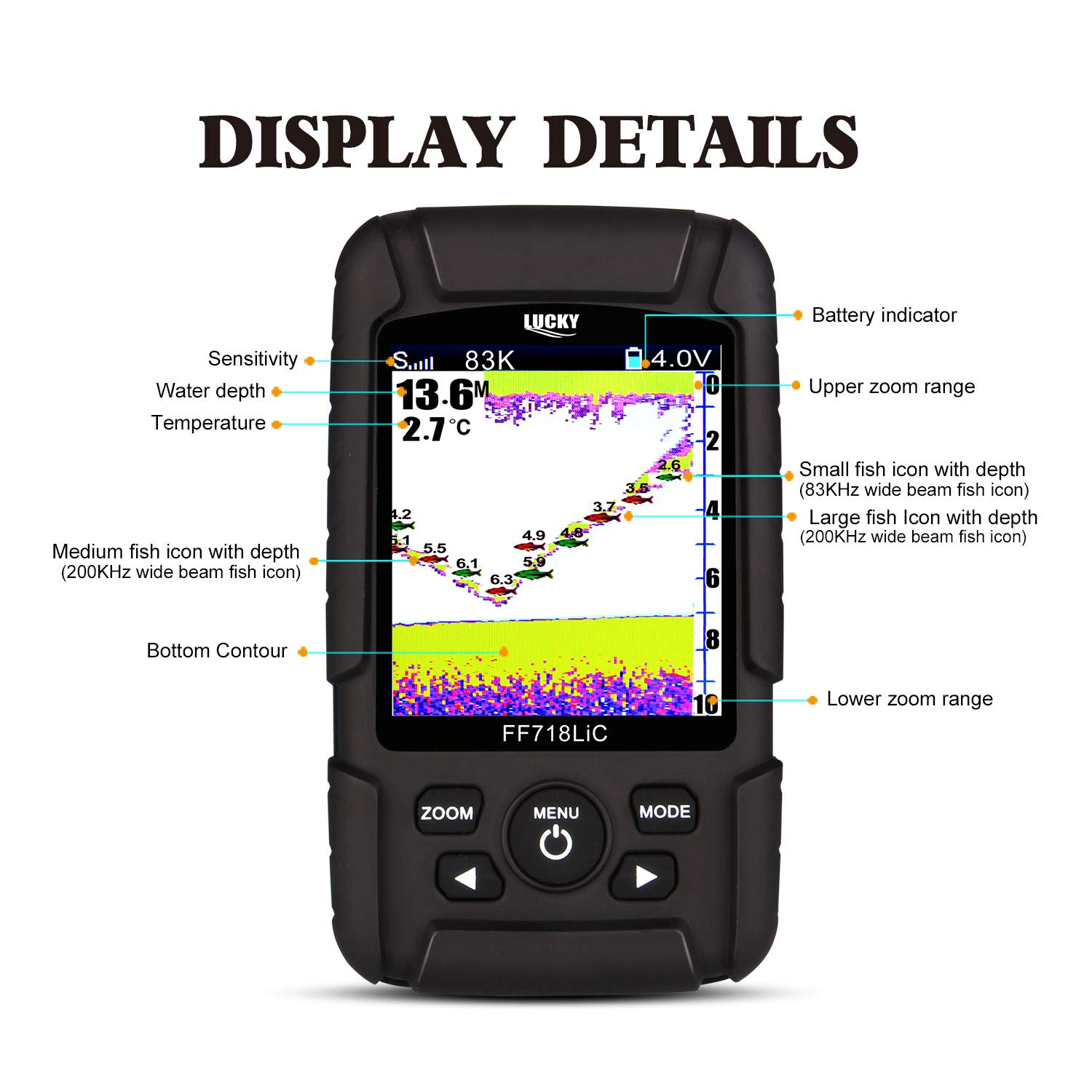
Image: Detailed breakdown of the information displayed on the LUCKY FF718LiCD-T screen, including sensitivity, water depth, temperature, battery indicator, fish icons, and bottom contour.
3. Sonar Coverage (Dual Frequency)
The FF718LiCD-T utilizes dual sonar frequencies to provide comprehensive underwater views:
- 83KHz Beam (60 degrees): Provides a wider coverage area, ideal for scanning large sections of water to locate fish schools. It offers less bottom detail.
- 200KHz Beam (20 degrees): Offers a narrower, more focused beam, providing greater detail of the bottom structure and individual fish.
- The device combines both beams to give a complete picture, detecting fish across a broad area while also providing precise details.

Image: Illustration demonstrating the difference between wide (83KHz) and narrow (200KHz) sonar beam coverage, and how they combine for comprehensive detection.
4. Menu Navigation and Settings
Use the MENU button to access various settings. Navigate through options using the arrow buttons and confirm selections. The device features user-selectable settings for:
- Sensitivity: Adjust to filter out noise or detect smaller targets.
- Zoom: Magnify a specific depth range for detailed viewing.
- Units: Switch between metric (meters, Celsius) and imperial (feet, Fahrenheit) measurements.
- Depth Range: Manually set the maximum depth displayed.
- Shallow Alarm: Set an alarm to sound when the water depth falls below a specified value.
- Fish Icon: Toggle fish icons on or off.
- Fish Alarm: Set an alarm to sound when fish are detected.
- Chart Speed: Adjust the speed at which the sonar history scrolls across the screen.
The built-in memory stores your sonar settings even when the fish finder is turned off, ensuring your preferences are retained for the next use.
Maintenance
- Cleaning: After each use, especially in saltwater, rinse the transducer and display unit with fresh water. Wipe the display screen with a soft, damp cloth. Do not use abrasive cleaners or solvents.
- Storage: Store the fish finder in a dry, cool place away from direct sunlight and extreme temperatures. Ensure the unit is completely dry before storing.
- Battery Care: For long-term storage, charge the battery to approximately 50% and recharge it every few months to maintain battery health. Avoid fully discharging the battery for extended periods.
- Cable Inspection: Regularly inspect the transducer cable for any signs of wear, cuts, or damage. Damaged cables can affect performance.
Troubleshooting
- No Readings or Inaccurate Depth:
- Ensure the transducer is fully submerged in water and has no air bubbles or debris on its surface.
- Check that the transducer cable is securely connected to the display unit.
- Adjust the sensitivity setting. If it's too low, it might not detect targets; if too high, it might pick up excessive noise.
- Avoid testing in very shallow or confined water bodies, as this can lead to false readings.
- Poor Performance in Ice Fishing:
- If detecting through ice, ensure there is no air gap between the transducer and the ice surface. A small amount of water can help create a good contact.
- Clear any floating ice or slush around the transducer if it's in a hole, as this can interfere with sonar signals.
- Display Not Turning On:
- Ensure the battery is sufficiently charged. Connect the unit to a charger and try again.
- Check for any visible damage to the unit or charging port.
Important Notes and Warnings
- The package does not contain a power plug for charging; only a USB cable is typically provided. Use a standard USB power adapter.
- Always ensure the transducer is in direct contact with water for accurate readings.
- Do not test the fish finder in small, enclosed water bodies like swimming pools, bathtubs, or buckets, as this can lead to incorrect readings and potential damage.
- The device is spray-water-proof (Level-4), but it is not designed for full submersion. Avoid submerging the display unit.
- Operating temperature range is 14°F to 122°F (-10°C to 50°C). Avoid using or storing the device outside this range.


