
Introduction
Thank you for choosing the Uniclife Aquarium Wave Maker. This device is designed to create natural wave-like water movement within your aquarium, promoting a healthier environment for aquatic life by improving circulation and oxygenation. This model is suitable for 60-120 gallon fish tanks and features an adjustable flow rate of up to 2100 GPH (Gallons Per Hour).
Please read this manual thoroughly before installation and operation to ensure proper use and longevity of your wave maker.
Safety Instructions
- Ensure the power supply voltage matches the specifications of the wave maker.
- Always unplug the device from the power outlet before performing any maintenance, installation, or removal.
- Do not operate the pump dry. Ensure it is fully submerged in water before turning it on.
- Keep the controller dry and away from water. Do not immerse the controller in water.
- The magnetic base contains strong magnets. Handle with care to avoid pinching fingers or damaging the aquarium glass. When installing, place the external magnet a safe distance away and slide it towards the internal unit.
- This wave maker is designed for 60-120 gallon tanks. Using it in smaller tanks may result in excessive water flow, potentially disturbing aquatic life or substrate.
- Regularly inspect the power cord for any damage. Do not use if the cord is damaged.
Package Contents
- Uniclife Aquarium Wave Maker Pump
- External Controller
- Magnetic Suction Base
- Power Adapter
Specifications
| Feature | Specification |
|---|---|
| Applicable Tank Size | 60-120 Gallons |
| Max Flow Rate | 2100 GPH |
| Power | 25 W |
| Voltage | DC 24 V |
| Material | Stainless Steel |
| Product Dimensions | 2.4"L x 2.4"W x 4.2"H |
| Item Weight | 1.83 Pounds |
Note: This wave maker is not suitable for tanks less than 60 gallons.

Image: Dimension reference for Uniclife wave makers, showing models W-10, W-25, and W-40. The W-25 model (this product) is suitable for 60-120 gallon tanks, measuring 2.4 inches in width and 4.2 inches in height.
Setup
- Unpack Components: Carefully remove all items from the packaging. Inspect for any damage.
- Position the Wave Maker: Place the wave maker pump inside your aquarium. The strong magnetic base allows for flexible positioning. Position the pump on the inner glass wall of the tank.
- Attach External Magnet: Align the external magnet on the outer glass wall directly opposite the internal pump unit. The magnets will secure the pump in place. Ensure the pump is fully submerged.
- Connect to Controller: Plug the wave maker pump's cable into the designated port on the external controller.
- Connect Power: Plug the power adapter into the controller, then plug the adapter into a suitable power outlet.
- Adjust Direction: The pump head can be rotated to direct the water flow in multiple directions, allowing for optimal circulation within your tank.

Image: The Uniclife Aquarium Wave Maker pump, highlighting its suitability for 60-120 gallon fish tanks with a maximum flow rate of 2100 GPH.
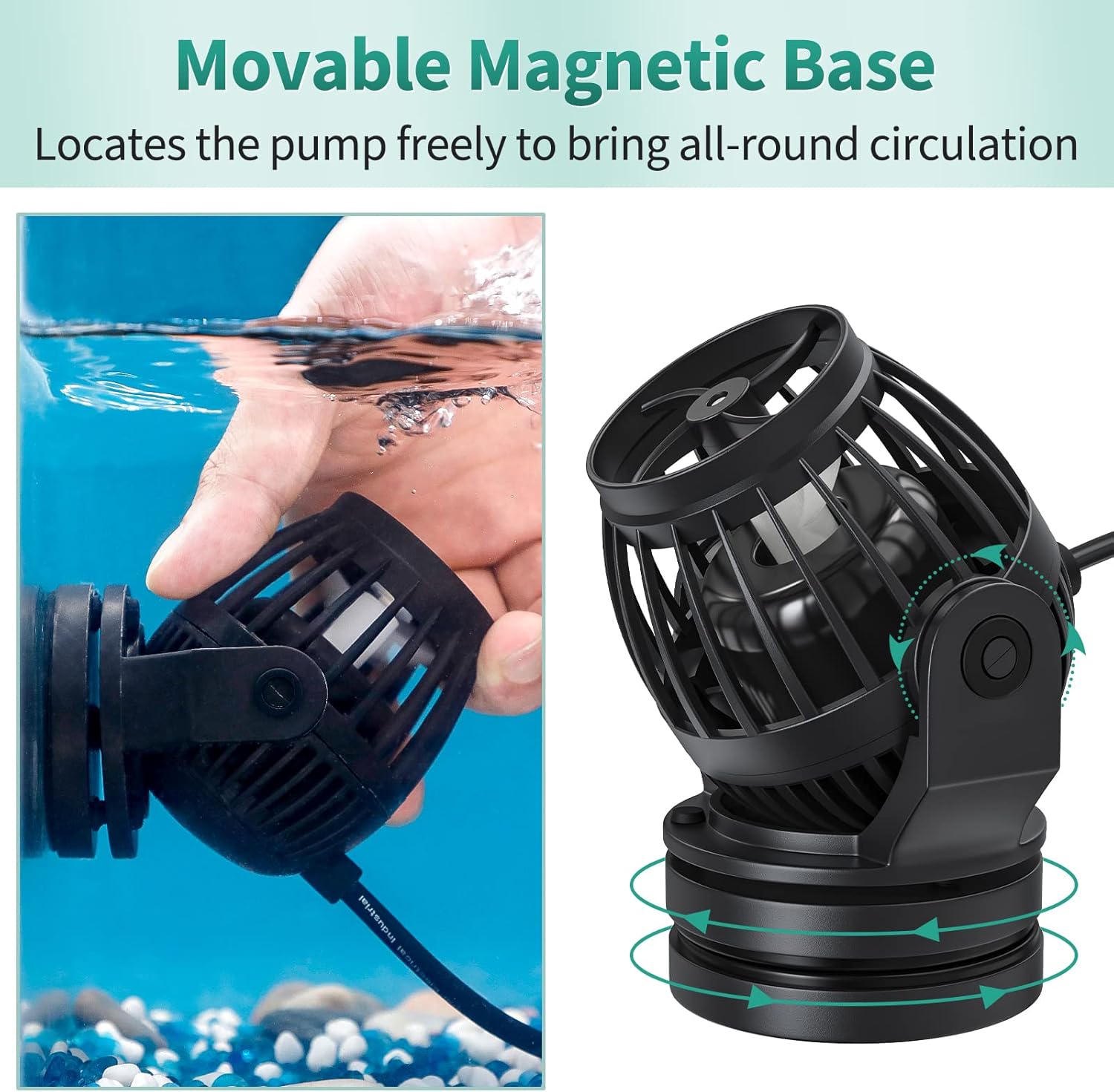
Image: Demonstration of the movable magnetic base, illustrating how the wave maker attaches to the tank wall and its ability to rotate for all-round circulation.
Operating Instructions
The wave maker is controlled by an external unit with various settings to customize water flow.
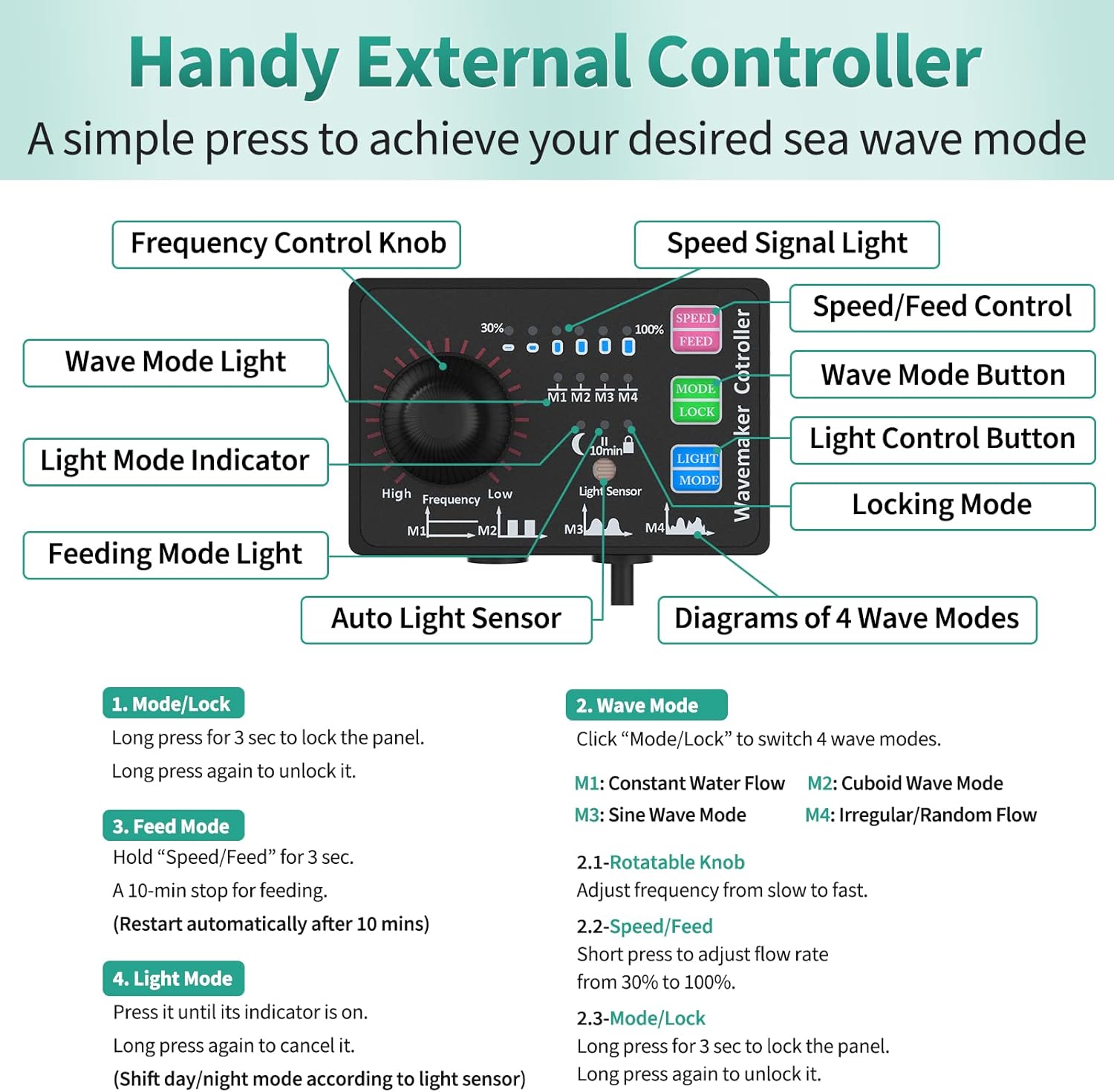
Image: Detailed diagram of the wave maker's external controller, showing all buttons, knobs, and indicators for various functions.
Controller Functions:
- Mode/Lock Button:
- Press to cycle through 4 wave modes (M1, M2, M3, M4).
- Long press for 3 seconds to lock the control panel. Long press again to unlock. - Speed/Feed Button:
- Short press to adjust the flow rate from 30% to 100%.
- Hold for approximately 3 seconds until the "10 min" light illuminates to activate the feeding mode. The pump will stop for 10 minutes and restart automatically. - Light Mode Button:
- Press until its indicator is on to activate light mode (shift day/night mode according to light sensor).
- Long press to cancel it. - Frequency Control Knob:
- Rotate to adjust the frequency of wave creation from slow to fast.
Wave Modes:
- M1: Constant Water Flow - Provides a steady, continuous flow.
- M2: Cuboid Wave Mode - Creates a cuboid wave pattern.
- M3: Sine Wave Mode - Generates a smooth, sine wave-like flow.
- M4: Irregular/Random Flow - Produces varied and unpredictable water movements.
Video: An official demonstration of the Uniclife 2100 GPH Controllable Wavemaker in operation, showcasing its water flow capabilities and how it creates waves within an aquarium.
Maintenance
Regular cleaning ensures optimal performance and extends the lifespan of your wave maker.
- Disconnect Power: Always unplug the wave maker from the power outlet before cleaning.
- Remove from Tank: Carefully detach the pump from the aquarium glass.
- Disassemble: The wave maker features a detachable design for easy cleaning. Gently twist and pull apart the components, including the protective cage and impeller housing. No special tools are required.
- Clean Components: Rinse all parts under clean water. Use a soft brush or cloth to remove any algae, debris, or mineral buildup from the impeller, impeller shaft, and housing. For stubborn deposits, a diluted vinegar solution can be used, followed by thorough rinsing.
- Reassemble: Ensure all components are clean and dry before reassembling. Carefully put the parts back together, ensuring the impeller spins freely.
- Reinstall: Place the cleaned wave maker back into the aquarium and reconnect the power.

Image: Exploded view of the wave maker, demonstrating its detachable design for tool-free cleaning.

Image: An illustration highlighting the ultra-quiet operation of the wave maker, showing minimal disturbance to the aquarium environment.
Troubleshooting
| Problem | Possible Cause | Solution |
|---|---|---|
| Wave maker not turning on | No power, loose connection, faulty adapter/controller. | Check power outlet, ensure all connections are secure. Test with another outlet. Inspect adapter and controller for damage. |
| Weak or no water flow | Impeller clogged, pump not fully submerged, incorrect mode/speed setting. | Clean the impeller and pump housing. Ensure the pump is fully submerged. Adjust the speed setting on the controller. |
| Excessive noise or vibration | Impeller obstructed, worn impeller, improper installation. | Clean the impeller and check for foreign objects. Ensure the magnetic base is securely attached and the pump is not touching any tank decorations. If noise persists after initial break-in period (a few days), the impeller might be worn and require replacement. |
| Controller not responding | Controller is locked, power issue, faulty controller. | Long press the Mode/Lock button to unlock. Check power connections. If issues persist, contact support. |
Warranty and Support
Uniclife products are manufactured to high-quality standards. For warranty information, technical support, or replacement parts, please refer to the product packaging or contact Uniclife customer service directly. Keep your purchase receipt as proof of purchase.